⚡ NEW: Gallery - Complete Album!

June 27, 2009

Mytime's Color Challenge -- With Ethan!

Hi Everyone~

The sun is shining. WOW - it's been quite elusive here for much of the month, what a welcome change.

This week's color challenge features Ethan, from the WAY cool Weiman Wranglers set. I'm THRILLED with how well this set has sold...the stamping community is INCREDIBLE, my thanks goes out to all of you, Ethan is smiling down, I'm sure...which brings me to...I heard a funny knock knock joke the other day...

"Knock knock"
"who's there"
"cow say"
"cow say who?"
"Noooooo, cow's say MOO!!"

pretty good, right?

Here's the colors for this week's challenge :


I got this GREAT digital scrapbooking kit from Scrap Girls, called 'Cowboy' by Cheryl Barber...it's got a lot of fun elements, and GREAT papers...I printed one out to use on my card today. Also my sentiment is one of the embellishments (though I tweaked the color to make it match my project) here it is:


The sentiment says 'Cowboys don't bathe, they dust off'...I really liked that, and made Ethan a little 'dirty' by using a little creamy caramel ink on the end of a qtip.

The rest of the team has cooked up some GREAT stuff, so be sure to stop by and show them some love! Here's the links:

Lauren
Alicia
Dana
Dawn
Jennifer
Kendra
Lisa
MacKenzie
Maria
Odette
Pam
Tamara

Don't forget, we'd love to see what YOU do -- play along, and link on the Mr. Linky on Lauren's blog...

Thanks for stopping by-Have a SUPER weekend!!

Supplies:
Stamps: Weiman Wrangler digital stamps (Pink Cat Studio)
Ink: NONE - well, creamy caramel for the 'dirt'
Paper: Dark Chocolate, Really Rust, Digital paper (Cowboy by Cheryl Barber)
Accessories: Ripe Avocado twill, dimensionals, copics

June 23, 2009

FINALLY - a Raspberry Suite Challenge!!

I have been wanting to play along with my friend Dawn's challenges for some time now, but life and other commitments kept getting in the way. Well, not today my friends!! FINALLY, I got to play along (and in time too!) with Dawn's latest challenge!


She always finds such fun and fresh combos. I did play along last week, but didn't get my card done in time, I'll include it at the bottom of this post...

So, without further adieu, here is my card for this week's challenge:


I needed to make a card for a co-worker who recently had surgery. I LOVE that branch image from Beyond Basic Borders (would you all be ashamed if I told you I HAD to have that set, just for that one image??? I like the others too, but that one really had me hooked) Now-it's a little hard to tell, but the base layer and the stamped sentiment are in Berry sorbet, and all of those yummy buttons are melon berry...mmmm delish, right?

Here's my card for LAST week's challenge -- which was this:


Remember the wedding invitations I made??? Well, Saturday was the wedding, and even though it rained...A LOT, it was a beautiful wedding. I needed a card for the bride and
groom. I thought this one up while sitting at work last Wednesday, but didn't get to actually put it to paper until Friday night...what do you think??


This uses that great big flourish from the With Sympathy set, and the Celebrate Sentiment is from Out on a Limb Sentiments. The flowers are my favorite little confetti flowers from M's, finished off with some flat back swarovski's, just like the invitations. The black border on the New Leaf layer is 1/4" black grosgrain ribbon, and the panel with the focal image is on dimensionals...

Before I go, thought I'd share a little photo of me and the hubby from the wedding


Thanks for stopping by!!!

Supplies:
Raspberry 10 card:
Stamps: Beyond Basic Borders
Ink: Brilliance Chocolate, Berry Sorbet (PTI)
Paper: Berry Sorbet, Vintage Cream, Dark Chocolate (all PTI)
Accessories: Melon Berry Vintage Buttons

Raspberry 9 card:
Stamps: With Sympathy, Out on a Limb Sentiments
Ink: Brilliance Graphite Black
Paper: Curious Iridescent 'Poison Ivory' CS, New Leaf (PTI)
Accessories: Black Grosgrain (SU!), M's confetti flowers, swarovski crystals

Weiman Wranglers - a new twist!

Hi all~

Hoping you're all having a great day. The sun is actually shining here -- it seems like FOREVER since we've had more than an hour of sun. On the news last night, they said for the first 21 days of June, 17 of them were rainy. BLECH, but our grass is green, and our reservoirs full, so for that I am grateful.

Enough about the weather...did you not just LOVE all of the projects you've seen using Ethan and Ava??? WOW! Is all I can say!!

I have 2 more projects for you today, this first one is a bright, happy little number, using Ava.


The base is Raspberry Fizz from PTI, and on that is a layer of Only Orange from SU! On that layer, I created a patterned paper using 2 stamps, one from MFT's Ride 'em Cowgirl, and the other from The Cat's Pajamas, It's a Western Thing. The seniment was sized to fit in my 1" circle punch, and it is layered on a piece of Raspberry Fizz that was cut using my Nestabilities Labels 3 dies.

I added some bling to her outfit, like the show cowgirls might, with some 'rhinestones' on her belt, along her hat band, and down her leg...(using my sakura stardust pen)

This next one is a bit different. I made a digital scrapbook page of my daughter, and colored in Ava digitally in Photoshop Elements. It was my first time doing this, but I think it turned out ok. I'm sure I have LOTS more to figure out with that, but I had fun doing this one.


Thank you to all that have purchased the images...in just a little over 24 hours of sales, they have raised over $900!!! That is FABULOUS!!! Way to go!

Also - a big shout out to Susanna Boyd from Papercraft Planet, who has so awesomely put this as top billing on the PCP home page.

A big HIGH FIVE to you all!!!

Have a super day --
Thanks for stopping by!

You Need to Read This...

I'll be back later today with some more projects using the Weiman Wranglers...but for now, you MUST go read this...not kidding - it's a great post to start your day...

Happy Birthday to Me!

June 22, 2009

Two Posts today!

Be sure to see my second post featuring Cowboy Ethan and Cowgirl Ava - and links on how to get a chance to win a GC to Pink Cat Studio!!

Digital Stamping 101...my way

Hey all -

I know I said tomorrow - but figured I wouldn't wait, this may help answer some questions.

Given the WONDERFUL big news from Pink Cat Studio, we want these digi-images of Cowboy Ethan and Cowgirl Ava to sell BIG, so if any of you have ANY concerns about digital stamps, I'm hoping to put you at ease.

Never given digi-stamps a try?? It's really not so bad. I use Photoshop Elements 7 for all of my photo and digi-scrapping/stamping needs, but there are great free programs like Picasa, or I know some of my colleagues on the Dustin Pike DT even use MS Word to drop their images into...

This can be super easy, or if you know your way around your photo editing software, you can make it more 'interesting' if you will.

Basics:

You've got this file - now what?

Download your file, and save it someplace you will remember. I have a folder named "Digital Stamps" and then sub folders by company "Pink Cat Studio", "CC Designs", "Dustin Pike" etc. That way, when I go back to print out again, I know EXACTLY where to look.

Go ahead and open your file. If you have photo software, great, if not, that's ok too, you can open up the image in the picture viewer, copy it and paste it into Word, or another word processing program.

You can go ahead and print right now...wasn't that easy? I thought so ;).

Now, you certainly CAN get more involved and actually layer images together -- such as my Ethan and Ava card shown here. I liked how when I use the .png files with transparent backgrounds, I'm able to place the images right next to one another. At this stage, I can also add a drop shadow it's kind of fun, to get the images to pop off the page a little...if you tried this with a jpeg, or another file without a transparent bg, you'd have a white 'box' around the image.

Let's see, do you want to know some COOL things about digi stamps??

  • you can flip your images, make a mirror, without having to use that special mirror stamp ;)
  • you can RESIZE your images to compliment your project. Larger or smaller, it's all up to YOU.
  • you can build a scene, without masking...can you IMAGINE??? Yep - the beauty of digi stamps...
You want to put some images together??? Sure! I'll show you how I do it...I don't claim to be an expert, but figure I'll share with those who may want to know more. For the purposes of showing you how you can build a scene, I'm going to use a background image from Dustin Pike, along with Cowboy Ethan and Cowgirl Ava.

So - here's my background: (click on thumbnails for a larger view)
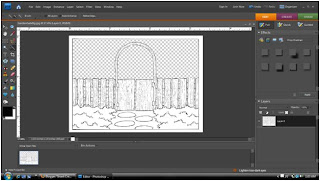


Isn't that cute? See the 'checkered' area?? That's all transparent, so anything you 'layer' with it, will not be blocked by the background (I haven't lost you , have I?? I hope not...I'm trying not to be too wordy...

OK-- so, you've got your background, and you want cowboy Ethan to be outside of the gate... open up Ethan, copy him, and paste him into your 'scene...it will look like this:
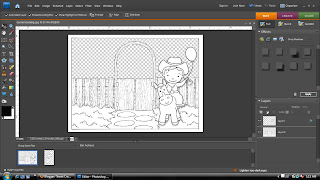


(notice that tiny bit of drop shadow?? ) If you look on the right of the screen shot, you'll see the 'Layers' of my scene. Layer 0 is the background...Layer 1 is Ethan. These are independent from one another -- think back to old school animation --same kind of principle...now onto the next step...let's add Cowgirl Ava, and have her coming up to the gate, from behind it...
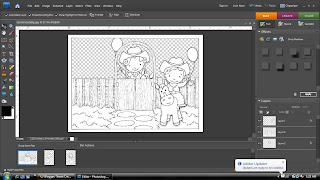


(oh hey -- look I have an update! -- sorry about that) If you take a look over at that layers palette on the right -- you'll see the order top to bottom is 1-0-2. By putting layer 2 at the bottom, it layers it behind the background - putting Ava behind the gate, on her way to meet Ethan for a ride together. Now you can print and color -- all set!

I use an inkjet printer - no need to have a laser printer, though if your printer does not have a pigment cartridge, I've heard spraying your image with a sealer, or heat setting will help if you experience running when coloring. I have a pigment cartridge and color with Copics, and have never had an issue with running at all.

That wasn't too bad, was it?? I've never written a 'tutorial' before, so hope I didn't make things too confusing. Please feel free to post any questions you might have, I'm more than happy to answer as best I can.

One last thing before I go --

Have you gotten an image where the background wasn't transparent??? This is how I 'fix' my images (and again, not the only way, or even perhaps considered the 'right' way, but it works for me ;) ).
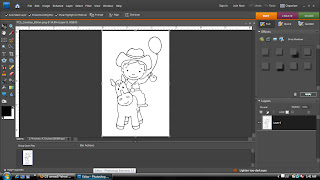


Here's Ethan - with the white Background...on the layers palette -- you might see a lock on the layer -- I double click on that, and it unlocks the layer, and you can change this, instead of adding other layers, etc. The next thing you'll do, is click on the 'Quick Selection Tool' (In PSE7 it looks like a little magic wand with a dotted box at the top). You'll see along the top of the screen, that you can change the size of the brush -- as well as some other items, like a deselect tool, in the event that too much of the image gets selected.

Now what you'll do, is click in that white space surrounding the image -- keep clicking, until it looks something like this:
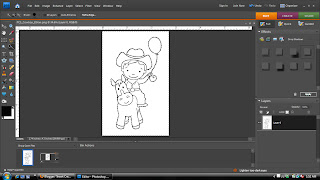


Then head up to the menus up top -- click 'Edit' then 'Cut'. And POOF! Your image will look like this:
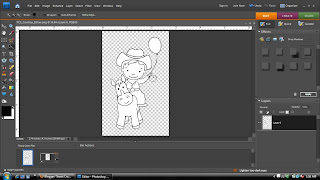


Recognize that checkered bg?? Now all you need to do, is click, 'File', then 'Save As...' and select .png as the file type. Then you're all set! Build your scenes, or just print your individual images...either way - HAVE FUN with it.

Make-A-Wish for the Weiman Wranglers!!

Can I get a YEE-HAW?!?

I'm so happy to be able to share this GREAT news with you all!

Melissa from Pink Cat Studio was approached by Lauren Meader to design a set in honor of Ethan Weiman. Melissa eagerly accepted the request, and got to work on some WONDERFUL images. TODAY, these images are available to YOU, and ALL proceeds from these images will go to the Make-A-Wish Foundation of Illinois, in honor of Ethan.

Please note -- these are digital images, NOT stamps.

I'd like to introduce you to Cowboy Ethan, and Cowgirl Ava, The Weiman Wranglers!!


The best part?? For the Ethan, Ava, and the two sentiments...it's just $6.00 (USD)!!! I think that is a GREAT price, for such adorable images. Click HERE to read more from Melissa, and from Alicia as well (oh and don't forget to fill your cart while you're there too ;) ).

The card I've prepared for today features both Ethan and Ava, and I call it "Ethan and Ava Ride Again"


Look at how the ballon strings make an upside down heart...isn't that cute? Now -- Some of you may be new to digital images, or perhaps, intimidated by them...PLEASE don't be. I have a tutorial scheduled for tomorrow that explains how easy it can really be, and it also goes into more detail to show some versatility of digital stamping...but for today, just take my word for it, ok?? ;)

The sentiment is from Winter Lily and Billy, I thought it was really fitting for this card. I used my labels 4 Nestabilities to cut it out, and outlined it with my gold paint pen.

The images were colored with my Copics, and there's some crystal effects on the balloons...

Be SURE to check out what these ladies have created with these adorable new images, you're in for a treat!