Page Builder Integrations for Bricks & Oxygen – You can now seamlessly control your SEO settings directly within the visual builders of Bricks and Oxygen and analyze their content with TruSEO.
Fixed
Browser alert incorrectly appearing in Classic Editor after page reload when Focus Keyword is set.
Version 4.9.1.1
New
Users using AIOSEO, Broken Link Checker and Link Assistant now see their broken links count in the AIOSEO Details post column.
Updated
Compatibility with WordPress 6.9.
Various database performance improvements.
Hardened database queries against SQL attacks.
Fixed
Redirects would no longer work for AIOSEO Pro users on discontinued plans.
AI Assistant shortcut no longer shown for paragraph blocks that are nested under a parent block.
Version 4.9.1
New
AI Insights – Our new AI-powered Keyword Report tool lets you see which brands are ranking for search queries in AI search results. Now 100% free for a limited time only!
Basic & Plus plan AIOSEO Pro users can now create redirects and control HTTP headers!
Updated
Switched from PHP serialization to JSON for caching to prevent cache misses due to charset mismatches.
Translations are no longer fetched when the site and all users are using the English locale.
Latest available date for Google Search Console data is now fetched in the background.
Improved error handling and performance for Semrush integration.
Added a filter to customize the Site Audit scan interval.
Added new shortcuts to the AI Assistant block to tweak content length, structure and tone.
Improved HTML parsing for Site Audit.
Fixed
Smart tag names now correctly refer to the current post type.
Some multisite network admins were unable to analyze competitor URLs in SEO Analysis.
Browser “unsaved changes” alert now properly triggers when SEO settings are modified in post editor.
Styling for breadcrumb separator settings in Thrive Architect page builder.
Incorrect character count calculation for the Product Short Description smart tag.
PHP warnings triggered when Search Statistics processed incomplete or malformed data from Google Search Console.
Conflict with the Pro Mail SMTP plugin causing some AIOSEO fields to be inaccessible.
TruSEO was not detecting links present in the FAQ Block.
Video sitemap scan now properly handles numeric post IDs when triggered by WP Cron, preventing posts from being skipped during automated scans.
PHP warning shown on the custom login page of Theme My Login plugin when AIOSEO was active.
Scheduled actions for clearing redirect logs failing due to unregistered callbacks.
Some users not being able to access Redirect menu in Lite.
Version 4.9.0
New
Table of Contents Block 2.0 – Our revamped Table of Contents block now supports multiple blocks on the same page, with a standalone or synced mode. We also added accordion support so you can collapse or expand it.
Recipe Block – Highlight your best recipes with a new block that also comes with schema markup to get your recipes featured in search results.
Products Block – Showcase your products with granular controls and Product schema markup to drive more organic traffic to your page.
Fixed
Rare PHP error when action scheduler arguments are not a JSON object.
DB lock issue when checking table schema in MariaDB.
Version 4.8.9
Updated
Improved user permission checks to display Site Audit action buttons.
Added filter to disable AI Image Generator buttons in the block editor.
Fixed
Conflict with Avada theme where post content was disappearing in backend editor.
Elementor Side Cart automatically opening even when the cart is empty on single product pages.
Category title missing from meta descriptions on new sites.
Redundant schema queries when database schema cache fails to update.
JS error when accessing string offsets in SEO revisions data processing.
Keyword Rank Tracker button broke in the Post editor if the Spectra or Starter Templates plugin was activated.
Homepage meta description character counter breaks when the site is set as an Organization.
New feature popups rendering outside the viewport on smaller screens.
Version 4.8.8
New
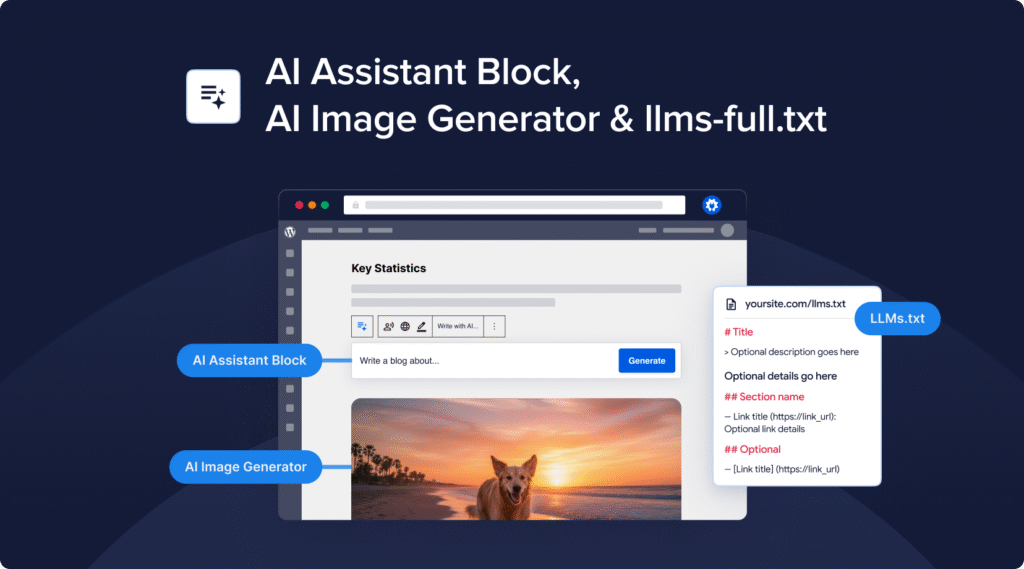
AI Assistant Block – Generate any type of content right inside the post editor: blog articles, summaries, comparison tables, and more. Whatever you need, the AI Assistant block makes it happen.
AI Image Generator – Instantly create eye-catching visuals for your posts and use them anywhere—from featured images to inline content. You can even edit existing images to give them a unique twist.
LLMs.txt Improvements – The new llms-full.txt file makes it easy for AI engines to index your site without overloading your server. We’ve also added post-to-Markdown conversion and new settings to control exactly what content gets included.
Updated
All existing AI Content features have been made compatible with all our supported page builders. You can now auto-generate SEO titles, meta descriptions, FAQs, keypoints and social posts directly inside Elementor, Divi, SeedProd, Avada, WPBakery, SiteOrigin and Thrive Architect!
The llms.txt file is now generated as a static file, removing the need for rewrite rules (e.g. on WP Engine).
Moved llms.txt under Sitemaps menu.
Fixed
Site Audit sometimes not showing results when all content types are included.
PHP error when Site Audit cannot scan post due to uninstantiated social class.
PHP error when dashboard widget failed to fetch RSS news feed.
Version 4.8.7.2
Updated
Added additional hardening to REST API routes.
Version 4.8.7.1
Fixed
WooCommerce products being automatically added to the cart.
Version 4.8.7
Updated
Hardened API routes to prevent unauthorized access.
Added support for tracking breadcrumb setting changes in SEO Revisions.
Added support for WooCommerce GTIN field to Product schema.
Added support for .avif images to Image Sitemap and Image SEO addon.
Review limit for Product schema can now be modified via a new filter hook.
Use site URL instead of home URL for llms.txt to handle WP installs in subdirectories.
Remove all user meta when AIOSEO is uninstalled.
Improved performance of Cornerstone Content filtering.
Fixed
Product shipping details schema clearing cart content in rare case where logged-in user adds a product to the cart and then edits a product in the admin panel.
ProfilePage schema sometimes invalid due to incorrect author URL.
Hide AIOSEO custom link fields inside the Edit Link modal in WPBakery visual builder to prevent plugin conflict.
AIOSEO Settings not successfully saving before post is published in WPBakery visual builder.
The SEO title and description were not persisting if the post content is too large.
Theme conflict with Neve where the EDD Checkout block does not show if Run Shortcodes is enabled.
Breadcrumb block not updating when changing the post title.
If WooCommerce brand is selected as primary category, it is now correctly used in the URL.
Headline Analyzer layout breaks when entering very long headlines.
Version 4.8.6.1
Updated
Prevent potential plugin conflicts caused by loading dependencies multiple times.
Local SEO render options for Opening Hours are now hidden when feature is disabled.
Fixed
Loading spinner for SEO Revisions in sidebar menu not aligned.
Cookie Consent
We use cookies to improve your experience on our site. By using our site, you consent to cookies.
Websites store cookies to enhance functionality and personalise your experience. You can manage your preferences, but blocking some cookies may impact site performance and services.
Essential cookies enable basic functions and are necessary for the proper function of the website.
Name
Description
Duration
Service URL
Cookie Preferences
This cookie is used to store the user's cookie consent preferences.
30 days
-
wordpress_logged_in
Used to store logged-in users.
Persistent
-
wordpress_sec
Used to track the user across multiple sessions.
15 days
-
wordpress_test_cookie
Used to determine if cookies are enabled.
Session
-
comment_author
Used to track the user across multiple sessions.
Session
-
comment_author_email
Used to track the user across multiple sessions.
Session
-
comment_author_url
Used to track the user across multiple sessions.
Session
-
wpfuuid
Used to track user interactions with forms.
11 years
-
Statistics cookies collect information anonymously. This information helps us understand how visitors use our website.
Name
Description
Duration
Service URL
ANONCHK
Indicates whether MUID is transferred to ANID, a cookie used for advertising. Clarity doesn't use ANID and so this is always set to 0.