

Descrição
Use o MailPoet para criar, enviar, gerenciar e aumentar suas campanhas de email marketing – tudo sem sair do painel do WordPress.
Nosso criador de newsletters se integra perfeitamente ao WordPress para que qualquer proprietário de site possa criar belos e-mails do zero ou usando nossos modelos responsivos que são exibidos perfeitamente em todos os dispositivos.
Agende seus boletins informativos, envie-os imediatamente ou configure novas notificações de postagem no blog para enviar automaticamente, com apenas alguns cliques.
Trusted by 500,000 WordPress websites since 2011.
Com um plano gratuito para começar e planos pagos escalonados com funcionalidades aprimoradas disponíveis, MailPoet é uma solução de marketing por email adequada tanto para iniciantes quanto para profissionais de marketing por email experientes.
Visite nosso site para obter mais informações sobre planos e preços
Todos os destaques
- Crie e adicione um formulário de assinatura de newsletter ao seu site
- Gerencie seus inscritos e listas de inscritos no WordPress
- Crie e envie newsletters com o WordPress
- Crie e-mails automáticos para enviar novas notificações de posts
- Envie emails de boas-vindas automatizados
- Opções de segmentação de assinantes com base em comportamento e interesse
- Modelos de formulário de assinatura e email pré-criados e personalizáveis
- Vários posicionamentos de formulário de assinatura: abaixo das páginas, barra fixa, pop-up, slide-in, shortcode, na intenção de saída
- WooCommerce emails: abandoned cart, first purchase, specific product, product category, order status change, review added
- Personalize e-mails transacionais WooCommerce
- Automate subscriber management (add/remove from list, add/remove tags, update subscriber data) (paid plan required)
- Create custom automation triggers and actions (paid plan required)
- Branch your automations with if/else conditions to improve engagement (paid plan required)
- Entrega de e-mail confiável com o serviço de envio MailPoet (disponível gratuitamente – plano necessário)
- Estatísticas básicas de engajamento (disponíveis gratuitamente) e estatísticas detalhadas de engajamento (é necessário um plano pago)
- Segmentação de várias condições (plano pago obrigatório)
- Integração com o Google Analytics (plano pago obrigatório)
- Suporte por meio de nossa base de conhecimento e fóruns da comunidade (disponível gratuitamente) e suporte prioritário ao cliente (plano pago necessário).
Por que escolher MailPoet
- Construtor de newsletter fácil de usar do WordPress
- Belos modelos que funcionam perfeitamente em todos os dispositivos
- Nenhuma configuração necessária: funcionamento “out of the box”
- Gerencie tudo dentro do seu painel do WordPress
- Maiores taxas de entrega com o serviço de envio MailPoet
- Compatível com GDPR
- Plano gratuito para pequenos remetentes ou para quem está começando
- Funcionalidade avançada disponível para ajudar a alcançar o crescimento.
E-mails do WooCommerce
Promova seu negócio, venda mais produtos e melhore seu atendimento ao cliente com os recursos WooCommerce do MailPoet.
Use as opções de e-mail automatizado para:
- Dê boas-vindas a seus clientes novos quando fazem sua primeira compra
- Faça upsell enviando e-mails para clientes que compraram um produto específico ou de uma categoria de produto específica
- Convert more customers by sending a series of abandoned cart emails
- Re-engage customers who haven’t made a purchase in a while with personalized offers (paid plan required)
- Follow up with customers who left a review to encourage more engagement (paid plan required).
And with WooCommerce-specific segmentation options, you’ll be able to send targeted emails to your customers based on criteria such as their country, the number of orders they’ve placed, how much they’ve spent, and if they have an active product subscription (powered by WooCommerce Subscriptions) or membership (powered by WooCommerce Memberships).
Além disso, você também poderá aumentar o reconhecimento da marca personalizando seus e-mails transacionais do WooCommerce. Crie uma experiência de marca unificada alterando o layout, as cores e as fontes usadas em seus e-mails, além de adicionar imagens ou informações adicionais a eles.
Serviço de envio do MailPoet
O MailPoet Sending Service é gratuito se você tiver apenas alguns assinantes, com planos de escalonamento disponíveis posteriormente. Leia mais.
Enviar e-mails e newsletters com seu host não é uma boa ideia. Você pode enfrentar limitações de velocidade de envio e ver seus e-mails indo parar na caixa de spam.
Para ajudar você a enviar sem problemas, criamos uma infraestrutura de entrega de e-mail avançada criada para o WordPress. Nossa tecnologia permite que você:
- Alcance caixas de entrada, não caixas de spam
- Envie seus e-mails super rápido (até 50.000 e-mails por hora)
- Mantenha sua reputação de remetente e melhore os níveis de engajamento com o tratamento automatizado de devoluções e reclamações. Pare de enviar automaticamente para endereços não entregues e de reclamação
- Autentique seus e-mails (com SPF e DKIM) para melhorar a capacidade de entrega e evitar caixas de spam.
O serviço de envio MailPoet é muito fácil de configurar, basta inserir uma chave no painel do WordPress e está tudo pronto!
Planos e preços do MailPoet
MailPoet está disponível para download gratuito. Nosso download gratuito inclui todos os recursos listados acima (com exceção daqueles que indicam um requisito de plano) de acordo com os seguintes critérios:
- Até 1.000 inscritos
- Marca MailPoet em e-mails
- Envie e-mails com seu próprio método de envio (host, SendGrid, Amazon SES, etc).
Ou se você optar por um plano MailPoet, terá acesso ao serviço de envio MailPoet.
Um plano gratuito está disponível para quem deseja começar com alguns assinantes e gostaria de usar o serviço de envio MailPoet. E nossos planos pagos oferecem recursos e funcionalidades para aqueles com listas maiores que desejam expandir seus negócios usando marketing por email.
Dê uma olhada em nossa página de preços para obter detalhes completos sobre o que está incluído em cada plano.
Antes de instalar
Observe:
- O suporte multisite é limitado
- Revise nossos requisitos mínimos.
Traduções
- Albanês
- Árabe
- Catalão
- Tcheco
- Dinamarquês
- Holandês
- Dutch (Formal)
- French (Canada)
- French (France)
- Alemão
- German (Switzerland)
- German (Formal)
- Grego
- Hindi
- Italiano
- Japonês
- Polonês
- Portuguese (Brazil)
- Portuguese (Portugal)
- Romeno
- Russo
- Sérvio
- Slovak
- Spanish (Mexico)
- Spanish (Spain)
- Sueco
- Turco
- Ucraniano
Congratulamo-nos com tradutores experientes para traduzir diretamente em nosso projeto Transifex. Observe que quaisquer traduções enviadas pelo site “Traduzindo WordPress” não funcionarão.
Segurança
Nosso repositório é público no GitHub.
Tem uma pergunta para nós? Entre em contato conosco em security@nosso domínio ou relate problemas de segurança ao nosso programa Bug Bounty.
Uso de serviços de terceiros
MailPoet utiliza os seguintes serviços que são necessários para sua plena funcionalidade:
- Translate WordPress.com – usado para baixar traduções para o plugin.
Para melhorar a experiência do usuário, o MailPoet pode usar as seguintes bibliotecas de terceiros se a configuração Carregar bibliotecas de terceiros estiver habilitada:
-
Google Fonts – usado no Editor de formulários, que você pode usar para personalizar seus formulários, e no editor de e-mails para estilizar e-mails. Isso pode ser desativado individualmente por um filtro. TOS e Política de Privacidade
-
WordPress.com – used for searching in Knowledge Base with the help of AI.
-
Mixpanel – usado para enviar dados sobre o uso do plugin MailPoet quando você concorda em compartilhar dados de uso conosco. TOS e Política de Privacidade
-
Satismeter – usado para pedir feedback. TOS e Política de privacidade
-
Crowdsignal – usado para carregar nossa enquete de desativação para melhorar nosso plugin. TOS e Política de Privacidade
O carregamento de todas essas bibliotecas está desabilitado por padrão. A opção pode ser habilitada nas Configurações do MailPoet > Avançado > Carregar bibliotecas de terceiros.
Capturas de tela

Amostra de newsletters 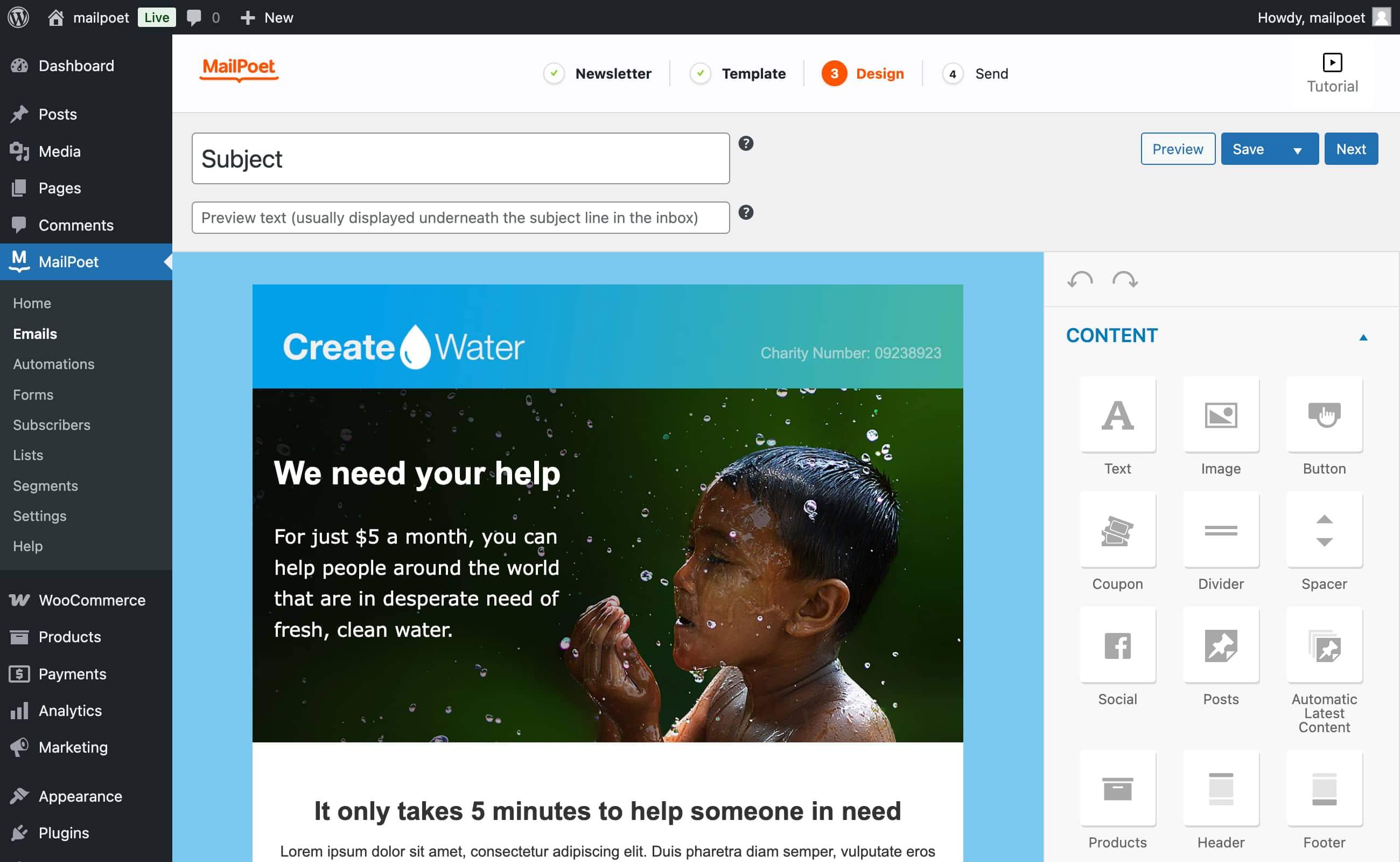
O designer de e-mail de arrastar e soltar 
Tipos de e-mail MailPoet 
Estatísticas do boletim informativo (Premium) 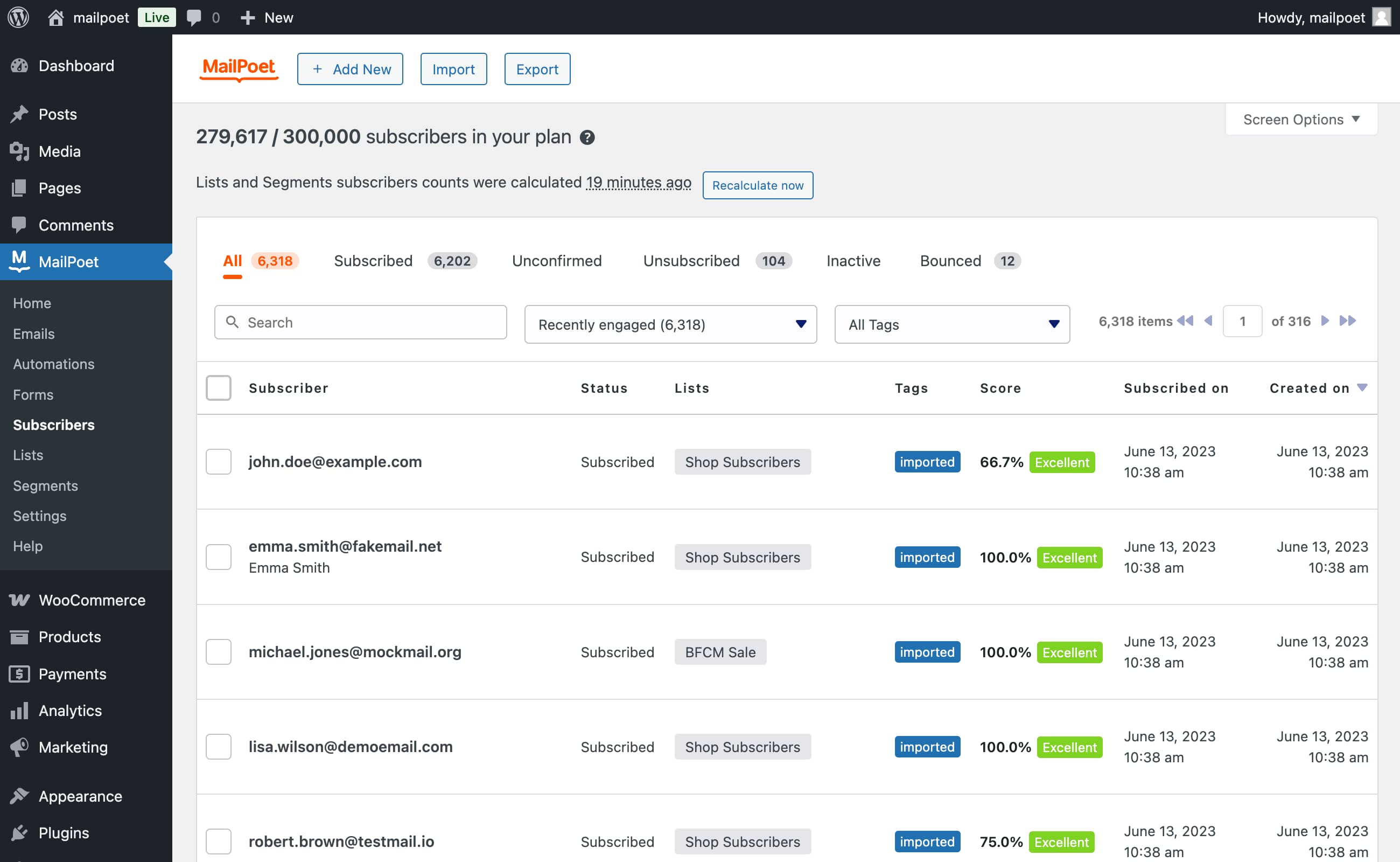
Importação de assinante (através de um arquivo CSV ou diretamente do MailChimp) 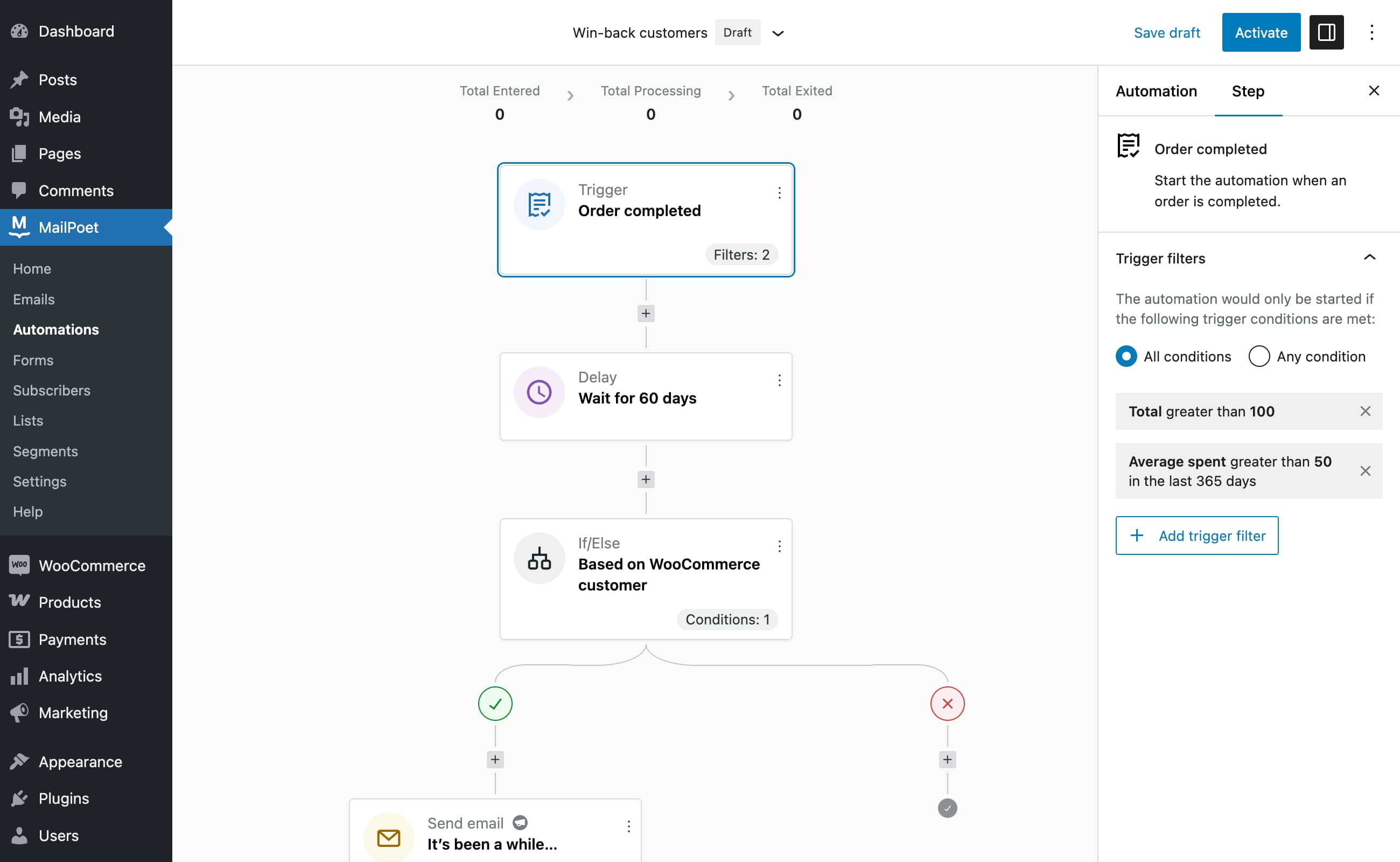
Automation editor (Premium)


Blocos
Este plugin disponibiliza 1 bloco.
- MailPoet Marketing Opt-in
Perguntas frequentes
-
O MailPoet armazena os dados dos assinantes do usuário?
-
Não armazenamos ou mantemos nenhum dado de seus assinantes. No entanto, se você estiver enviando conosco, processamos todos os e-mails a serem enviados. Isso significa que o MailPoet registra apenas endereços de e-mail para garantir que nosso serviço seja executado de forma eficaz. Não rastreamos mais nada.
-
O que é o serviço de envio MailPoet?
-
O MailPoet Sending Service foi desenvolvido exclusivamente para enviar e-mails WordPress e WooCommerce. Nossa tecnologia interna oferece velocidade incomparável (mais de 50.000 e-mails por hora) e desempenho, 99% de tempo de atividade e perda zero.
-
Você tem a liberdade de escolher como enviar seus e-mails: seu próprio host (padrão, mas não recomendado), o MailPoet Sending Service, SendGrid, Amazon SES ou a maioria dos provedores SMTP, incluindo MailGun, etc.
-
Por que devo usar o serviço de envio MailPoet?
-
Nossa taxa de entrega global é de 98,5%, muitas vezes excedendo os padrões da indústria. Monitoramos cada um dos milhões de e-mails que enviamos para nossos usuários.
Quer você envie 10 ou 100.000 e-mails por dia, o MailPoet Sending Service lida rotineiramente com boletins de pequenas empresas até enormes listas de e-mail com dezenas de milhares de assinantes.
É altamente recomendável não enviar com seu host, aqui está o motivo .
Se você está apenas começando com seu boletim informativo, oferecemos um plano gratuito para você começar.
-
Posso filtrar categorias específicas da minha notificação de postagem?
-
Sim! No MailPoet você pode definir categorias ou tags para incluir/excluir. Isso permite que você envie apenas postagens de categorias ou tags específicas, garantindo que postagens não relevantes fiquem fora de seus e-mails. Você também pode configurar vários e-mails de notificação de postagem para direcionar melhor os interesses de seus assinantes.
-
O MailPoet é compatível com GDPR?
-
Sim, estamos em conformidade com o GDPR. No entanto, não temos um Contrato de Processamento de Dados. Nosso aviso de privacidade pode funcionar como um acordo e o GDPR leva isso em consideração. Ao usar nosso serviço, você reconhece nosso Aviso de Privacidade.
Sugerimos que você também adicione um link para nosso Aviso de Privacidade em sua própria página de aviso de privacidade. O importante é garantir que seus assinantes estejam cientes de que o MailPoet entrega seu e-mail, se você enviar com o MailPoet.
Você também pode ler nosso Guia para estar em conformidade com o GDPR.
-
Sim, com o MailPoet seus clientes podem se inscrever no checkout da sua lista de e-mails. Você poderá até enviar um lembrete de carrinho abandonado se eles esquecerem de concluir a compra.
-
É MailPoet ou Mail poet?
-
É MailPoet, não Mail Poet. Nós responderemos a qualquer um deles!
-
Precisa de ajuda?
-
Verifique nossa Base de conhecimento ou entre em contato conosco através de nosso site de suporte.
Avaliações


Colaboradores e desenvolvedores
“MailPoet – Boletins informativos, email marketing e automação” é um programa de código aberto. As seguintes pessoas contribuíram para este plugin.
Colaboradores


MailPoet – Boletins informativos, email marketing e automação” foi traduzido para 27 localidades. Agradecemos aos tradutores por suas contribuições.
Traduzir o “MailPoet – Boletins informativos, email marketing e automação” para seu idioma.
Interessado no desenvolvimento?
Navegue pelo código, consulte o repositório SVN ou assine o registro de desenvolvimento por RSS.
Registro de alterações
5.17.4 – 2025-12-12
- Fixed: Rendering of Wide width blocks when WooCommerce 10.4.0 is active.
