

Descripción
The UpdraftPlus Backup & Migration Plugin is trusted by the WordPress community to backup, restore and migrate their WordPress websites. UpdraftPlus is actively installed on more than 3 million websites around the world.
Backup with UpdraftPlus
UpdraftPlus is the world’s highest ranking and most popular scheduled backup and migration plugin. Backup to your preferred storage location and restore in just three clicks.
Backup to Dropbox, Google Drive, Amazon S3 (or compatible), Rackspace Cloud, FTP, DreamObjects, Openstack Swift or email.
The paid version also allows you to backup to Microsoft OneDrive, Microsoft Azure, Google Cloud, Backblaze B2, SFTP, SCP, pCloud, WebDAV or UpdraftVault, our integrated storage option for UpdraftPlus.
Backup manually or schedule to run every 2, 4, 8 or 12 hours, daily, weekly, monthly or fortnightly.
Restore with UpdraftPlus
Your WordPress website is vulnerable. Your site may get hacked. Something could go wrong with an update or your server could crash. You might need to reverse a change made or a mistake caused by human error.
Whatever the reason, you can restore your WordPress website in just a few clicks with UpdraftPlus. Choose which components to restore (e.g. plugins, themes, database etc.), click again to restore, then click again to return to the main screen.
Migrate with UpdraftPlus
It’s easy to migrate your WordPress website to another web host, server or domain with this free version of UpdraftPlus.
To migrate, simply download your database, plugins, themes etc. from the source site, then upload them into your destination site.
When migrating, a built-in search-and-replace engine identifies old strings and replaces these to reflect the new location. UpdraftPlus saves you time and reduces the risk of broken links or missing files associated with manual migrations.
Why UpdraftPlus?
Writing a reliable backup and migration plugin that ‘just works’ consistently across millions of different WordPress deployments is hard. UpdraftPlus is relied upon to do exactly that. We’re trusted and actively deployed on more websites around the world than any other WordPress backup and migration plugin.
UpdraftPlus:
- Backs up, migrates and restores
- Offers a huge number of remote storage locations
- Allows you to schedule backups, so you can ‘set and forget’
- Is comprehensive and easy to use
- Is proven to work on over 3 million sites.
UpdraftPlus Premium
The free version of UpdraftPlus will back up and migrate your website perfectly well. However if you need more features and options you can purchase our Premium version.
Backup and Migrate with UpdraftPlus Premium, and:
-
Get automatic backups before updates. Restore the very latest version if a WordPress or plugin update breaks your site.
-
Backup Incrementally. Changes are added to the master, saving server resources vs repeatedly backing up in full.
-
Get more remote storage options including Microsoft OneDrive, SFTP, Microsoft Azure, WebDAV, Google Cloud, SCP, Backblaze and pCloud.
-
Get 1GB of integrated storage with UpdraftVault for 99.999% reliability, redundancy and scalability.
-
Get more control over how many backups are stored in a specified interval.
Restore from other backup plugins including BackWPup, BackupWordPress, Simple Backups and more. -
Run backups at set times e.g. during periods of low traffic.
-
Backup to more than one location for added protection.
-
Get detailed reports. Includes cryptographic checksums so you can verify the integrity of the backup files and more.
-
Get Premium migration. Migrating to the destination site is more direct and can be done from the source site.
-
Get Multisite / multi-network compatibility.
-
Backup non-WP files and databases e.g. tables belonging to your e-commerce store or customisations to WordPress core.
-
Get database encryption.
-
Manage your backups and migrations from the WP-CLI.
-
Get Premium Support.
Find out more on our comparison page. UpdraftPlus Premium is available for purchase here.
Managing multiple websites?
UpdraftCentral is a powerful remote control dashboard for WordPress that allows you to manage your backups, as well as updates, users, pages, posts, plugins and themes from one central location. Choose between:
- UpdraftCentral (free, self-hosted)
- UpdraftCentral Premium (paid-for, self-hosted)
- UpdraftCentral Cloud (paid-for, fully-hosted)
Optimize your sites centrally by combining the power of WP-Optimize and UpdraftCentral or manage your backups centrally by combining the power of UpdraftPlus with UpdraftCentral.
Need to create a temporary clone of your site?
UpdraftClone makes it quick and easy to create a temporary sandbox for changes you want to try out. Simply select the versions of WordPress and PHP that you want, and we’ll do the rest. More about UpdraftClone
The full suite of plugins from Team Updraft and friends
-
UpdraftPlus.
Backup, migrate and restore. Rated 5* on the plugin directory and trusted by more than 3 million WordPress website owner -
WP-Optimize.
Clean the database, compress images and caching. Optimize your WordPress website. 5* user rating. 1 million + active installs. -
All-In-One Security (AIOS).
Secure your WordPress website. Comprehensive, feature rich and easy to use. 5* user rating and 1 million + active installs. -
WP Overnight.
Quality Extensions for your WooCommerce store. 5* rated invoicing, order and product management, customer management solutions and more. -
Easy Updates Manager.
Take control of updates. Lots of features for free, and a Premium version with even more – over 300,000 users. -
Internal Link Juicer.Boost your SEO. Automate internal links within your WordPress website. Save time and rank higher in the search engines.
For other useful, free plugins see our lead developer’s profile, here.
Are you multilingual? Can you translate?
Do you want to help people that speak your language to backup, migrate and restore their WordPress websites?
The UpdraftPlus backup, migration and restoration plugin is ready and waiting. The translation process is easy, and web-based – please go here for instructions: https://updraftplus.com/translate/.
Or, if you’re already an expert WordPress translator, just pick out the .pot file from the wp-content/plugins/updraftplus/languages/ directory – if you scan for translatable strings manually, then you need to get these functions: _x(), __(), _e(), _ex(), log_e().
Many thanks to our existing translators.
License
Copyright 2011-24 David Anderson

This program is free software; you can redistribute it and/or modify
it under the terms of the GNU General Public License as published by
the Free Software Foundation; either version 3 of the License, or
(at your option) any later version.

This program is distributed in the hope that it will be useful,
but WITHOUT ANY WARRANTY; without even the implied warranty of
MERCHANTABILITY or FITNESS FOR A PARTICULAR PURPOSE.  See the
GNU General Public License for more details.

You should have received a copy of the GNU General Public License
along with this program; if not, write to the Free Software
Foundation, Inc., 51 Franklin St, Fifth Floor, Boston, MA  02110-1301  USA
Non-English translators are provided by volunteers, and wordpress.org does not give plugin developers control over their translations; thus relying on them is at your own risk; UpdraftPlus cannot guarantee that translations from the original English are accurate.
We recognise and thank those mentioned at https://updraftplus.com/acknowledgements/ for code and/or libraries used and/or modified under the terms of their open source licences.
Capturas

Main dashboard – screenshots are from UpdraftPlus Premium, so may reference some features that are not part of the free version
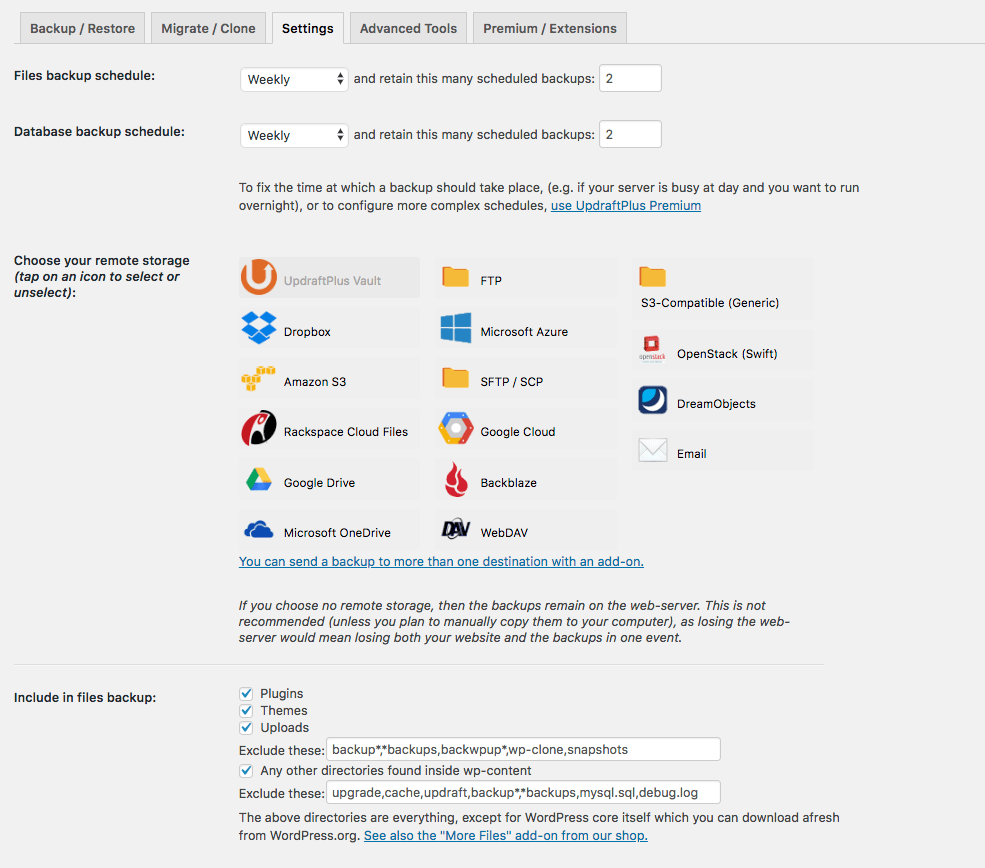
Configuring your backups

Take a backup
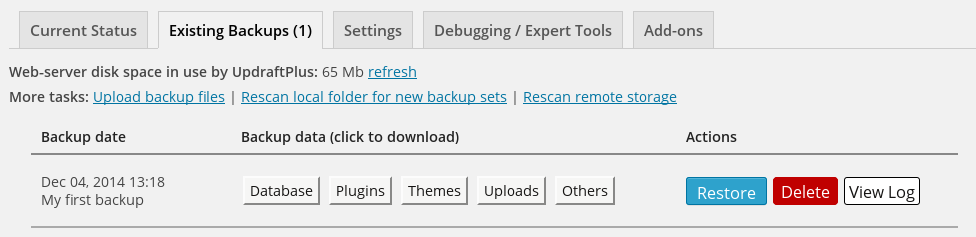
Choose which components to restore


Preguntas frecuentes
-
How do I install the UpdraftPlus backup & migration plugin?
-
Here are the installation guidelines from our YouTube channel or from our website.
-
What if I have a problem / need support ?
-
If you’re struggling to backup, migrate or restore there’s help available.
Search existing topics on the WordPress support forum or post a new one. Our support and development teams check and respond to queries everyday.
UpdraftPlus Premium customers can log a ticket directly with our support and development teams via the UpdraftPlus support hub.
Before you get in touch, please ensure that you have read through our <a href=https://updraftplus.com/frequently-asked-questions/”>FAQs and that you’ve updated to the latest release of our plugin.
It helps greatly if you can include the backup log and as much other information as possible in your report, for example the PHP version, your website, the error description, how you got to the page that caused it, any other relevant plugins you have installed, plus any other information that might be of use.
To find the backup log: there are links to download the logs on the UpdraftPlus settings page in the plugin – or you may be emailed it. Failing that, FTP into the directory wp-content/updraft and look for it there.
If you know how, please send your PHP error logs – just the few lines that appear when you run a backup, often the file called error_log, possibly in your wp-admin directory which you can check via FTP. If you’re a programmer that can debug and send a patch, that’s even better.
-
Migrating in the free plugin involves downloading the backups from the source site then uploading these to the destination site.
To find the backup log: there are links to download the logs on the UpdraftPlus settings page- or you may be emailed it. Failing that, FTP into the directory wp-content/updraft and look for it there.
Both free and Premium plugins include a built-in search-and-replace engine to replace old strings with the new location.
If migration is all you require, and for simple single site migrations the free plugin will likely be enough to meet your needs. If you have additional needs around backups e.g. the ability to backup before updates, if you require more remote storage locations or if you have a WordPress multisite then we recommend UpdraftPlus Premium for the additional benefits that it brings.
-
UpdraftPlus runs out of time when it’s trying to backup, after I have left it for some time to give it a good chance. What can I do?
-
This problem is probably caused by your account being starved of resources by your (cheap) web host provider. This is far from ideal; although UpdraftPlus supports resuming backup runs right from the beginning to avoid everything having to be done at once, it has its limits. The best thing is to choose a more reputable web host. Failing this, try going into the “Expert settings” and reducing the size at which zip files are split. UpdraftPlus is known to successfully backup websites that run into the multiple-gigabytes on web servers that are not resource-starved.
Reseñas


Colaboradores y desarrolladores
“UpdraftPlus: WP Backup & Migration Plugin” es un software de código abierto. Las siguientes personas han colaborado con este plugin.
Colaboradores


“UpdraftPlus: WP Backup & Migration Plugin” ha sido traducido a 36 idiomas. Gracias a los traductores por sus contribuciones.
Traduce “UpdraftPlus: WP Backup & Migration Plugin” a tu idioma.
¿Interesado en el desarrollo?
Revisa el código , echa un vistazo al repositorio SVN , o suscríbete al log de desarrollo por RSS .
Registro de cambios
The UpdraftPlus backup blog is the best place to learn in more detail about any important changes.
N.B. Paid versions of UpdraftPlus Backup / Restore have a version number which is 1 higher in the first digit, and has an extra component on the end, but the changelog below still applies. i.e. changes listed for 1.16.32.x of the free version correspond to changes made in 2.16.32.x of the paid version.
1.25.9 – 12/Nov/2025
- FIX: A regression that resulted in the list of tables within the “Database size” tools not being displayed, due to code refactoring implemented in version 1.25.8.
- TWEAK: Add function for returning Advanced Tools menu data in a structured format.
- TWEAK: Refactoring connection keys data function to deduplicate and read from a single source
- TWEAK: Restored the missing backup confirmation pop-up icon for older WordPress versions.
- TWEAK: Stripped unwanted HTML from the plain-text notice and added new lines after each sentences in the sale offer message.
- TWEAK: Update Black Friday seasonal sale URL/link
- TWEAK: Updated “Check our premium” and “Back up non-WP tables and external databases” URL links to avoid HTTP 404 (not found) errors.
- TWEAK: Update database charset detection to support both CHARSET= and CHARACTER SET syntax in SQL dumps
- TWEAK: Replaced deprecated (boolean) casting
1.25.8 – 07/Oct/2025
- FIX: A fatal error in UpdraftCentral when trying to manage posts when no posts exist.
- FIX: During a failure in the file copy process while restoring, a directory was created with the same name as the file, and the restoration process persisted when it ought to have been stopped
- FIX: PHP fatal error in WP CLI commands for listing or scanning existing backups on PHP 8.0+ after a rescan
- TWEAK: Add UpdraftCentral support to import_settings function with return values
- TWEAK: Add support for new Amazon AWS S3 regions
- TWEAK: Added Burst Statistics to the family plugin list
- TWEAK: Adjust the backup logic to recognize invisible columns, and when that occurs, use a query that explicitly specifies the required columns instead of relying on “SELECT *”.
- TWEAK: Ensure the restore process terminates with an error when file copying/moving fails
- TWEAK: Improve the backup email report to better reflect the backup types and status.
- TWEAK: New endpoint for getting locked settings data for UpdraftCentral
- TWEAK: Perform a search and replace on __PHP_Incomplete_Class to make it work with unserialize() when object deserialization is not allowed.
- TWEAK: Refactoring site info section to deduplicate and read from single source
- TWEAK: Resolved a PHP warning triggered when uploading the plugin via the WP Plugins page — caused by translation functions (e.g. __()) being called too early.
- TWEAK: Some text was left out of the translation POT file, which meant that certain translator plugins and libraries could not find the text, making it impossible to translate.
- TWEAK: Update the db_size function to allow returning either data or html, depending on the argument that is passed in.
1.25.7 – 07/Aug/2025
- FIX: A regression for verifying the presence of old folders in the backup directory; old folders created during the restoration of the “Others” entity were not detected correctly.
- FIX: The per-backup lock entries were not removed, resulting in an accumulation of these entries in the database over time. (Includes clean-up of old entries).
- TWEAK: Add IDrive e2 and MEGA to the S3-Compatible storage list
- TWEAK: Internal function call to prevent a PHP 8.1 deprecation notice on fresh WP installs
- TWEAK: Add wp-staging to the default uploads exclusion list
- TWEAK: Add UpdraftCentral handler for site icon upload request.
- TWEAK: Added support for the database view dashicon in WordPress versions prior to 5.5.
- TWEAK: Include site icon information in the ‘get_site_icon’ response of the UpdraftCentral core module.
- TWEAK: Resolve the empty list issue on the backup email reports created by the UpdraftPlus free version
- TWEAK: The “Get every feature of UpdraftPlus Premium” box shouldn’t be displayed after purchases got claimed/activated
- TWEAK: Remove seasonal (new year, summer, spring and plugin collection) sale notices
- TWEAK: Handle unsupported character set defined for table fields during database pre-restoration.
- TWEAK: Updated links in the Premium Extensions tab of the plugin’s admin menu page.
1.25.6 – 27/May/2025
- FIX: A regression that prevented the remote storage label from being updated
- FIX: A regression that could cause unintended behaviour when restoring special files
- FIX: A fatal error when executing a standalone php backup script with “do_action(‘updraft_backup_all’)”.
- FIX: Regression that caused certain features (e.g. PHP Info) to break due to a missing HTML attribute on the triggering element
- FIX: An issue that caused migration failure for sites using the Performance Lab plugin or other plugins implementing an object cache drop-in
- TWEAK: handle non fatal file rename failure during restore
- TWEAK: The automatic backup feature is now disabled by default on new installs
- TWEAK: return post status and formatted date from UDC post API
- TWEAK: Replace a call to unserialize() in the Dropbox storage library
- TWEAK: Validate the DreamObjects endpoint to ensure only expected DreamObjects enpoint formats can pass through.
- TWEAK: Position the “includes all tables not listed below” option at the beginning of the first known table in the DB restoration widget.
- TWEAK: Add a new default endpoint in DreamObjects along with UI to allow users to add custom endpoint in the format “s3..dream.io”.