
Descripción
Mejora fácilmente la seguridad del sitio con el refuerzo de WordPress, autenticación de dos factores (2FA), protección de inicio de sesión, la detección de vulnerabilidades y el certificado SSL.
Seguridad para WordPress realmente sencilla, eficaz y eficiente
Really Simple Security es el plugin de seguridad más ligero y fácil de usar para WordPress. Protege tu sitio web WordPress con la generación de certificados SSL, incluyendo la redirección 301 https adecuada y la aplicación de SSL, el escaneo de posibles vulnerabilidades, la protección de inicio de sesión y la implementación de funciones esenciales de endurecimiento de WordPress.
Creemos que la seguridad debe tener el mínimo efecto sobre el rendimiento del sitio web, la experiencia del usuario y la facilidad de mantenimiento. Por lo tanto, Really Simple Security es:
- Ligero: Cada característica de seguridad se desarrolla con un enfoque modular y con el rendimiento en mente. Las funciones desactivadas no cargarán código redundante.
- Facilidad de uso: Configuración en 1 minuto con una breve configuración inicial.
Características de seguridad
Fácil migración a SSL
Mueve tu sitio a HTTPS y aplica SSL con un solo clic.
- Redirección 301 mediante PHP o .htaccess
- Asegurar las cookies
- Let’s Encrypt: Instala un certificado SSL si tu proveedor de hosting admite la instalación manual.
- Chequeo de salud del servidor: La configuración de tu servidor es igual de importante para la seguridad de tu sitio web.
Protección de WordPress
Ajusta tu configuración y mantén WordPress fuerte y seguro atajando posibles puntos débiles.
- Evitar la ejecución de código en la carpeta uploads
- Evitar comentarios en los inicios de sesión y desactivar la enumeración de usuarios
- Desactivar XML-RPC
- Desactivar la navegación por carpetas
- Restricciones de nombre de usuario (bloqueo de "admin" y nombres públicos)
- y mucho más..
Detección de vulnerabilidades
Recibe notificaciones cuando los plugins, temas o el núcleo de WP contengan vulnerabilidades y sea necesario tomar las medidas oportunas.
Protección de Inicio de Sesión
Permite o aplica la Autenticación en Dos Pasos (2FA) para roles de usuario específicos. Los usuarios reciben un código de dos factores por correo electrónico.
Mejora la seguridad con Really Simple Security Pro
Aplicación avanzada de SSL
- Escaneo y corrección de Contenido mixto. Detecta archivos que se solicitan mediante HTTP y corrígelos a HTTPS, tanto en el Front-end como en el Back-end.
- Activar la seguridad de transporte estricta de HTTP y configura tu sitio para la lista de precarga de HSTS.
Cortafuegos
Really Simple Security Pro incluye un firewall de WordPress eficiente y de alto rendimiento, para detener bots, rastreadores y actores malintencionados mediante bloqueos de IP y nombre de usuario.
- Bloqueo de 404: bloquea rastreadores que generan un número inusual de errores 404.
- Bloqueo por región: permite o bloquea el acceso a tu sitio solo desde regiones específicas.
- Reglas de cortafuegos automatizadas y personalizables.
- Lista de bloqueo y lista blanca de IP.
Cabeceras de seguridad
Los encabezados de seguridad protegen a los visitantes de tu sitio contra el riesgo de clickjacking, ataques de falsificación de solicitudes entre sitios, robo de credenciales de inicio de sesión y malware.
- Independiente de tu configuración de servidor, funciona en Apache, LiteSpeed, NGINX, etc.
- Proteja a los visitantes de su sitio web con protección X-XSS, X-Content-Type-Options, X-Frame-Options, y una política de referencias y cabeceras CORS.
- Genera automáticamente tu Política de Seguridad de Contenidos adaptada a WordPress.
Medidas contra la vulnerabilidad
Cuando se detecta un problema en un plugin, tema o en el núcleo de WordPress, recibirás una notificación. Con "Medidas de Vulnerabilidad", puedes configurar medidas simples pero efectivas para asegurarte de que un problema crítico no quede sin atender.
- Forzar actualización: Se intentará un proceso de actualización varias veces hasta que se pueda suponer que se abandona el desarrollo de un tema o plugin. Se le notificará durante estos pasos.
- Cuarentena: Si un plugin o tema no se puede actualizar para resolver una vulnerabilidad, Really Simple Security puede ponerlo en cuarentena.
Protección Avanzada del Sitio
- Elige una URL de inicio de sesión personalizada
- Verificación y reparación automática de permisos de archivos
- Renombra y aleatoriza el prefijo de tu base de datos
- Cambia la ubicación del archivo debug.log a una carpeta no pública
- Desactivar contraseñas de aplicaciones
- Controlar la creación de administradores
- Desactivar métodos HTTP, reduciendo las peticiones HTTP
Protección de Inicio de Sesión
Protege el inicio de sesión de tu web y las cuentas de usuario con potentes medidas de seguridad.
- Verificación en dos pasos (Inicio de sesión por correo electrónico)
- 2FA (autenticación de dos factores) con TOTP
- Inicio de sesión sin contraseña con clave de acceso
- Obliga a usar contraseñas seguras y a cambiarlas frecuentemente
- Limitar los intentos de inicio de sesión
Con "Limitar intentos de inicio de sesión" puedes configurar un umbral para bloquear temporal o permanentemente direcciones IP o nombres de usuario (inexistentes). También puede lanzar un CAPTCHA después de un inicio de sesión fallido (hCaptcha o Google reCaptcha)
Control de Acceso
- Restringe el acceso a tu web en regiones específicas.
- Añade direcciones IP o rangos de IP específicos a la Lista de Bloqueo o a la Lista de Permisos.
Enlaces útiles
- Documentación
- Definiciones de seguridad
- Traducir Really Simple Security
- Problemas & pull requests
- Solicitudes de funciones
¿Te gusta Really Simple Security?
Si quieres apoyar el desarrollo continuo de este plugin, considera la posibilidad de comprar Really Simple Security Pro, que incluye algunas funciones de seguridad excelentes y soporte premium.
Acerca de Really Simple Plugins
Nuestra misión es hacer que los complejos requisitos de WordPress sean realmente fáciles. Really Simple Security está desarrollado por Really Simple Plugins.
Para generar certificados SSL, Really Simple Security utiliza la biblioteca cliente le acme2 PHP Let’s Encrypt, gracias a 'fbett' por proporcionarla. Vulnerability Detection utiliza WP Vulnerability, una iniciativa de código abierto de Javier Casares. ¿Quieres unirte como colaborador? ¡También estamos en GitHub!
Capturas
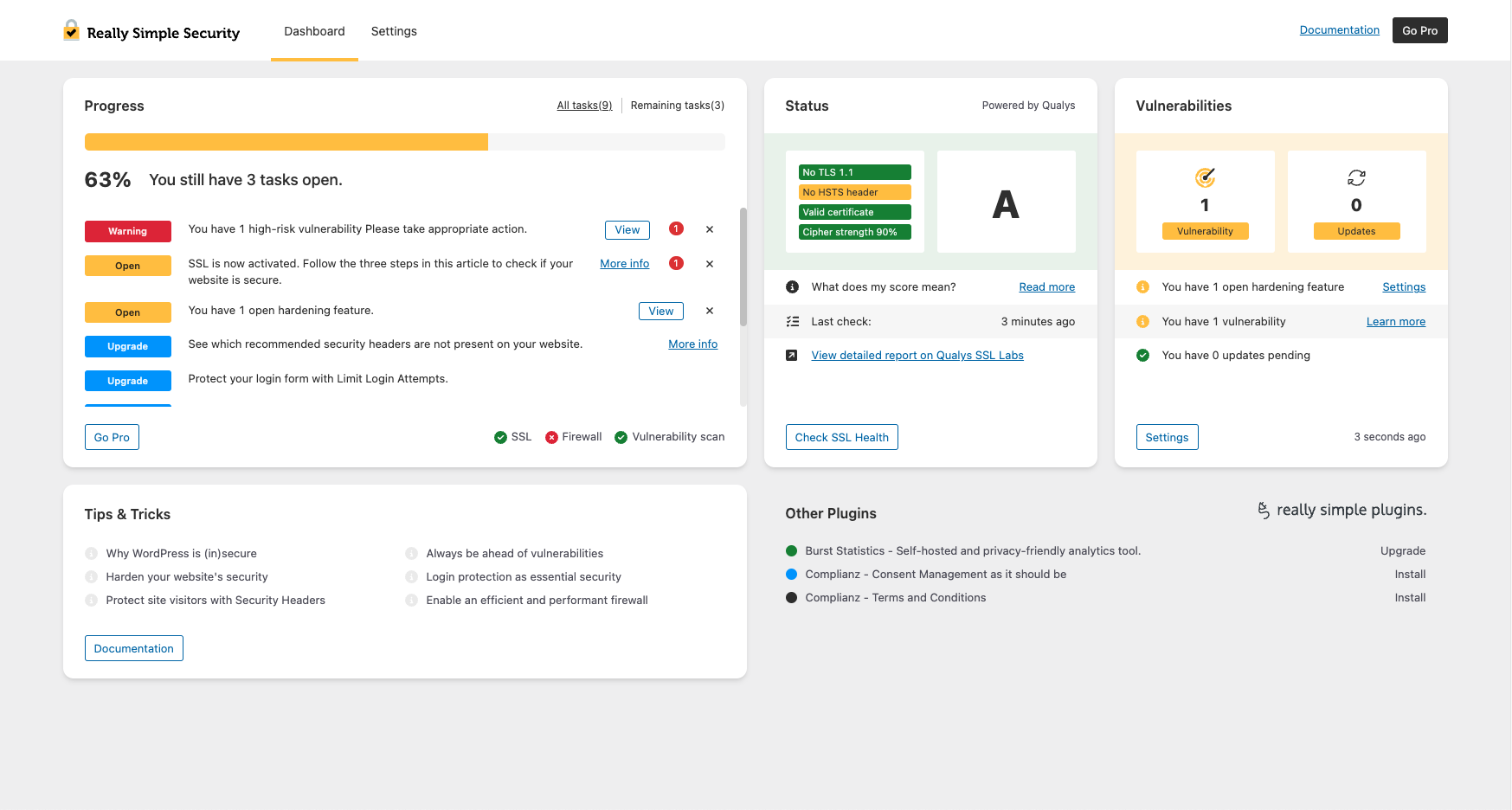
El Panel de Seguridad de Really Simple proporciona una vista rápida de la seguridad. 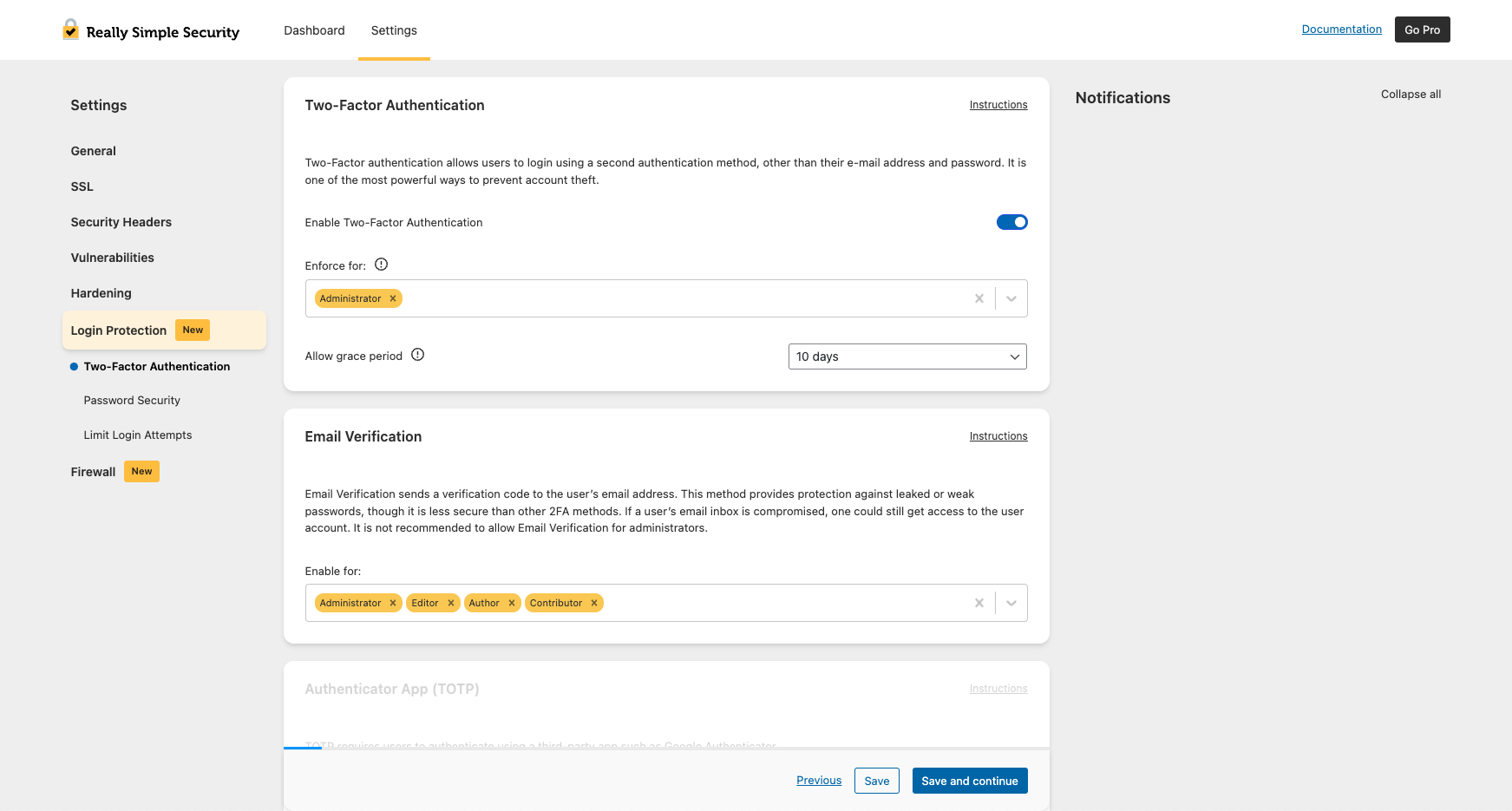
Habilita o aplica 2FA según el rol de usuario. 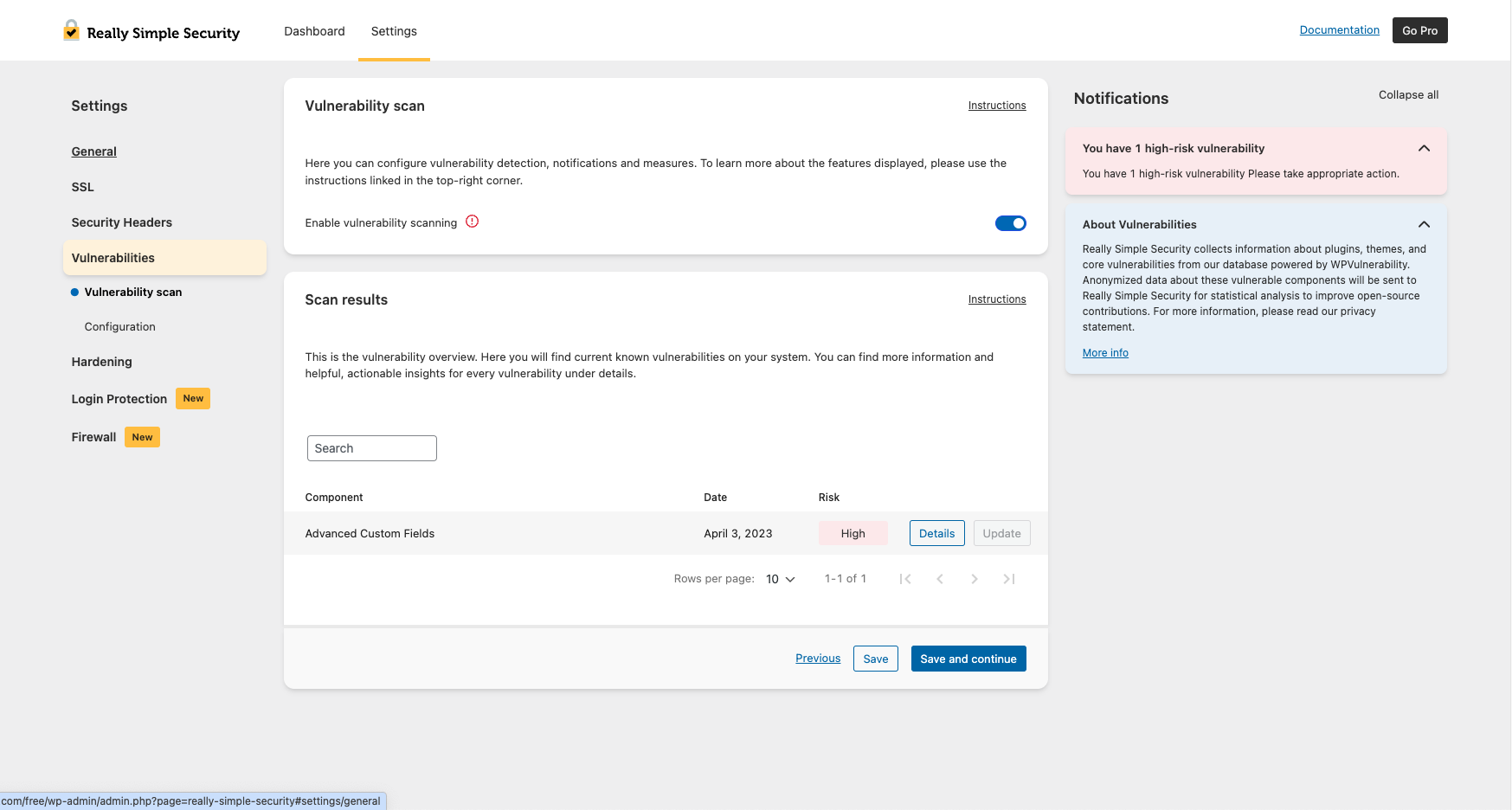
Mantente al día con las vulnerabilidades de plugins, temas y el núcleo de WordPress. 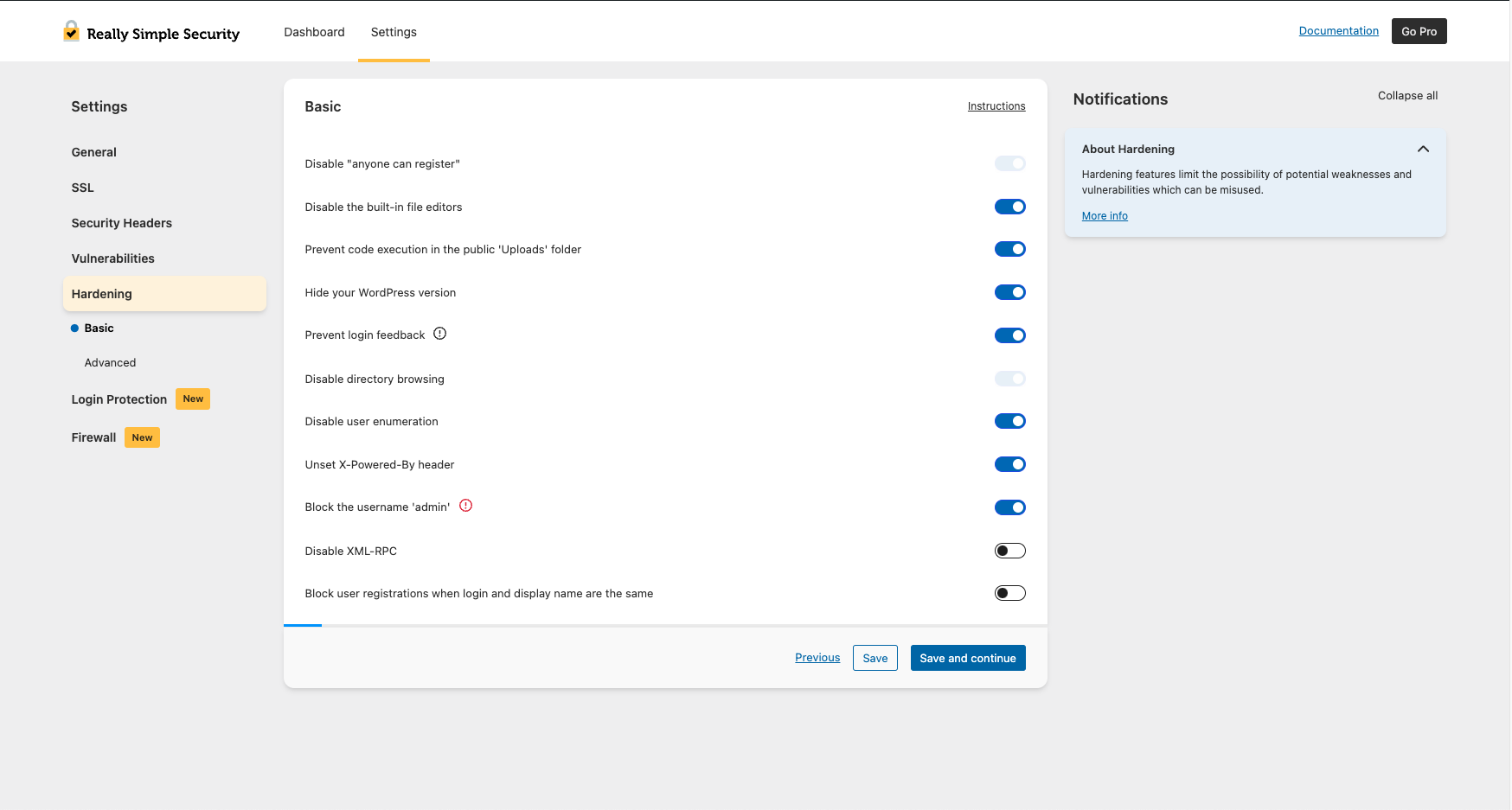
Refuerza la seguridad de tu sitio con las funciones de Endurecimiento básico. 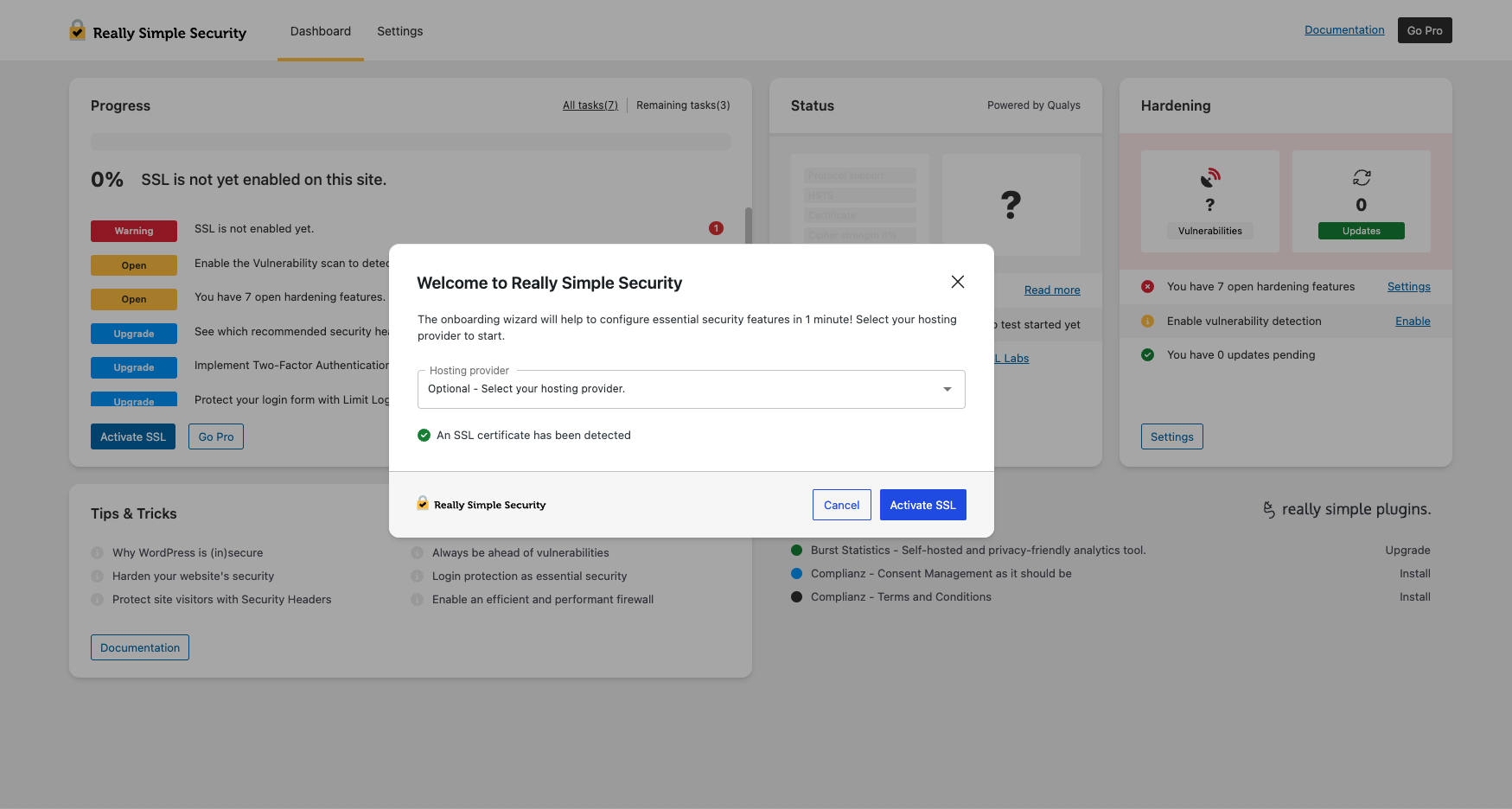
Configuración de 1 minuto con la incorporación de seguridad rápida.


Instalación
Para instalar este plugin:
- ¡Haga una copia de seguridad! Consulte nuestras recomendaciones.
- Descarga el plugin.
- Sube el plugin al directorio «wp-content/plugins».
- Ve a «Plugins» en tu administración de WordPress y, después, haz clic en «Activar».
- Ahora verás el proceso de incorporación de Really Simple Security, para ayudarte rápidamente en el proceso de configuración.
FAQ
-
Base de conocimiento
-
Para obtener explicaciones más detalladas y documentación sobre todas las funciones de Really Simple Security, busca en la Base de conocimientos.
-
¿Qué pasó con Really Simple SSL?
-
Todas las funciones que hicieron de Really Simple SSL el plugin de generación y redirección SSL más potente y fácil de usar siguen formando parte de Really Simple Security. El plugin se desarrolla con un enfoque modular: si no deseas usar el conjunto completo de funciones de seguridad, el código no utilizado no se cargará y no tendrá ningún efecto en el rendimiento de tu sitio.
-
¿Por qué Really Simple Security?
-
En nuestra experiencia, las soluciones de seguridad para WordPress suelen ser difíciles de configurar, generan muchos falsos positivos y afectan significativamente el rendimiento del sitio. Durante años hemos recibido solicitudes de nuestros usuarios para simplificar la seguridad en WordPress, ¡y esa se ha convertido en nuestra misión!
-
¡No podríamos estar más contentos! Really Simple Security tiene licencia GPL y fue co-creado por la comunidad de WordPress. Todos los comentarios son muy apreciados y siempre nos han ayudado a comprender mejor las necesidades de los usuarios. Para contribuciones de código o sugerencias, estamos en GitHub. Para sugerencias, por favor abre un ticket de soporte. También puedes mostrar tu agradecimiento dejando una reseña.
-
¿Qué son los problemas de Contenido mixto?
-
La mayoría de los problemas de contenido mixto son causados por URLs en archivos CSS o JS.
Para instrucciones detalladas sobre cómo encontrar el contenido mixto, lee este artículo. -
Generando un Certificado SSL de Let’s Encrypt
-
Hemos añadido la posibilidad de generar un Certificado SSL Gratuito con Let’s Encrypt en nuestro asistente de seguridad realmente sencillo. Disponemos de una lista actualizada de todas las integraciones posibles aquí. Por favor, deja tus comentarios sobre otra integración, información incorrecta o si necesitas ayuda.
-
¿Cómo puedo solucionar un bucle de redirección?
-
Si experimentas bucles de redirección en tu sitio, prueba estas instrucciones. Esto puede ocurrir a veces durante la migración a HTTPS o debido a reglas de redirección en conflicto.
-
¿Es este plugin compatible con multisitio?
-
Sí. Hay una página de ajustes de la red dedicada donde puedes controlar los ajustes de toda tu red, a la vez.
-
¿Cómo puedo exigir contraseñas seguras?
-
En Protección de acceso, puedes configurar los ajustes de fortaleza mínima y exigir a los usuarios que cambien sus contraseñas después de un intervalo definido. Desactivar el uso de contraseñas débiles es una práctica recomendada.
-
¿Cómo puedo cambiar mi URL de acceso?
-
Puedes configurar una URL de acceso personalizada en Endurecimiento avanzado del sitio, lo que ayuda a prevenir ataques de fuerza bruta y bots que apuntan a wp-login.php.
-
¿Este plugin redirige HTTP a HTTPS?
-
Sí. El plugin aplica HTTPS y gestiona todas las redirecciones necesarias, opcionalmente usando .htaccess o PHP.
-
¿Puedo utilizar Really Simple Security además de WordFence?
-
Really Simple Security y WordFence se solapan en gran medida en términos de funcionalidad. Si quieres utilizar funciones específicas de ambos plugins, te recomendamos encarecidamente que no habilites dos veces funciones similares. La ventaja de Really Simple Security es que las funciones desactivadas no cargan código, por lo que no afectan al rendimiento del sitio.
Reseñas


Colaboradores y desarrolladores
"Really Simple Security – Simple and Performant Security (formerly Really Simple SSL)" es un software de código abierto. Las siguientes personas han colaborado con este plugin.
Colaboradores


"Really Simple Security – Simple and Performant Security (formerly Really Simple SSL)" ha sido traducido a 58 idiomas locales. Gracias a los traductores por sus contribuciones.
¿Interesado en el desarrollo?
Revisa el código , echa un vistazo al repositorio SVN o suscríbete al registro de desarrollo por RSS.
Registro de cambios
9.5.5 – 2025-12-16
- Fixed: JavaScript error when using custom roles with 2FA
- Fixed: fatal error caused by hosts class being instantiated twice
- Fixed: fatal error when upgrading from older plugin versions
- Fixed: WP-CLI activate_ssl command now works correctly on first attempt
- Changed: removed two unused files from the plugin
- Changed: updated readme to align with standards
9.5.4 – 2025-11-18
- Fixed: 2FA login error when user has no assigned roles
- Fixed: fatal error when wp-config.php path is empty
- Changed: added file locking to .htaccess and wp-config.php to prevent race conditions
- Changed: clarified .htaccess directory indexing comment
- Changed: replaced site_url() with home_url() in the 404 resource check on the homepage
- Changed: security functions now skip cron jobs and CLI environments
- Changed: Let’s Encrypt wizard final step now shows only SSL activation button
- Changed: added a license.txt file
9.5.3.1
- Fixed: WP-CLI commands not working correctly
9.5.3
- Fixed: text domain loaded too early warning from unused translation
- Fixed: deactivation modal now always displays
- Changed: refactored the onboarding code
9.5.2.3
- Fixed: 2FA reset now correctly calls the 2FA reset service
9.5.2.2
- Fixed: 2FA TypeError when updating from older plugin versions
9.5.2
- Fixed: all users will now appear in the 2FA list
- Fixed: tasks will now always display on multisite
- Changed: activate_ssl WP-CLI command supports –force to skip confirmation
9.5.1
- Fixed: missing getmyuid function check to prevent errors
- Fixed: Right-To-Left CSS now works correctly when SCRIPT_DEBUG is enabled
- Changed: standardized REST namespaces to really-simple-security
9.5.0.2
- Fixed: prevent empty content from being written into .htaccess
9.5.0.1
- Fixed: .htaccess protected from empty overwrites, auto-creation requires filter opt-in
9.5.0
- Fixed: whitelisted LiteSpeed Cache crawler in .htaccess to prevent redirect issues
- Fixed: 2FA grace period email logic to avoid reminders to users with active 2FA
- Fixed: updated hosting provider name from "XXL Hosting" to "Superspace"
- Changed: reworked .htaccess handling with insert_with_markers and WP Rocket integration
- Changed: SBOM added to plugin
- Changed: improved text consistency and updated geopolitical terminology
9.4.3
- Fixed: user ID could be empty in 2FA
- Fixed: learn more button in vulnerability email now links to correct page
- Fixed: rsssl_user_can_manage undefined error when downloading system status
- Changed: improved compatibility with plain permalinks
- Changed: updated links in the plugin
9.4.2
- Fixed: .htaccess redirect requirements for subfolder configurations
- Fixed: re-send email button on 2FA page now shows confirmation message
- Fixed: restored SCSS files
- Fixed: plugin kept redirecting to settings page after activation
- Changed: updated plugin installation via onboarding and dashboard page
- Changed: added notice with option to force verify email address
- Changed: updated minimum WordPress version to 6.6
9.4.1
- Fixed: text domain loaded too early warning
9.4.0
- Fixed: plugin initialization timing to prevent textdomain warning
- Fixed: feedback when email is resent during 2FA setup
- Fixed: Single Sign On link now supports custom login URLs
- Added: SimplyBook in onboarding and other plugins sections
- Changed: more detailed feedback when using CLI commands
- Changed: detect EXTENDIFY_PARTNER_ID and run activate_recommended_features
- Changed: standardized onboarding hoster list to brand names
- Changed: user enumeration now returns 401 instead of 404
9.3.5 – 2025-04-29
- Fixed: 2FA methods can now be set on profile page
- Changed: tested up to WordPress 6.8
- Changed: translation updates
- Changed: check for autoloader in cron
9.3.3 – 2025-04-02
- Changed: added multiple WP-CLI commands to align with recent plugin features
- Changed: added support for custom/multiple roles in Two Factor Authentication
9.3.2.1 – 2025-03-20
- Fixed: properly handle unknown plugins in upgrade requests
9.3.2 – 2025-03-05
- Fixed: removed default checkbox behavior from configuration settings
- Fixed: handle multiple tooltip reasons for disabled select fields
- Changed: added filters to customize Let’s Encrypt Wizard behavior
9.3.1 – 2025-02-12
- Fixed: all instruction links are now correct
- Fixed: undefined array key "m" when showing vulnerability details
- Fixed: prevent errors when downgrading to free
- Fixed: 2FA compatibility with JetPack WordPress.com login
- Changed: email functions require verified email address
9.2.0 – 2025-01-20
- Fixed: added nonce check to certificate re-check button
- Fixed: review notice was not properly dismissible in some cases
9.1.4
- Fixed: shields in UI datatables no longer cut off
- Changed: do not track 404s for logged in users
- Changed: implemented rsssl_wpconfig_path filter in all wp-config functions
- Changed: faster onboarding completion after clicking Finish button
9.1.3 – 2024-11-28
- Fixed: remove duplicate site URL
- Fixed: rsssl_sanitize_uri_value() now always returns a string
- Fixed: multisite 2FA role enforcement for users with multiple roles
- Fixed: Skip Onboarding button undefined page with email method
- Fixed: translation loading updated for WordPress 6.7
- Changed: improved 2FA lockout notice
- Changed: catch use of short init in advanced-headers file
- Changed: string improvements and translator comments
- Changed: Bitnami support for rsssl_find_wordpress_base_path()
- Changed: integrate Site Health notifications with Solid Security
- Changed: enhanced random password generation in Rename Admin User
- Changed: always return string in wpconfig_path() function
9.1.2
- Security: authentication bypass fix
9.1.1.1 – 2024-11-05
- Fixed: 2FA grace period was kept active after a reset
9.1.1 – 2024-10-30
- Fixed: 2FA grace period kept active after reset
- Changed: safe-mode.lock file deactivates Firewall, 2FA and LLA for debugging
- Changed: update to system status
- Changed: textual changes
- Changed: updated instructions URLs
- Changed: site health notices changed from critical to recommended
- Changed: dropped obsolete react library
9.1.0 – 2024-10-22
- Fixed: prevent potential errors with login feedback
- Fixed: catch type error when $transients is not an array
- Changed: allow scanning for security headers via scan.really-simple-ssl.com
- Changed: remove unnecessary rsssl_update_option calls
9.0.2
- Fixed: issue with deactivating 2FA
9.0.0 – 2024-09-16
- Fixed: instructions URL in the Firewall settings
- Fixed: incorrect instructions URL
- Fixed: Let’s Encrypt returning old certificate on auto-renewed certificates
- Changed: dropped X-Frame-Options header in favor of frame-ancestors
- Changed: save and continue in vulnerabilities overview not working correctly
8.3.0.1
- Fixed: issues with the decryption model
8.3.0 – 2024-08-12
- Fixed: some strings were not translatable
- Fixed: premium support link did not work
- Fixed: links in emails were sometimes incorrect
- Fixed: fatal error on permission detection
- Added: password security scan detects weak and compromised passwords
- Changed: disable cron schedules on deactivation
- Changed: custom license check header improves hosting compatibility
- Changed: added option to disable X-powered-by header
- Changed: new improved encryption method for some settings
8.1.5 – 2024-06-21
- Fixed: documentation links to website broken
- Changed: some text changes in helptexts
- Changed: new structure to upgrade database tables
8.1.4 – 2024-06-11
- Fixed: cookie expiration change not loading
- Fixed: Visual Composer compatibility with Enforce Strong Password
- Fixed: multiple CloudFlare detected notices in onboarding
- Fixed: checkbox position in onboarding
- Changed: dropdown in onboarding not entirely visible
- Changed: styling of locked XML RPC overview
8.1.3 – 2024-05-16
- Fixed: WP Rocket compatibility when advanced-headers.php does not exist
8.1.2 – 2024-05-16
- Fixed: advanced-headers.php now supports early inclusion
8.1.1 – 2024-05-14
- Fixed: upgrade from <6.0 to >8.0 causing fatal error
- Fixed: URL to details of detected vulnerabilities was incorrect
- Added: detection of non-recommended permissions on files
- Added: configure region restrictions for your site
- Changed: textual change on premium overlay
- Changed: upgraded minimum required PHP version to 7.4
- Changed: compatibility with Bitnami
- Changed: compatibility of Limit Login Attempts with WooCommerce
- Changed: remove duplicate X-Really-Simple-SSL-Test from advanced-headers-test.php
- Changed: clear notice about .htaccess writable if do_not_edit_htaccess is enabled
8.1.0
- Fixed: show 'self' as default in Frame Ancestors
- Added: Limit Login Attempts Captcha integration
- Changed: some string corrections
- Changed: catch not existing rsssl_version_compare
- Changed: check for openSSL module existence
- Changed: set default empty array for options, for legacy upgrades
- Changed: disable custom login URL when plain permalinks are enabled
- Changed: drop renamed folder notice, not needed anymore
- Changed: enable advanced headers in onboarding
- Changed: is_object check in updater
8.0.1
- Fixed: enable 2FA during onboarding when not selected by user
- Fixed: upgrading to Pro preserves settings when clear on deactivation enabled
- Fixed: catch several array key not existing errors
- Changed: better CSP defaults
8.0.0
- Added: hide remember me checkbox
- Added: extend blocking of malicious admin creation to multisite
- Changed: drop prefetch-src from Content Security Policy
- Changed: disable two-fa when login protection is disabled
7.2.8
- Fixed: clear cron schedules on deactivation
- Changed: translations update
- Changed: info notice about automatic free and pro plugin merge
7.2.7
- Changed: added integration with FlyingPress and Fastest Cache
- Changed: fix exiting a filter, causing compatibility issue with BuddyPress
7.2.6
- Fixed: custom 404 pages with custom login URL
- Added: option to limit login cookie expiration time
- Changed: text changes
- Changed: CSS on login error message
- Changed: header detection improved by checking the last URL in redirect chain
7.2.5
- Fixed: IP detection header order
- Fixed: table creation on activation of LLA module
7.2.4
- Fixed: PHP warning in Password Security module
- Fixed: change login URL feature not working with password protected pages
- Changed: move database table creation to Limit Login Attempts module
- Changed: prevent PHP error caused by debug.log file hardening feature
7.2.3
- Fixed: CSP data not showing in datatable
7.2.2
- Changed: improved check for PharData class
7.2.1
- Fixed: config for CSP preventing Learning mode from completing
- Fixed: datatable styling
- Fixed: using deactivate_https with WP-CLI did not remove htaccess rules
- Changed: add query parameter to enforce email verification
- Changed: CSS for check certificate manually button
7.2.0
- Fixed: changed link to article
- Fixed: remove flags .js file which was added twice
- Fixed: typo in missing advanced-headers.php notice
- Changed: catch PHP warning when script src is empty when using hide WP version
- Changed: new save & continue feedback
- Changed: datatable styling
- Changed: new react based modal
- Changed: menu re-structured
- Changed: re-check vulnerability status after core update
- Changed: vulnerability notification emails now link to specific details
7.1.3 – 2023-10-11
- Fixed: React ErrorBoundary preventing Let’s Encrypt generation to complete
7.1.2 – 2023-10-06
- Fixed: hook change in integrations loader causing modules not to load
7.1.1 – 2023-10-05
- Fixed: incorrect function usage
7.1.0 – 2023-10-04
- Changed: detection if advanced-headers.php file is running
7.0.9 – 2023-09-05
- Changed: typo update word
- Changed: translatability in several strings
7.0.8 – 2023-08-08
- Fixed: handling of legacy options in PHP 8.1
- Fixed: count remaining tasks
- Changed: WordPress tested up to 6.3
- Changed: improve file existence check json
7.0.7 – 2023-07-25
- Fixed: handling of legacy options in PHP 8.1
- Fixed: prevent issues with CloudFlare when submitting support form
- Fixed: translations singular/plural for Japanese translations
- Changed: modal icon placement in wizard on smaller screens
- Changed: expire cached detected headers five minutes after saving settings
7.0.6 – 2023-07-04
- Fixed: translations not loading for chunked react components
- Changed: support custom wp-content directory in advanced-headers.php
- Changed: prevent usage of subdirectories in custom login URL
- Changed: added manual vulnerability recheck parameter
7.0.5
- Fixed: reverted redirect method to fix non-www site login issues
7.0.4 – 2023-06-14
- Fixed: feedback on hardening features enable action not showing as enabled
- Changed: notice informing about the new free vulnerability detection feature
- Changed: improved the PHP redirect method
- Changed: make the wp-config.php not writable notice dismissable
7.0.3
- Fixed: fix false positives on some plugins
- Changed: vulnerability notifications in site health, if notifications are enabled
7.0.2
- Changed: improve matching precision on plugins with vulnerabilities
7.0.1
- Fixed: REST API ajax fallback now works correctly
7.0.0
- Added: Vulnerability Detection (Beta)
- Changed: move onboarding rest api to do_action rest_route
- Changed: catch several edge situations in SSL Labs api
- Changed: SSL Labs block responsiveness
- Changed: more robust handling of wp-config.php detection
6.3.0
- Changed: added support for the new Let’s Encrypt staging environment
6.2.5
- Fixed: capability mismatch in multisite
- Changed: add warning alert option
6.2.4
- Fixed: catch non array value from notices array
- Fixed: typo in documentation link
- Changed: optionally enable notification emails in onboarding wizard
- Changed: onboarding styling
6.2.3
- Changed: back-end react to functional components
- Changed: multisite notice should link to network admin page
- Changed: detect existing CAA records to check Let’s Encrypt compatibility
- Changed: tested up to WP 6.2
- Changed: UX improvement learning mode
6.2.2
- Fixed: capability mismatch for non-administrator in multisite admin
6.2.1
- Fixed: race condition when activating SSL through WP-CLI
- Fixed: missing disabled state in textarea and checkboxes
- Fixed: some strings not translatable
- Fixed: Let’s Encrypt renewal with add on
- Changed: permissions check re-structuring
- Changed: notice on subsite within multisite environment about wildcard updated
6.2.0
- Added: optional email notifications on advanced settings
- Changed: added tooltips
- Changed: added warnings for .htaccess redirect
- Changed: don’t send user email change on renaming admin user
- Changed: use BASEPATH only for wp-load.php, symlinked folders load based on ABSPATH
- Changed: improved support for environments where Rest API is blocked
6.1.1
- Fixed: WP-CLI SSL activation fix when site not visited before
- Changed: prevent 'undefined' status showing up in api calls on settings page
- Changed: notice for incompatible Let’s Encrypt shell add-on versions
6.1.0
- Fixed: empty menu item visible in Let’s Encrypt menu
- Changed: some UX changes
- Changed: limit number of notices in the dashboard
- Changed: load rest api request URL over https if website is loaded over https
6.0.14
- Fixed: settings page when using plain permalinks
6.0.13
- Fixed: CSS for blue labels in progress dashboard below 1080px
- Fixed: WP-CLI SSL activation not working due to capability checks
- Fixed: catch invalid account error in Let’s Encrypt generation
- Fixed: do not block user enumeration for gutenberg
- Changed: improve method of dropping empty menu items in settings dashboard
- Changed: dynamic links in auto installer
- Changed: change rest_api method to core wp apiFetch()
- Changed: scroll highlighted setting into view after clicking "fix" on a task
- Changed: HTTP method tests run in batches to prevent CURL timeouts
- Changed: clean up code-execution.php file after test
- Changed: notification when DISABLE_FILE_EDITING is set to false
- Changed: drop some unnecessary translations
- Changed: WP version test uses options for better persistence
6.0.12
- Fixed: multisite admin username test uses correct database prefix
- Changed: allow submenu in back-end react application
- Changed: skip value update when no change has been made
- Changed: no redirect on dismiss of admin notice
- Changed: remove obsolete warning
- Changed: qtranslate support on settings page
6.0.11
- Fixed: login check works when HTTP_X_WP_NONCE unavailable
- Fixed: admin notices now dismiss immediately
6.0.10
- Fixed: Apache 2.4 compatibility for upload directory code blocking
- Fixed: Varnish cache compatibility for REST API requests
- Fixed: manage_security capability added for upgraded users
- Fixed: allow for custom rest api prefixes
- Fixed: Let’s Encrypt DNS verification save and action issues
- Fixed: REST API error handling prevents blank settings page
- Changed: simplify user enumeration test
- Changed: catch unexpected response in SSL Labs object
- Changed: z-index on onboarding modal on smaller screen sizes
- Changed: hide username field if no admin username is present
6.0.9
- Fixed: incorrectly disabled email field in Let’s Encrypt wizard
- Changed: on rename admin user, catch existing username, and strange characters
- Changed: catch openBaseDir restriction in cpanel detection function
- Changed: removed 6.0 update notices from subsites
6.0.8
- Changed: Let’s Encrypt wizard CSS styling
- Changed: re-add link to article about Let’s Encrypt
- Changed: let user choose a new username when selecting "rename admin user"
6.0.7
- Fixed: restricted .htaccess rewrite to prevent plugin conflicts
6.0.6
- Fixed: drop upgrade of .htaccess file in upgrade script
6.0.5
- Fixed: .htaccess race condition with simultaneous updates
6.0.4
- Fixed: .htaccess redirect compatibility with upload code blocking
- Fixed: deactivation now fully removes wp-config.php changes
6.0.3
- Fixed: Rest Optimizer no longer deactivates other plugins
6.0.2
- Fixed: do not show WP_DEBUG_DISPLAY notice if WP_DEBUG is false
- Fixed: empty cron schedule
- Fixed: auto installer used function not defined yet
- Fixed: rest api optimizer causing an error in some cases
- Changed: several typos and string improvements
6.0.1
- Fixed: translations not loading for scripts
6.0.0
- Added: Server Health Check – powered by SSLLabs
- Added: WordPress Hardening Features
- Changed: User Interface
- Changed: Tested up to WordPress 6.1.0