
Descripción
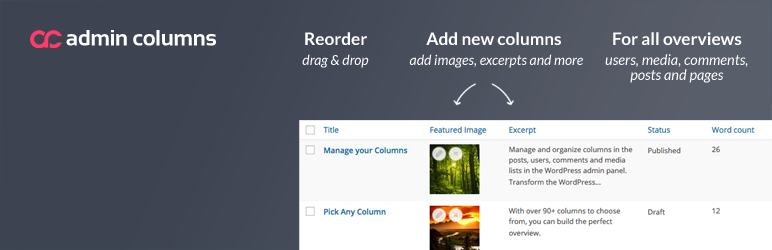
Manage and organize columns in the posts, users, comments and media lists in the WordPress admin panel. Transform the WordPress admin screens into beautiful, clear overviews.
Admin Columns Pro
The Pro version of Admin Columns will allow columns to be sorted, filtered, directly edited and its content to be exported to CSV. Admin Columns Pro offers integration with many third party plugins:
- Advanced Custom Fields: añade columnas para todos tus campos personalizados
- WooCommerce: muestra información detallada del producto y del pedido
- Tipos de Toolset, Yoast SEO y mucho más
Infórmate sobre las funciones adicionales de Admin Columns Pro en nuestro sitio web.
Enhanced list tables
By default, WordPress provides list tables, giving you an overview of your content in the admin panel. These list tables are quite limited, however. For posts and custom post types, for example, not much more than the date and title of the post is displayed. Admin Columns allows you to take control over these list tables, managing the columns dislpayed in these overviews. Supporting custom fields, featured images, custom taxonomies, EXIF data for media and much, much more (Admin Columns features over 200 columns), you can create overviews that are perfectly suited for your content.
Características
Admin Columns greatly enhances your WordPress installation. Whether you’re running a simple blog or a full-blown enterprise website, it will prove its worth within minutes. Thanks to our dedicated development and support team, you can rest assured that Admin Columns will persist to be an essential part of any WordPress installation.
To give you some insight into the great amount of possibilities Admin Columns offers to enhance your (or your client’s) WordPress admin panel, be sure to check out the screenshots or the demo video!
Sortable, filterable and editable columns & import/export
All of the new columns support sorting on all screens, and many of them support filtering. Another great feature is direct editing: it allows you to directly edit all types of data (including titles, featured images, custom fields and taxonomies) directly from the posts overview. These features are only available with Admin Columns Pro! Admin Columns Pro also allows you to import and export your column setup, and it allows you to save your columns to PHP, so you (and your clients) don’t have to worry about the admin interface!
Third party plugin integration
Admin Columns works perfectly with just about all external plugins with custom columns. Examples include Yoast SEO (SEO columns), WooCommerce, Advanced Custom Fields, Types and Pods. Not only can you reorganize the custom columns added by these plugins, you can also add custom columns provided by Admin Columns in the overview!
La licencia de desarrollador de Admin Columns Pro incluye Advanced Custom Fields y las extensiones de WooCommerce para una fácil integración y edición en línea de los datos de estos plugins.
Custom field column
Admin Columns te permite mostrar los campos personalizados para las entradas (meta de entradas) y los usuarios (meta de usuarios) para todos los campos personalizados que tengas. Con muchos tipos de campos personalizados diferentes: como archivos, imágenes, números e incluso relaciones entre usuarios y entradas. ¡Puedes crear una bonita vista general de tu contenido personalizado!
To ensure proper formatting of your custom fields, Admin Columns provides a set of custom field types, which automatically format your meta data properly.
- Color
- Fecha
- Imágenes
- Número
- Texto
- URL
- Verdadero/Falso
- [Pro] Relacional: entradas, usuarios y medios
Supported content types
Admin Columns can change your post (posts, pages and custom post types), user, comment, media and taxonomy (Admin Columns Pro only) lists! Below, you can find a list of supported column types for each content type.
Post types columns
- Acciones
- [PRO] Columna de Advanced Custom Field
- Adjunto
- Attachment count
- Autor
- Nombre del autor
- Before More Tag
- Categorías
- Comment Count
- Comment Status
- Comentarios
- Contenido
- Custom Field
- Fecha de publicación
- Profundidad de página
- Tiempo de lectura estimado
- Extracto
- Imagen destacada
- Formatos
- ID
- Modificado
- Orden
- Page Template
- Superior
- Ruta
- Enlace permanente
- Ping Status
- Post Format
- Roles
- Shortcodes
- Slug
- Estado
- Fijo
- Taxonomy
- Word Count
User columns
- Acciones
- Comment Count
- Custom Field
- Descripción
- Correo electrónico
- Nombre
- ID
- Apellidos
- Nombre
- Alias
- Post Count
- Registered Date
- Role
- URL
- Nombre de usuario
Media columns
- Acciones
- Texto alternativo
- Adjunto a
- Tamaños disponibles
- Leyenda
- Custom Field
- Descripción
- Dimensiones
- Datos EXIF
- Archivo
- Nombre del archivo
- Tamaño del archivo
- Full Path
- Altura
- ID
- Tipo mime
- Taxonomy
- Ancho
Comment columns
- Acciones
- Agente
- Aprobado
- Autor
- Avatar
- Custom Field
- Correo electrónico
- IP
- Nombre
- URL
- Fecha
- Fecha GMT
- Extracto
- ID
- Entrada
- Responder a
- Tipo
- usuario:
- Word Count
Docs & Support
Is this the first time you’re using Admin Columns? Check out our Getting Started guide.
We offer an extensive and up-to-date documentation, FAQ, how-tos and an advanced Developer Documentation. For one-on-one support, please check out the Admin Columns Forums.
Traducciones
Thanks to the great community of translators surrounding Admin Columns, the plugin is available in many languages! To find your translation or to contribute to Admin Columns by translating it into your own language, please visit our Transifex page.
Feedback & Feature Requests
Puedes dejar solicitudes o comentarios en admincolumns.com.
Enlaces relacionados
Capturas
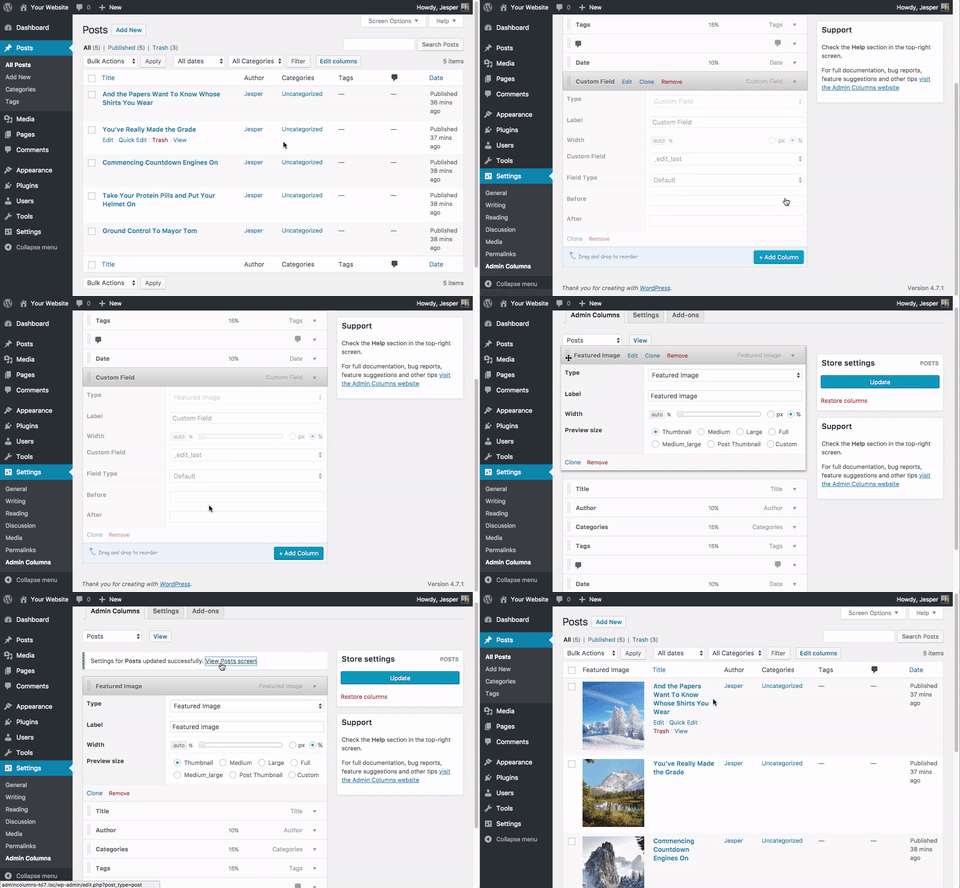
Settings page for Entrada(type) columns. 
Posts Screen with the customized sortable columns. 
Settings page for the Media Library columns. 
Media Screen with the customized sortable columns. 
Settings page for Users columns../ch 
Users Screen with the customized sortable columns. 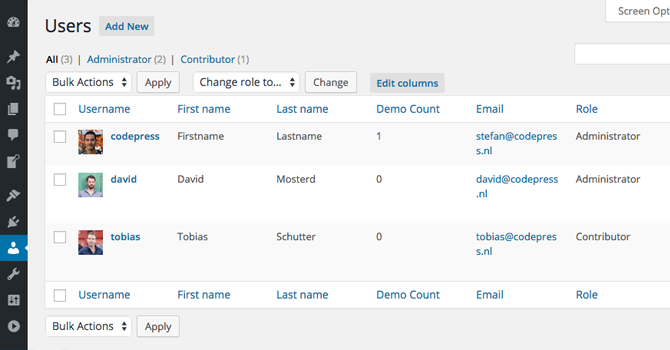
Settings page showing the different displaying types for custom field. 
Posts Screen with custom fields. 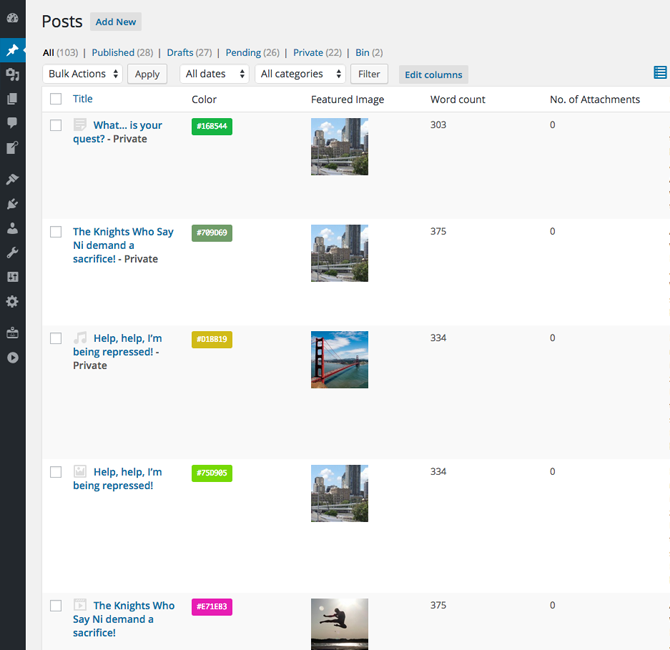


Instalación
- Upload codepress-admin-columns to the /wp-content/plugins/ directory
- Activate Admin Columns through the ‘Plugins’ menu in WordPress
- Configure the plugin by going to the Admin Columns settings that appears under the Settings menu.
FAQ
-
Is there documentation for Admin Columns?
-
Yes, you will find all the documentation you need on the admincolumns.com documentation page.
-
I have an idea for a great way to improve this plugin
-
Great, we’d love to hear from you! Please leave your feature request in our forums!
-
How can I change the thumbnail size of images?
-
You can select a custom size for your custom field option from the Column options.
-
What filters and hooks can I use?
-
You can find a list of the available actions and filters (and examples on how to use them!) in the Admin Columns documentation.
Reseñas


Colaboradores y desarrolladores
«Admin Columns» es un software de código abierto. Las siguientes personas han colaborado con este plugin.
Colaboradores


«Admin Columns» está traducido en 15 idiomas. Gracias a los traductores por sus contribuciones.
Traduce «Admin Columns» a tu idioma.
¿Interesado en el desarrollo?
Revisa el código , echa un vistazo al repositorio SVN o suscríbete al registro de desarrollo por RSS.
Registro de cambios
4.7.20
Release Date: December 5th, 2025
- [Fixed] Upgrade notice Fatal fix
4.7.19
Release Date: December 2nd, 2025
- [Added] Black friday promo
4.7.18
Release Date: September 22nd, 2025
- [Improved] Prepared backward compatibility for upcoming 7.0 release
4.7.17
Release Date: August 27th, 2025
- [Fixed] Security fixes (Axios update)
4.7.16
Release Date: June 17th, 2025
- [Fixed] Cache optimization
4.7.15
Release Date: June 16th, 2025
- [Fixed] Better null check for options to prevent PHP 8.3 issues
- [Improved] Small UI changes in the admin view
4.7.14
Release Date: April 30th, 2025
- [Improved] Column values with modals can now contain extra links
4.7.13
Release Date: March 19th, 2025
- [Improved] Compacter display of the Value modal of the Images column
4.7.12
Release Date: March 12th, 2025
- [Fixed] Corruption issues affecting certain languages in the core.
4.7.11
Release Date: March 3rd, 2025
- [Updated] Axios library updates because of know security issues with older version
4.7.10
Release Date: January 7th, 2025
- [Fixed] Prevent conflicting classnames for generated column names
4.7.9
Release Date: November 5th, 2024
- [Improved] Better edit term link with taxonomy as parameter
4.7.8
Release Date: October 1st, 2024
- [Improved] WordPress tested up to 6.6.2
4.7.7
Release Date: June 10th, 2024
- [Fixed] Gravity Forms column no longer relies on namespace check
4.7.6
Release Date: June 4th, 2024
- [Fixed] Custom Field column with Post as Display value could give an error
4.7.5
Release Date: April 14th, 2024
- [Fixed] SVG Support in image columns
4.7.4
Release Date: March 4th, 2024
- [Fixed] The Custom Field column setting gave an error when using the text field hook
4.7.3
Release Date: February 6th, 2024
- [Improved] Better loading of available integrations
4.7.2
Release Date: January 16th, 2024
- [Fixed] Fatal error when Restoring the settings in the Settings tab
4.7.1
Release Date: January 9th, 2024
- [Fixed] When the edit columns button was disabled, a styled container was displayed
4.7
Release Date: December 6th, 2023
- [Improved] It is now possible to choose how dates are stored in the Custom Field column
- [Improved] Webp images are not recognized for the custom field column
- [Fixed] Fixed an issue where non-existing terms could cause an error on the column settings page
4.6.9
Release Date: October 2nd, 2023
- [Fixed] Render values for Taxonomies fixed
- [Fixed] URLs for Terms in Taxonomy columns were incorrect
4.6.8
Release Date: September 19th, 2023
- [Improved] Taxonomy Helper fixes and improvements
4.6.7
Release Date: August 25th, 2023
- [Fixed] Error when adding the ‘Last Modified Author’ column
4.6.6
Release Date: August 21st, 2023
- [Improved] Give better feedback when the settings could not be saved because of missing database tables
- [Fixed] Error on the WPML string translation page
- [Fixed] Some custom columns could give a fatal error on the settings page
4.6.5
Release Date: August 15th, 2023
- [Added] New hook to disable Admin Columns for certain list tables
ac/list_screen/is_active - [Added] New hook to disable Admin Columns for certain list tables based on keys
ac/list_screen/key/is_active - [Improved] The Preview Column now also show a preview for video and audio files
- [Fixed] The hook
ac/post_typesworks again to disable Admin Columns for specific post types
4.6.4
Release Date: May 25th, 2023
- [MLA] Media Library Assistant columns were not loaded correctly
4.6.3
Release Date: April 26th, 2023
- [Fixed] Fixed the array helper that could throw an error when an array contained an object
- [Fixed] Re-added deprecated register_group function to prevent fatal errors for third-party plugins
4.6.2
Release Date: April 25th, 2023
- [Improved] Minor changes
4.6.1
Release Date: February 22nd, 2023
- [Added] Integration for Media Library Assistant
4.6
Release Date: November 30th, 2022
- [Improved] Styling for dynamic select boxes is improved
- [Improved] The date column setting has some minor UI improvements
4.5.5
Release Date: October 17th, 2022
- [Fixed] DOMDocument will use
libxml_clear_errorsto clear any possible errors - [Fixed] The
word_countmethod will always return anint