

توضیحات
THE MOST POPULAR WORDPRESS FIREWALL & SECURITY SCANNER
WordPress security requires a team of dedicated analysts researching the latest malware variants and WordPress exploits, turning them into firewall rules and malware signatures, and releasing those to customers in real-time.
Choose the right protection for you: Wordfence Free, Premium, Care or Response
Wordfence is widely acknowledged as the number one WordPress security research team in the World. Our plugin provides a comprehensive suite of security features, and our team’s research is what powers our plugin and provides the level of security that we are known for.
At Wordfence, WordPress security isn’t a division of our business – WordPress security is all we do. We employ a global 24-hour dedicated incident response team that provides our priority customers with a 1 hour response time for any security incident.
The sun never sets on our global security team and we run a sophisticated threat intelligence platform to aggregate, analyze and produce ground breaking security research on the newest security threats.
Wordfence Security includes an endpoint firewall, malware scanner, robust login security features, live traffic views, and more. Our Threat Defense Feed arms Wordfence with the newest firewall rules, malware signatures, and malicious IP addresses it needs to keep your website safe.
Rounded out by 2FA and a suite of additional features, Wordfence is the most comprehensive WordPress security solution available.
🔥 WORDPRESS FIREWALL
- Web Application Firewall identifies and blocks malicious traffic. Built and maintained by a large team focused 100% on WordPress security.
- Real-time firewall rule and malware signature [Premium] updates via the Threat Defense Feed (free version is delayed by 30 days).
- Real-time IP Blocklist [Premium] blocks all requests from the most malicious IPs, protecting your site while reducing load.
- Protects your site at the endpoint, enabling deep integration with WordPress. Unlike cloud alternatives, it does not break encryption, cannot be bypassed and cannot leak data.
- Integrated malware scanner blocks requests that include malicious code or content.
- Protection from brute force attacks by limiting login attempts.
📡 WORDPRESS SECURITY SCANNER
- Malware scanner checks core files, themes and plugins for malware, bad URLs, backdoors, SEO spam, malicious redirects and code injections.
- Real-time malware signature updates [Premium] via the Threat Defense Feed (free version is delayed by 30 days).
- Compares with WordPress.org repository your core files, themes and plugins, checking their integrity and reporting any changes to you.
- Repair WordPress core, theme, and plugin files that have changed by overwriting them with a pristine, original version. Delete any files that don’t belong easily within the Wordfence interface.
- Malware Removal Tools “Delete File” and “Delete All Deletable Files” options allow for efficient malware removal. Remember to investigate the scan results and backup files first!
- Checks your site for known security vulnerabilities and alerts you to any issues. Also alerts you to potential security issues when a plugin has been closed or abandoned.
- Checks your content safety by scanning file contents, posts and comments for dangerous URLs and suspicious content.
- Checks to see if your site or IP have been blocklisted [Premium] for malicious activity, generating spam or other security issues.
🔒 LOGIN SECURITY
- Two-factor authentication (2FA), one of the most secure forms of remote system authentication available via any TOTP-based authenticator app or service.
- Login Page CAPTCHA stops bots from logging in.
- 2FA for WooCommerce and custom integrations allow for 2FA to be setup on custom account pages
- XML-RPC options including disabling or adding 2FA.
- Password Security: Block logins for administrators using known compromised passwords.
📋 SECURITY AUDIT LOG [Premium]
- The Audit Log monitors all changes and actions in security-sensitive areas of the site.
- Remote tamper-proof data storage via Wordfence Central.
- Monitor events and actions ranging from user creation and editing to plugin/theme installation and updates to post and page changes.
- Configurable to log all events or significant events only, which includes all authentication, site configuration, and site functionality events.
🌐 WORDFENCE CENTRAL
- Wordfence Central is a powerful and efficient way to manage the security for multiple sites in one place.
- Centralized management: Efficiently assess the security status of all your websites in one view. View detailed security findings without leaving Wordfence Central.
- Powerful templates make configuring Wordfence a breeze.
- Highly configurable alerts can be delivered via email, SMS or Slack. Improve the signal to noise ratio by leveraging severity level options and a daily digest option.
- Track and alert on important security events including administrator logins, breached password usage and surges in attack activity.
- Free to use for unlimited sites.
🛠️ SECURITY TOOLS
- Live Traffic monitors visits and hack attempts not shown in other analytics packages in real time; including origin, their IP address, the time of day and time spent on your site.
- Block attackers by IP or build advanced rules based on IP Range, Hostname, User Agent and Referrer.
- Country blocking available with Wordfence Premium.
عکسهای صفحه

The dashboard gives you an overview of your site’s security including notifications, attack statistics and Wordfence feature status. 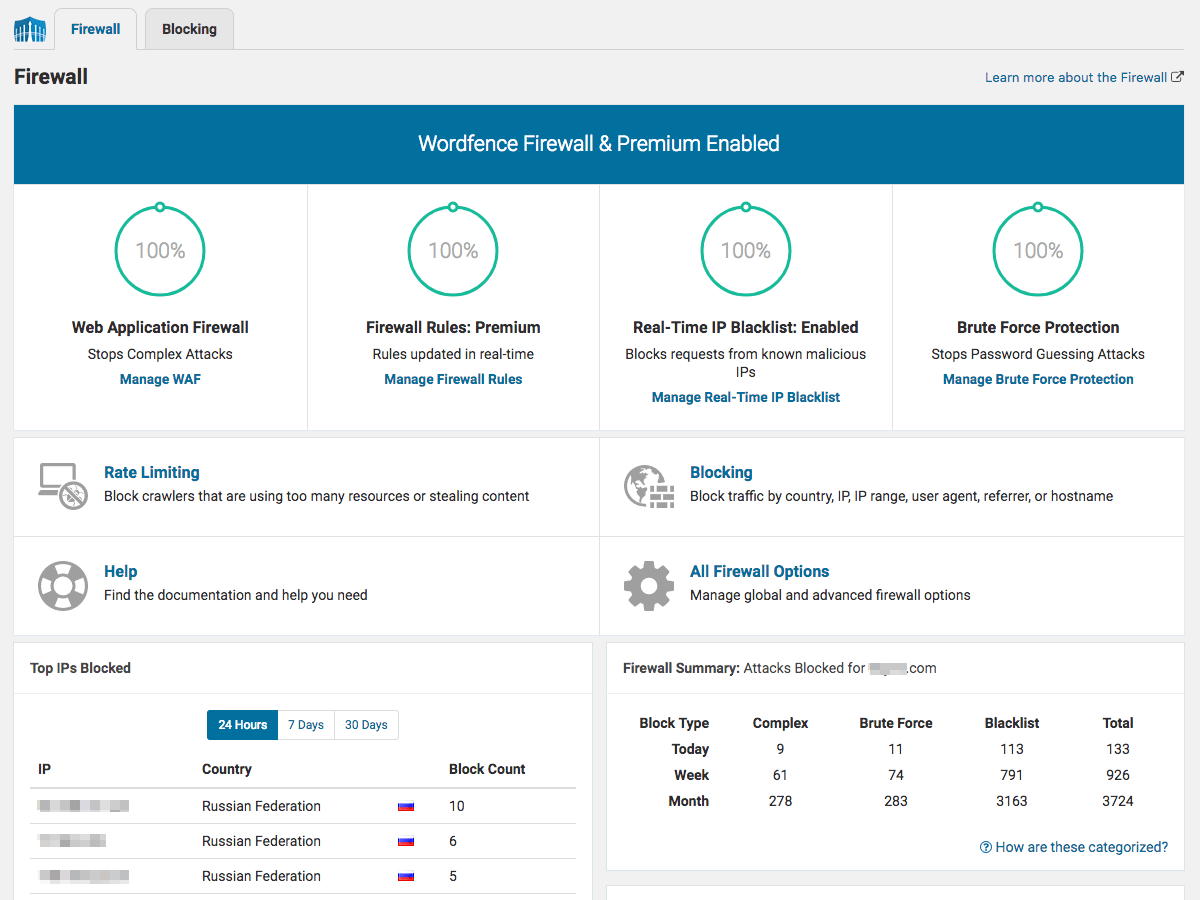
The firewall protects your site from common types of attacks and known security vulnerabilities. 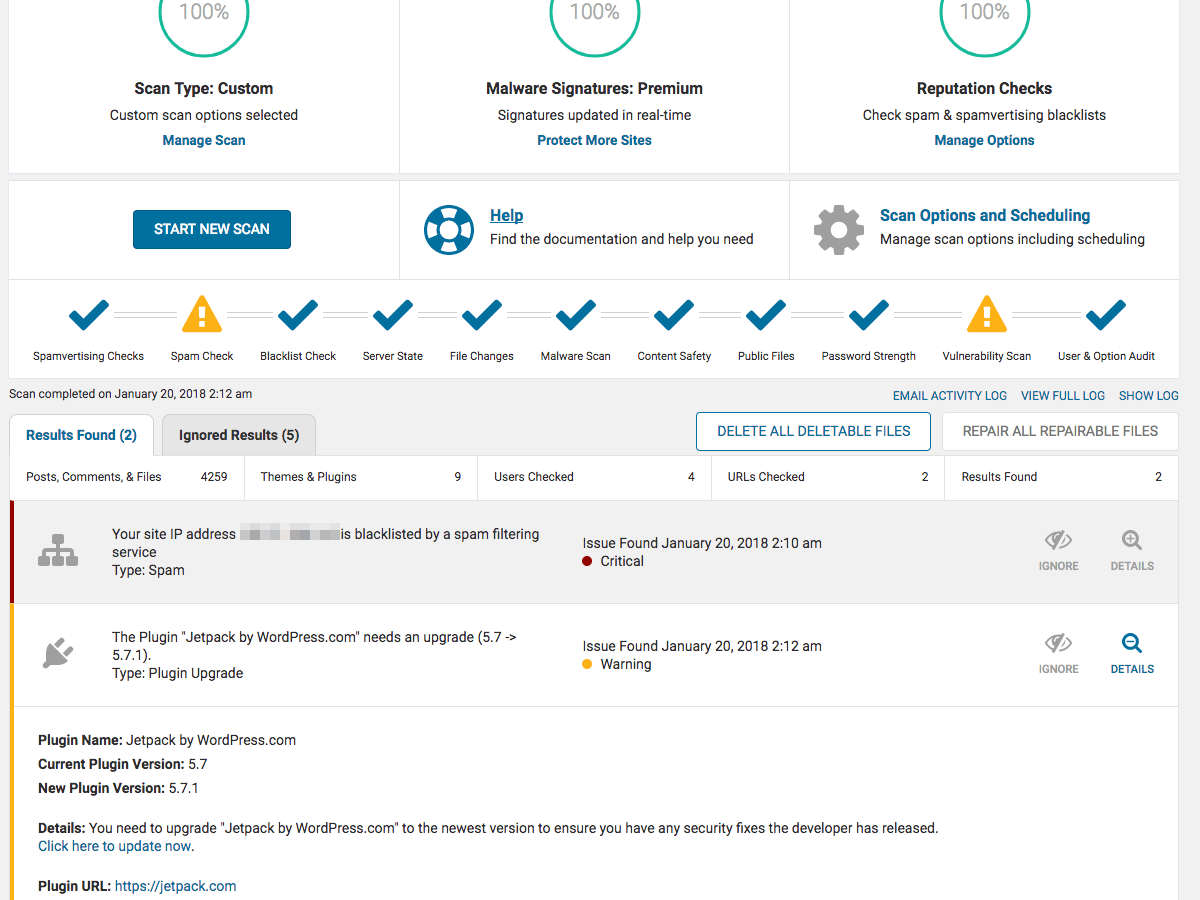
اسکنر امنیتی وردفنس به شما اجازه می دهد تا بدانید که آیا سایت شما به خطر افتاده است و به شما در مورد مسائل امنیتی دیگر که باید مورد توجه قرار گیرد هشدار میدهد . 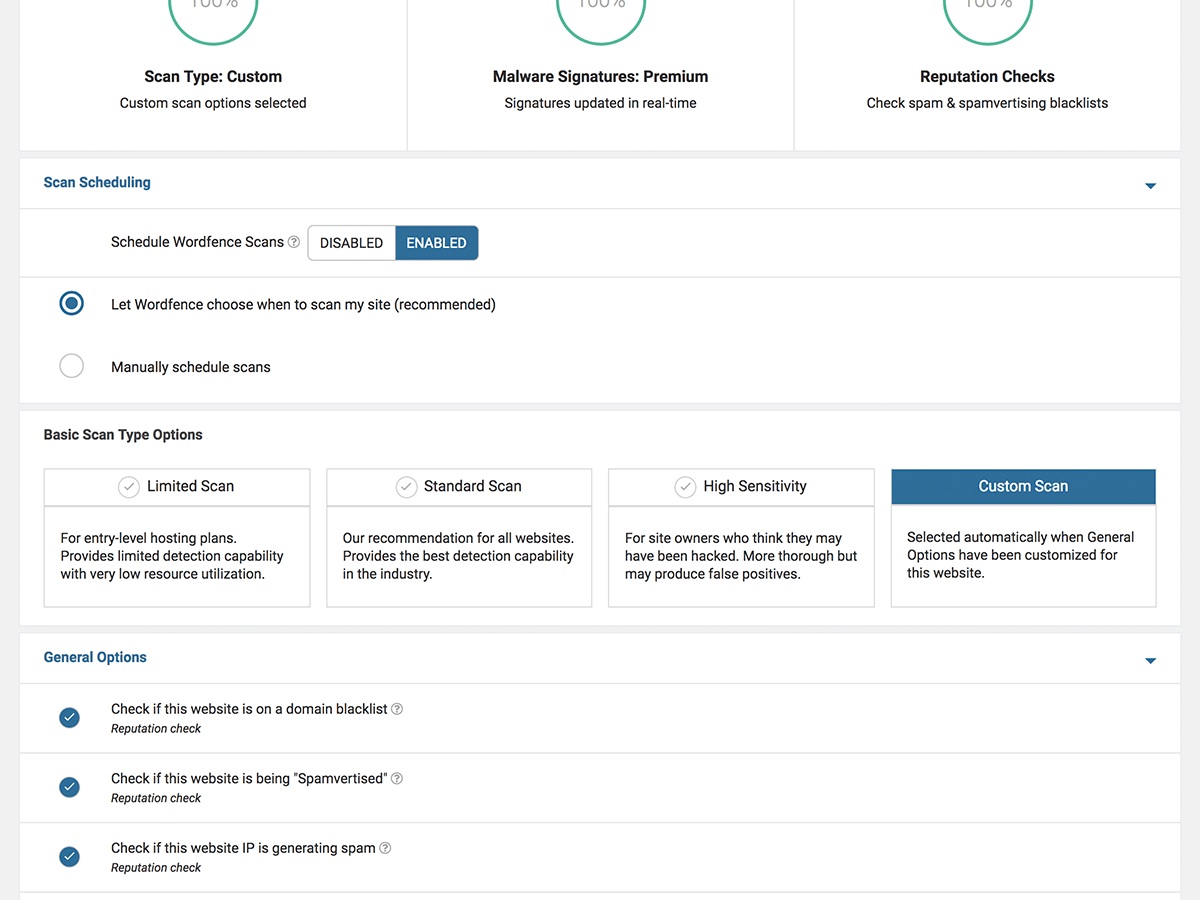
Wordfence is highly configurable, with a deep set of options available for each feature. High level scan options are shown above. 
Brute Force Protection features protect you from password guessing attacks. 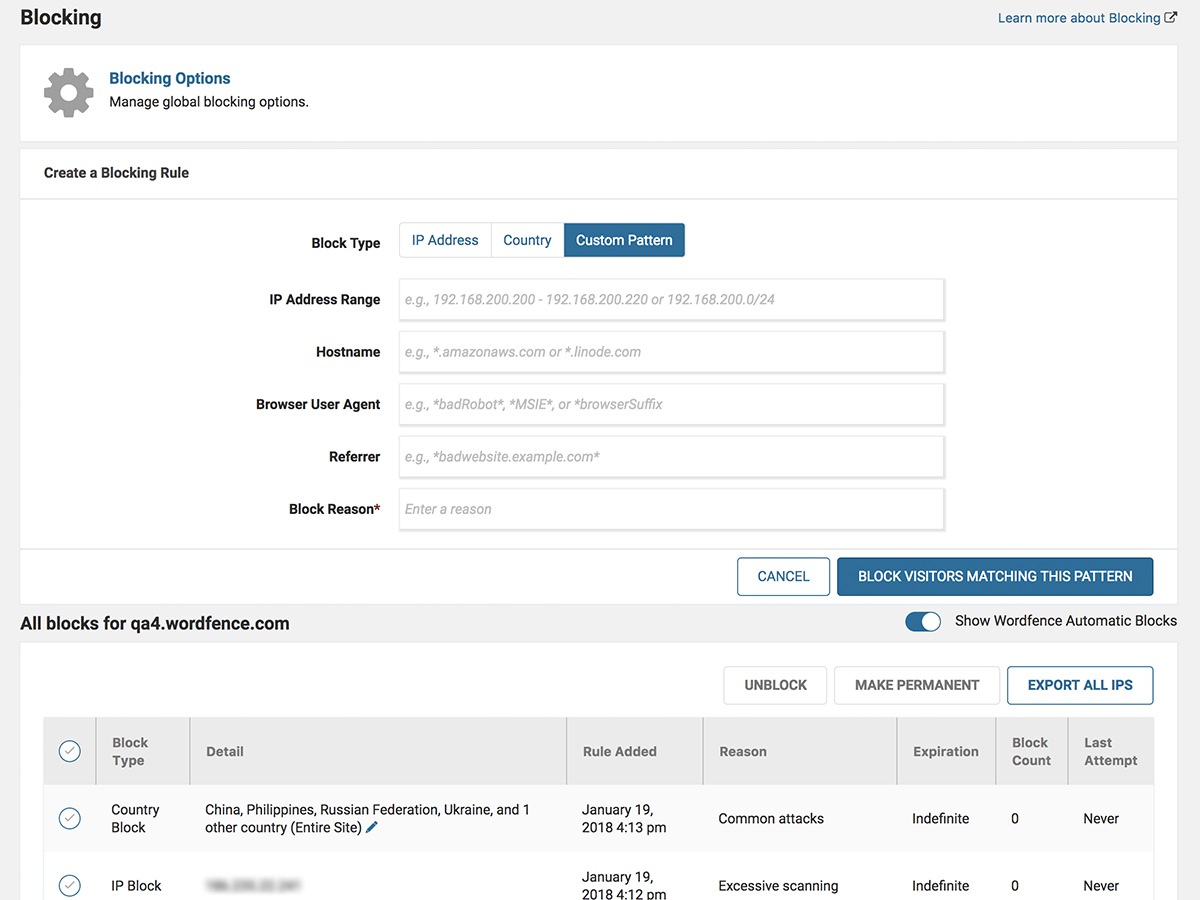
Block attackers by IP, Country, IP range, Hostname, Browser or Referrer. 
وردفنس ترافیک سایت را در زمان واقعی فعالیت در سایت شما از جمله ترافیک ربات و تلاشهای سوء استفاده شده را به صورت زنده نمایش میدهد. 
Take login security to the next level with Two-Factor Authentication. 
به آسانی با ورد فنس وارد شوید


نصب
Secure your website using the following steps to install Wordfence:
- Install Wordfence automatically or by uploading the ZIP file.
- Activate the Wordfence through the ‘Plugins’ menu in WordPress. Wordfence is now activated.
- Go to the scan menu and start your first scan. Scheduled scanning will also be enabled.
- Once your first scan has completed, a list of threats will appear. Go through them one by one to secure your site.
- برای وارد کردن آدرس ایمیل خود به صفحه گزینه های ورد فنس مراجعه کنید تا بتوانید هشدارهای ایمنی را در ایمیل دریافت کنید.
- Optionally, change your security level or adjust the advanced options to set individual scanning and protection options for your site.
- Click the “Live Traffic” menu option to watch your site activity in real-time. Situational awareness is an important part of website security.
To install Wordfence on WordPress Multi-Site installations:
- وردفنس را از طریق پوشه افزونه یا با بارگذاری پرونده ZIP نصب کنید.
- Network Activate Wordfence. This step is important because until you network activate it, your sites will see the plugin option on their plugins menu. Once activated that option disappears.
- Now that Wordfence is network activated it will appear on your Network Admin menu. Wordfence will not appear on any individual site’s menu.
- Go to the “Scan” menu and start your first scan.
- وردفنس تمام پرونده های موجود در نصب وردپرس از جمله پرونده های موجود در فهرست blogs.dir سایتهای شخصی شما را اسکن میکند.
- Live Traffic will appear for ALL sites in your network. If you have a heavily trafficked system you may want to disable live traffic which will stop logging to the DB.
- قوانین دیوار آتش و قوانین ورود به کل سیستم اعمال می شود.بنابراین اگر شما موفق به ورود به site1.example.com و site2.example.com نشوید آنرا به عنوان دو شکست محاسبه می کند.ترافیک خزنده بین وبلاگ ها شمرده می شود ،بنابراین اگر به سه سایت در شبکه برخوردید ،همه بازدیدها به عنوان نرخ دسترسی به سیستم جمع میشود و این مهم است.
سوالات متداول
-
How does Wordfence Security protect sites from attackers?
-
افزونه امنیتی وردپرس بهترین محافظت موجود در وب سایت را برای شما فراهم می کند.فایروال وردفنس با پشتیبانی از فید پایدار تهدید دائماً به روز شده و مانع از هک شدن شما می شود.وردفنس اسکنر با استفاده از همان خوراک اختصاصی ، به سرعت در مورد مسائل امنیتی یا اینکه سایت شما به خطر بیفتد هشدار میدهد. نمای ترافیک زنده به شما امکان مشاهده واقعی در زمان مراجعه به سایت و ترافیک و هک شدن وب سایت را می دهد. مجموعه ای عمیق از ابزارهای اضافی ، جامع ترین راه حل امنیتی وردپرس در دسترس است.
-
We offer a Premium API key that gives you real-time updates to the Threat Defense Feed which includes a real-time IP blocklist, firewall rules, and malware signatures. Premium support, country blocking, more frequent scans, and spam and spamvertising checks are also included. Click here to sign-up for Wordfence Premium now or simply install Wordfence free and start protecting your website.
-
How does the Wordfence WordPress Firewall protect websites?
-
- Web Application Firewall stops you from getting hacked by identifying malicious traffic, blocking attackers before they can access your website.
- Threat Defense Feed automatically updates firewall rules that protect you from the latest threats. Premium members receive the real-time version.
- Block common WordPress security threats like fake Googlebots, malicious scans from hackers and botnets.
-
What checks does the Wordfence Security Scanner perform?
-
- پرونده های هسته، پوسته ها و افزونه ها را در برابر نسخه های مخزن WordPress.org اسکن می کند تا درستی آنها را بررسی کند. امنیت منبع خود را تأیید کنید.
- ببینید که چگونه پرونده ها تغییر کرده اند. در صورت تمایل پرونده های تغییر یافته را که تهدیدات امنیتی هستند تعمیر کنید.
- Scans for signatures of over 44,000 known malware variants that are known WordPress security threats.
- اسکن بسیاری از بَکدُرهای (Backdoors) شناخته شده که حفره های امنیتی ایجاد می کنند از قبیل C99 ، R57 ،RootShell ، Crystal Shell ، Matamu ، Cybershell ، W4cking ، Sniper ، Predator ، Jackal ، Phantasma ، GFS ، Dive ، Dx و موارد دیگر.
- Continuously scans for malware and phishing URL’s including all URLs on the Google Safe Browsing List in all your comments, posts and files that are security threats.
- اسکن برای کشف بکدُرها (Backdoors) ، تروجان ها ، کد مشکوک و دیگر مسائل امنیتی.
-
What security monitoring features does Wordfence include?
-
- See all your traffic in real-time, including robots, humans, 404 errors, logins and logouts and who is consuming most of your content. Enhances your situational awareness of which security threats your site is facing.
- نمایش زمان واقعی از تمام ترافیک از جمله رباتها خودکار که اغلب تهدیدات امنیتی را تشکیل می دهند و بسته های تجزیه تحلیل جاوا اسکریپت را هرگز به شما نشان نمی دهد.
- ترافیک در زمان واقعی شامل جابجایی DNS معکوس و جابجایی سطح شهر است. بدانید تهدیدات امنیتی منطقه جغرافیایی از کجا سرچشمه گرفته است.
- Monitors disk space which is related to security because many DDoS attacks attempt to consume all disk space to create denial of service.
-
What login security features are included
-
- See all your traffic in real-time, including robots, humans, 404 errors, logins and logouts and who is consuming most of your content. Enhances your situational awareness of which security threats your site is facing.
- نمایش زمان واقعی از تمام ترافیک از جمله رباتها خودکار که اغلب تهدیدات امنیتی را تشکیل می دهند و بسته های تجزیه تحلیل جاوا اسکریپت را هرگز به شما نشان نمی دهد.
- ترافیک در زمان واقعی شامل جابجایی DNS معکوس و جابجایی سطح شهر است. بدانید تهدیدات امنیتی منطقه جغرافیایی از کجا سرچشمه گرفته است.
- Monitors disk space which is related to security because many DDoS attacks attempt to consume all disk space to create denial of service.
-
اگر سایت من مشکل امنیتی داشته باشد ، چگونه هشدار داده می شود ؟
-
Wordfence sends security alerts via email. Once you install Wordfence, you will configure a list of email addresses where security alerts will be sent. When you receive a security alert, make sure you deal with it promptly to ensure your site stays secure.
-
Do I need a security plugin like Wordfence if I’m using a cloud based firewall (WAF)?
-
Wordfence provides true endpoint security for your WordPress website. Unlike cloud based firewalls, Wordfence executes within the WordPress environment, giving it knowledge like whether the user is signed in, their identity and what access level they have. Wordfence uses the user’s access level in more than 80% of the firewall rules it uses to protect WordPress websites. Learn more about the Cloud WAF identity problem here. Additionally, cloud based firewalls can be bypassed, leaving your site exposed to attackers. Because Wordfence is an integral part of the endpoint (your WordPress website), it can’t be bypassed. Learn more about the Cloud WAF bypass problem here. To fully protect the investment you’ve made in your website you need to employ a defense in depth approach to security. Wordfence takes this approach.
-
چه ویژگی های در وردفنس شامل میشود؟
-
- Real-time blocking of known attackers. If another site using Wordfence is attacked and blocks the attacker, your site is automatically protected.
- کل شبکه های مخرب را مسدود کنید. شامل IP و هویز پیشرفته دامنه برای گزارش IP یا شبکه های مخرب و مسدود کردن کل شبکه ها با استفاده از دیوار آتش. تهدیدات امنیتی وردپرس را به مالک شبکه گزارش دهید.
- Rate limit or block WordPress security threats like aggressive crawlers, scrapers and bots doing security scans for vulnerabilities in your site.
- Choose whether you want to block or throttle users and robots who break your WordPress security rules.
- Premium users can also block countries and schedule scans for specific times and a higher frequency.
-
چه چیزی وردفنس را از سایر افزونه های امنیتی وردپرس متمایز می کند؟
-
- Wordfence Security provides a WordPress Firewall developed specifically for WordPress and blocks attackers looking for vulnerabilities on your site. The Firewall is powered by our Threat Defense Feed which is continually updated as new threats emerge. Premium customers receive updates in real-time.
- وردفنس صحت کد منبع وب سایت شما را در برابر مخزن رسمی وردپرس تأیید می کند و تغییرات را به شما نشان می دهد.
- اسکن هایورد فنس تمام فایل ها ، نظرات و نوشته های شما را برای آدرس های اینترنتی در لیست مرور ایمن Google بررسی می کنند.ما تنها افزونه ای هستیم که این پیشرفت امنیتی بسیار مهم را ارائه می دهیم.
- اسکن های وردفنس مقادیر زیادی از پهنای باند شما را مصرف نمی کنند زیرا همه اسکن های امنیتی روی وب سرور شما انجام میشود که باعث سریع شدن کارها میشود.
- Wordfence fully supports WordPress Multi-Site which means you can security scan every blog in your Multi-Site installation with one click.
- Wordfence includes Two-Factor authentication, the most secure way to stop brute force attackers in their tracks.
- Wordfence fully supports IPv6 including giving you the ability to look up the location of IPv6 addresses, block IPv6 ranges, detect IPv6 country and do a whois lookup on IPv6 addresses and more.
-
Will Wordfence slow down my website?
-
No. Wordfence Security is extremely fast and uses techniques like caching its own configuration data to avoid database lookups and blocking malicious attacks that would slow down your site.
-
اگر سایت من قبلاً هک شده باشد چه می شود؟
-
Wordfence Security is able to repair core files, themes and plugins on sites where security is already compromised. You can follow this guide on how to clean a hacked website using Wordfence. If you are cleaning your own site after a hack, note that site security cannot be assured unless you do a full reinstall if your site has been hacked. We recommend you only use Wordfence Security to get your site into a running state in order to recover the data you need to do a full reinstall. If you need help with a security issue, check out Wordfence Care, which offers hands-on support from our team, including dealing with a hacked site. For mission-critical sites, check out Wordfence Response.
-
Does Wordfence Security support IPv6?
-
بله. ما به طور کامل از IPv6 با تمامی توابع امنیتی از جمله مسدود سازی کشور ، مسدود کردن محدوده ، جستجوی شهر ، جستجوی هویز و سایر عملکردهای امنیتی پشتیبانی می کنیم. اگر IPv6 را اجرا نمی کنید ،وردفنس در سایت شما نیز بسیار کار خواهد کرد. ما چه با برنامه IPv4 و چه با IPv6 کاملاً سازگار هستیم ، خواه شما فقط یک آدرس یا هر دو آدرس را اجرا کنید.
-
Does Wordfence Security support Multi-Site installations?
-
Yes. WordPress Multi-Site is fully supported. Using Wordfence you can scan every blog in your network for malware with one click. If one of your customers posts a page or post with a known malware URL that threatens your whole domain with being blocklisted by Google, we will alert you in the next scan.
-
What support options are available for Wordfence users?
-
Providing excellent customer service is very important to us. Our free users receive volunteer-level support in our support forums. Wordfence Premium customers get paid ticket-based support. Wordfence Care customers receive hands-on support including help with security incidents and a yearly security audit. Wordfence Response customers get 24/7/365 support from our incident response team, with a 1 hour response time, and a maximum of 24 hours to resolve a security issue.
-
Where can I learn more about WordPress security?
-
Designed for every skill level, The WordPress Security Learning Center is dedicated to deepening users’ understanding of security best practices by providing free access to entry-level articles, in-depth articles, videos, industry survey results, graphics and more.
-
از کجا می توانم شرایط استفاده از وردفنس و سیاست حفظ حریم خصوصی را پیدا کنم ؟
-
اینها در وب سایت ما موجود است: شرایط استفاده و خط مشی رازداری
نقد و بررسیها


توسعه دهندگان و همکاران
“Wordfence Security – Firewall, Malware Scan, and Login Security” نرم افزار متن باز است. افراد زیر در این افزونه مشارکت کردهاند.
مشارکت کنندگان


“Wordfence Security – Firewall, Malware Scan, and Login Security” به 23 زبان ترجمه شده است. با تشکر از مترجمین برای همکاری و کمکهایشان.
ترجمه “Wordfence Security – Firewall, Malware Scan, and Login Security” به زبان شما.
علاقه مند به توسعه هستید؟
Browse the code, check out the SVN repository, or subscribe to the development log by RSS.
گزارش تغییرات
8.1.4 – December 20, 2025
- Fix: Fixed an issue with
inet_ptonintroduced by a recent patch to PHP 8.1+ that could cause a fatal error if a malformed IP address was passed to the call
8.1.3 – December 3, 2025
- Improvement: Updated the bundled geoip database
- Note: Verified compatibility with WordPress 6.9
8.1.2 – November 12, 2025
- Improvement: Updated the bundled geoip database
8.1.1 – November 5, 2025
- Improvement: Improved localization support for the various block screens and messages
- Improvement: Updated the bundled geoip database
- Improvement: Prioritized Wordfence tables in the diagnostics tool when large numbers of tables exist
- Improvement: Allow non-US Google crawler IP addresses to pass country blocking
- Improvement: Enforcement of password strength requirements is now applied on the corresponding REST API endpoints
- Fix: Fixed detection for first-time logins and overall sending for login alerts when the corresponding settings are enabled
- Fix: When the WAF is using the mysql storage engine, fixed an issue with exclusion rules for the WAF not running correctly
- Fix: Reduced per-hit database query load around checking license status for free installations
- Fix: Optimized data sync with the WAF to better detect when the known server IP address list has changed
8.1.0 – August 25, 2025
- Improvement: Added password scanning support for WordPress 6.8 and later
- Improvement: Limited email alerts to 5 per hour by default and added notification when limit has been reached
- Improvement: Improved URL scanning performance
- Improvement: Updated GeoIP database
- Change: Reduced scan result severity for vulnerabilities with high attack complexity or required privileges
- Change: Added messaging around WAF support when NGINX Unit is detected
- Change: Added notice and scan result about Wordfence Assistant
- Change: Adjusted IPv6 connection issue message and appearance
- Fix: Prevented deprecation notice about calling base64_encode with null parameter
- Fix: Prevented deprecation message about calling preg_match with null parameter
- Fix: Corrected license type shown on dashboard when expiring
- Fix: Prevented disabled getmyuid function from causing fatal error
- Fix: Prevented disabled get_current_user function from causing fatal error
- Fix: Prevented notice about _load_textdomain_just_in_time being called incorrectly
8.0.5 – April 8, 2025
- Fix: Compatibility fixes for WordPress 6.8
8.0.4 – March 19, 2025
- Improvement: Improved error handling and messaging for some responses from our servers
- Improvement: Added messaging when a site may be using the same free license shared among multiple sites because it can cause the sites to use the same scan schedule rather than spreading out the load
- Improvement: Updated the readme content and formatting
8.0.3 – January 15, 2025
- Improvement: Added support for hosts relocating the WAF’s auto-prepend file via the constant/envvar WORDFENCE_WAF_PREPEND_DIRECTORY
- Improvement: Added detection for non-repo plugins and themes to avoid the scanner reporting changes when the same slug + version exists within the wordpress.org repo
- Improvement: Messaging for Central disconnections now better reflects the user making the change
- Improvement: Scan errors due to unreachable Wordfence servers will now provide a link to our status page to check for outages
- Improvement: Reduced the number of network calls created to sync scan issues when updates are performed in bulk
- Change: Reworked setting caching to avoid issues with some object caches
- Change: Reworked cURL check to avoid using WP_Http_Curl, which has been deprecated
- Fix: Normalized all wordfence.com links to be https
- Fix: Fixed a rare error that could occur on the diagnostics page when displaying a list of error logs
- Fix: Removed the “back to top” button and related script block from emailed diagnostics
- Fix: Fixed some UI coloring that did not correctly reflect the license type in use
8.0.2 – January 2, 2025
- Improvement: General compatibility improvements and better error handling for PHP 8+
- Improvement: Added audit log status to the plugin dashboard
- Change: Increased width of diagnostics text export for better legibility
- Fix: Addressed an error with mail hooks and the audit log when third party plugins send unexpected value types
8.0.1 – November 14, 2024
- Improvement: Updated GeoIP database
- Change: Revised some help text related to the audit log to be more clear
- Fix: Improved audit log compatibility with some plugins that would cause excessive noise due to their behaviors around setting up user roles and capabilities
- Fix: Fixed a log notice that could occur when deactivating Wordfence with audit log events still pending and a broken Wordfence Central link
8.0.0 – November 4, 2024
- Improvement: Introduced the Wordfence Audit Log, a new premium feature to monitor all changes and actions in security-sensitive areas of the site with remote tamper-proof data storage via Wordfence Central
- Change: Increased the minimum supported WordPress version to 4.7
- Change: Increased the minimum supported PHP version to 7.0
7.11.7 – July 29, 2024
- Improvement: Optimized scan performance by reducing database queries by approximately 38% along with CPU usage
- Fix: Added translation support for “Page not found” string when viewing recent traffic
7.11.6 – June 6, 2024
- Improvement: Revised the strong password requirements notice to be more readable
- Improvement: Removed unnecessary calls for the plugin and theme vulnerability checks
- Improvement: Reduced the frequency of calls to Wordfence Central during some operations where the values do not need to be synced
- Improvement: Refactored some queries to avoid the automatic SHOW FULL COLUMNS queries that WordPress performs to verify database encodings
- Improvement: Infrequently-used config values are no longer automatically loaded into memory and instead loaded only on demand
- Fix: Fixed an issue where multisite installations using the WAF mysqli storage engine could repeatedly attempt to update WAF rules when not in optimized mode
- Improvement: Updated the bundled GeoIP database
- Change: Revised the formatting of TOTP app URLs to prioritize the site’s own URL for better sorting and display
- Fix: Fixed the last captcha column in the users page so it no longer displays “(not required)” on 2FA users since that no longer applies
- Fix: Added a check in wflogs/rules.php to only run when within the WAF’s bootstrap stage when hosted behind nginx
7.11.5 – April 3, 2024
- Fix: Revised the behavior of the reCAPTCHA verification to use the documented expiration period of the token and response to avoid sending verification requests too frequently, which could artificially lower scores in some circumstances
- Fix: Addressed PHP 8 deprecation notices in the file differ used by file changed scan results
- Fix: Reduced the frequency of Wordfence Central status update callbacks in sections of the scan that occur quickly in sequence
7.11.4 – March 11, 2024
- Change: CAPTCHA verification when enabled now additionally applies to 2FA logins (may send an email verification on low scores) and no longer reveals whether a user exists for the submitted account credentials (credit: Raxis)
- Fix: Addressed a potential PHP 8 notice in the human/bot detection AJAX call
- Fix: Addressed a potential PHP 8 notice when requesting a lockout unlock verification email
- Fix: Fixed the emailed diagnostics view not showing the missing table information when applicable
- Fix: Improved quick scan logic to base timing on regular scans so they’re more evenly distributed
7.11.3 – February 15, 2024
- Fix: Fixed an issue with sites containing invalid Wordfence Central site data where they could throw an error when viewing Wordfence pages
7.11.2 – February 14, 2024
- Improvement: Enhanced the vulnerability scan to check and alert for WordPress core vulnerabilities and to adjust the severity of the scan result based on findings or available updates
- Improvement: Updated the bundled GeoIP database
- Improvement: Increased compatibility of brute force protection with plugins that override the normal login flow and omit traditional hooks
- Change: Adjusted the behavior of automatic quick scans to schedule themselves further away from full scans
- Fix: Added detection for a site being linked to a non-matching Wordfence Central record (e.g., when cloning the database to a staging site)
- Fix: Streamlined the license and terms of use installation flow to avoid unnecessary prompting
- Fix: Fixed an issue where user profiles with a selected locale different from the site itself could end up loading the site’s locale instead
7.11.1 – January 2, 2024
- Improvement: Added “.env” to the files checked for “Scan for publicly accessible configuration, backup, or log files”
- Improvement: Provided better descriptive text for the option “Block IPs who send POST requests with blank User-Agent and Referer”
- Improvement: The diagnostics page now displays the contents of any
auto_prepend_file.htaccess/.user.ini block for troubleshooting - Fix: Fixed an issue where a login lockout on a WooCommerce login form could fail silently
- Fix: The scan result for abandoned plugins no longer states it has been removed from wordpress.org if it is still listed
- Fix: Addressed an exception parsing date information in non-repo plugins that have a bad
last_updatedvalue - Fix: The URL scanner no longer generates a log warning when matching a potential URL fragment that ends up not being a valid URL
7.11.0 – November 28, 2023
- Improvement: Added new functionality for trusted proxy presets to support proxies such as Amazon CloudFront, Ezoic, and Quic.cloud
- Improvement: WAF rule and malware signature updates are now signed with SHA-256 as well for hosts that no longer build SHA1 support
- Improvement: Updated the bundled trusted CA certificates
- Change: The WAF will no longer attempt to fetch rule or blocklist updates when run via WP-CLI
- Fix: Removed uses of SQL_CALC_FOUND_ROWS, which is deprecated as of MySQL 8.0.17
- Fix: Fixed an issue where final scan summary counts in some instances were not sent to Central
- Fix: Fixed a deprecation notice for get_class in PHP 8.3.0
- Fix: Corrected an output error in the connectivity section of Diagnostics in text mode
7.10.7 – November 6, 2023
- Fix: Compatibility fix for WordPress 6.4 on the login page styling
7.10.6 – October 30, 2023
- Fix: Addressed an issue with multisite installations when the wp_options tables had different encodings/collations
7.10.5 – October 23, 2023
- Improvement: Updated the bundled GeoIP database
- Improvement: Added detection for Cloudflare reverse proxies blocking callbacks to the site
- Change: Files are no longer excluded from future scans if a previous scan stopped during their processing
- Fix: Added handling for the pending WordPress 6.4 change that removes $wpdb->use_mysqli
- Fix: The WAF MySQLi storage engine will now work correctly when either DB_COLLATE or DB_CHARSET are not defined
- Fix: Added additional error handling to Central calls to better handle request failures or conflicts
- Fix: Addressed a warning that would occur if a non-repo plugin update hook did not provide a last updated date
- Fix: Fixed an error in PHP 8 that could occur if the time correction offset was not numeric
- Fix: 2FA AJAX calls now use an absolute path rather than a full URL to avoid CORS issues on sites that do not canonicalize www and non-www requests
- Fix: Addressed a race condition where multiple concurrent hits on multisite could trigger overlapping role sync tasks
- Fix: Improved performance when viewing the user list on large multisites
- Fix: Fixed a UI bug where an invalid code on 2FA activation would leave the activate button disabled
- Fix: Reverted a change on error modals to bring back the additional close button for better accessibility
7.10.4 – September 25, 2023
- Improvement: “Admin created outside of WordPress” scan results may now be reviewed and approved
- Improvement: The WAF storage engine may now be specified by setting the environmental variable “WFWAF_STORAGE_ENGINE”
- Improvement: Detect when a plugin or theme with a custom update handler is broken and blocking update version checks
- Change: Deprecated support for WordPress versions lower than 4.7.0
- Change: Exclude parse errors of a damaged compiled rules file from reporting
- Fix: Suppress PHP notices related to rule loading when running WP-CLI
- Fix: Fixed an issue with the scan monitor cron that could leave it running unnecessarily
7.10.3 – July 31, 2023
- Improvement: Updated GeoIP database
- Fix: Added missing text domain to translation function call
- Fix: Corrected inconsistent styling of switch controls
- Change: Made MySQLi storage engine the default for Flywheel hosted sites
7.10.2 – July 17, 2023
- Fix: Prevented bundled sodium_compat library from conflicting with versions included with older WordPress versions
7.10.1 – July 12, 2023
- Improvement: Added support for processing arrays of files in the WAF
- Improvement: Refactored security event processing to send events in bulk
- Improvement: Updated bundled sodium_compat and random_compat libraries
- Fix: Prevented deprecation warning caused by dynamic property creation
- Fix: Added translation support for additional strings
- Change: Adjusted Wordfence registration UI
7.10.0 – June 21, 2023
- Improvement: Added translation support for strings from login security plugin
- Improvement: Added translator notes regarding word order and hidden text
- Improvement: Added translation support for additional strings
- Improvement: Prevented scans from failing if unreadable directories are encountered
- Improvement: Added help link to IPv4 scan option
- Improvement: Updated scan result text to clarify meaning of plugins removed from wordpress.org
- Improvement: Made “Increased Attack Rate” emails actionable
- Improvement: Updated GeoIP database
- Improvement: Updated JavaScript libraries
- Fix: Corrected IPv6 address expansion
- Fix: Ensured long request payloads for malicious requests are recorded in live traffic
- Fix: Prevented “commands out of sync” database error messages when the database connection has failed
- Fix: Prevented rare JSON encoding issues from breaking free license registration
- Fix: Prevented PHP notice from being logged when request parameter is missing
- Fix: Prevented deprecation warning in PHP 8.1
- Change: Moved detection for old TimThumb files to malware signature
- Change: Moved translation file from .po to .pot
- Change: Renamed “Macedonia” to “North Macedonia, Republic of”
7.9.3 – May 31, 2023
- Improvement: Added exception handling to prevent WAF errors from being fatal
- Fix: Corrected error caused by method call on null in WAF
- Change: Deprecated support for PHP 5.5 and 5.6, ended support for PHP 5.3 and 5.4
- Change: Specified WAF version parameter when requesting firewall rules
7.9.2 – March 27, 2023
- Improvement: The vulnerability severity score (CVSS) is now shown with any vulnerability findings from the scanner
- Improvement: Changed several links during initial setup to open in a new window/tab so it doesn’t interrupt installation
- Change: Removed the non-https callback test to the Wordfence servers
- Fix: Fixed an error on PHP 8 that could occur when checking for plugin updates and another plugin has a broken hook
- Fix: Added a check for disabled functions when generating support diagnostics to avoid an error on PHP 8
- Fix: Prevent double-clicking when activating 2FA to avoid an “already set up” error
7.9.1 – March 1, 2023
- Improvement: Further improved performance when viewing 2FA settings and hid user counts by default on sites with many users
- Fix: Adjusted style inclusion and usage to prevent missing icons
- Fix: Avoided using the ctype extension as it may not be enabled
- Fix: Prevented fatal errors caused by malformed Central keys
7.9.0 – February 14, 2023
- Improvement: Added 2FA management shortcode and WooCommerce account integration
- Improvement: Improved performance when viewing 2FA settings on sites with many users
- Improvement: Updated GeoIP database
- Fix: Ensured Captcha and 2FA scripts load on WooCommerce when activated on a sub-site in multisite
- Fix: Prevented reCAPTCHA logo from being obscured by some themes
- Fix: Enabled wfls_registration_blocked_message filter support for WooCommerce integration
7.8.2 – December 13, 2022
- Fix: Releasing same changes as 7.8.1, due to wordpress.org error
7.8.1 – December 13, 2022
- Improvement: Added more granualar data deletion options to deactivation prompt
- Improvement: Allowed accessing diagnostics prior to completing registration
- Fix: Prevented installation prompt from displaying when a license key is already installed but the alert email address has been removed
7.8.0 – November 28, 2022
- Improvement: Added feedback when login form is submitted with 2FA
- Fix: Restored click support on login button when using 2FA with WooCommerce
- Fix: Corrected display issue with reCAPTCHA score history graph
- Fix: Prevented errors on PHP caused by corrupted login timestamps
- Fix: Prevented deprecation notices on PHP 8.2 related to dynamic properties
- Change: Updated Wordfence registration workflow
7.7.1 – October 4, 2022
- Fix: Prevented scan resume attempts from repeating indefinitely when the initial scan stage fails
7.7.0 – October 3, 2022
- Improvement: Added configurable scan resume functionality to prevent scan failures on sites with intermittent connectivity issues
- Improvement: Added new scan result for vulnerabilities found in plugins that do not have patched versions available via WordPress.org
- Improvement: Implemented stand-alone MMDB reader for IP address lookups to prevent plugin conflicts and support additional PHP versions
- Improvement: Added option to disable looking up IP address locations via the Wordfence API
- Improvement: Prevented successful logins from resetting brute force counters
- Improvement: Clarified IPv6 diagnostic
- Improvement: Included maximum number of days in live traffic option text
- Fix: Made timezones consistent on firewall page
- Fix: Added “Use only IPv4 to start scans” option to search
- Fix: Prevented deprecation notices on PHP 8.1 when emailing the activity log
- Fix: Prevented warning on PHP 8 related to process owner diagnostic
- Fix: Prevented PHP Code Sniffer false positive related to T_BAD_CHARACTER
- Fix: Removed unsupported beta feed option
7.6.2 – September 19, 2022
- Improvement: Hardened 2FA login flow to reduce exposure in cases where an attacker is able to obtain privileged information from the database