For anyone encountering the bug with the second to last scene not unlocking, open the 'game' directory (It's in the same folder as 'ThePrank.exe') and open 'script.rpy' in a text editor. Change line 3837 from
$ persistent.HjortGyldenEnding
to
$ persistent.HjortGyldenEnding = True
The 'T' must be uppercase, the others lowercase. Restart the game if it is running, then play through the game as normal until you reach the scene and it will now unlock.
That occurs right at the end of the chapter, so you're not missing much. If you don't want to wait for an actual fix to see the rest of the scene I've got a workaround, just place the file linked below next to the archive.rpa file. You should need to load from before the sabotage choice, sorry, but I can't fix that without directly modifying the archive.rpa file.
· Character portraits (including initial concept design sketches)
· Some in-game items
That sounds like a match. There should be 59 CG's in the 'CG' folder, the 'Characters' folder should have various sprites, drafts, and bios of each character, and the 'Items' folder should have images of in-game items. If you are missing the folder contents you may have a bad download, try re-downloading the DLC.
That is possible, but would also require some changes to the code to get the nude sprites. For just the CG's, you can actually do this yourself by navigating to 'HENRY'S_ALT_GLASSES-2.0-pc/game' (Windows might use '\') and copying the 'resource1.rpa' file. Name this copied version 'resource3.rpa'. Move this into 'Dragon Island/game' so that you have three resource files there.
Do note that this will also overwrite some parts of the main menu making it a bit harder to see the options. Simply delete 'resource3.rpa' if an actual mod is made.
In the Steam version, you can access the dlc by going to the game files where there will be a directory labeled 'image set'. The Itch.io version probably does something similar.
I got an file corrupt or damaged error when trying to extract the Linux version. Redownloading didn't fix it either. If any other Linux users encounter this issue I can confirm that the Windows version will run just fine if you have Renpy on your system.
Whenever I try to extract it I get an error saying the archive is corrupt. As a workaround, you can download and extract the Windows version and run it through Renpy directly. Wine/Proton might also work, but I haven't tested them.
One other thing that might work is just copy the 'game' folder from the Windows version to the Linux version. Nothing in that folder should be tied to any specific operating system, so as long as the audio is the only thing corrupted in the Linux version it should fix it.
I got the same error, but only with the bz2 file. When I tried it with the zip file it extracted normally. If you haven't already tried, you might be able to fix it just by re-downloading it.
I found a small bug in Kody's route preventing some text from appearing.
In the file 'Day 02 (Kody).rpy', lines 497 through 514, you have comparison operators instead of assignment operators. This prevents the variable wrong_knife from being set to False, so Ashford won't correct our mistake.
For anyone who can't play due to the persistent data, here's how to fix it.
Open the directory where you have the game's executable. Open the 'game' directory. Open the file 'script.rpy' in the text editor of your choice. Locate line 254 and 255. It should look like below:
if persistent.its_over == True:
    return
Edit it so it looks like this:
if persistent.its_over == True:
    $ persistent._clear(False)
    return
This will make it so you clear all of the saved data when you run the game. You will have to click Start twice, once to run the new code and a second to start the game.
Unfortunately, I think this goes against what the author was intending, but it will let you play until an official fix is made.
Edit - It's probably obvious, but I'll say it anyway - you need to save the 'script.rpy' file before running the game.
If you aren't using Google Docs for its cloud features, I can recommend Manuskript and/or Kate. Manuskript is awesome for writing stories, I highly recommend it. However, it isn't very good for writing code. If you were doing your RenPy code in Google Docs, then Kate (K Advanced Text Editor) might be the correct option for you.
Both options run locally, so no chance of anyone stealing your work for training their AI or any other reason.
The Linux download is corrupt and will not extract. This isn't much of an issue though, as you actually included the Linux version inside the PC version and that one extracts just fine.
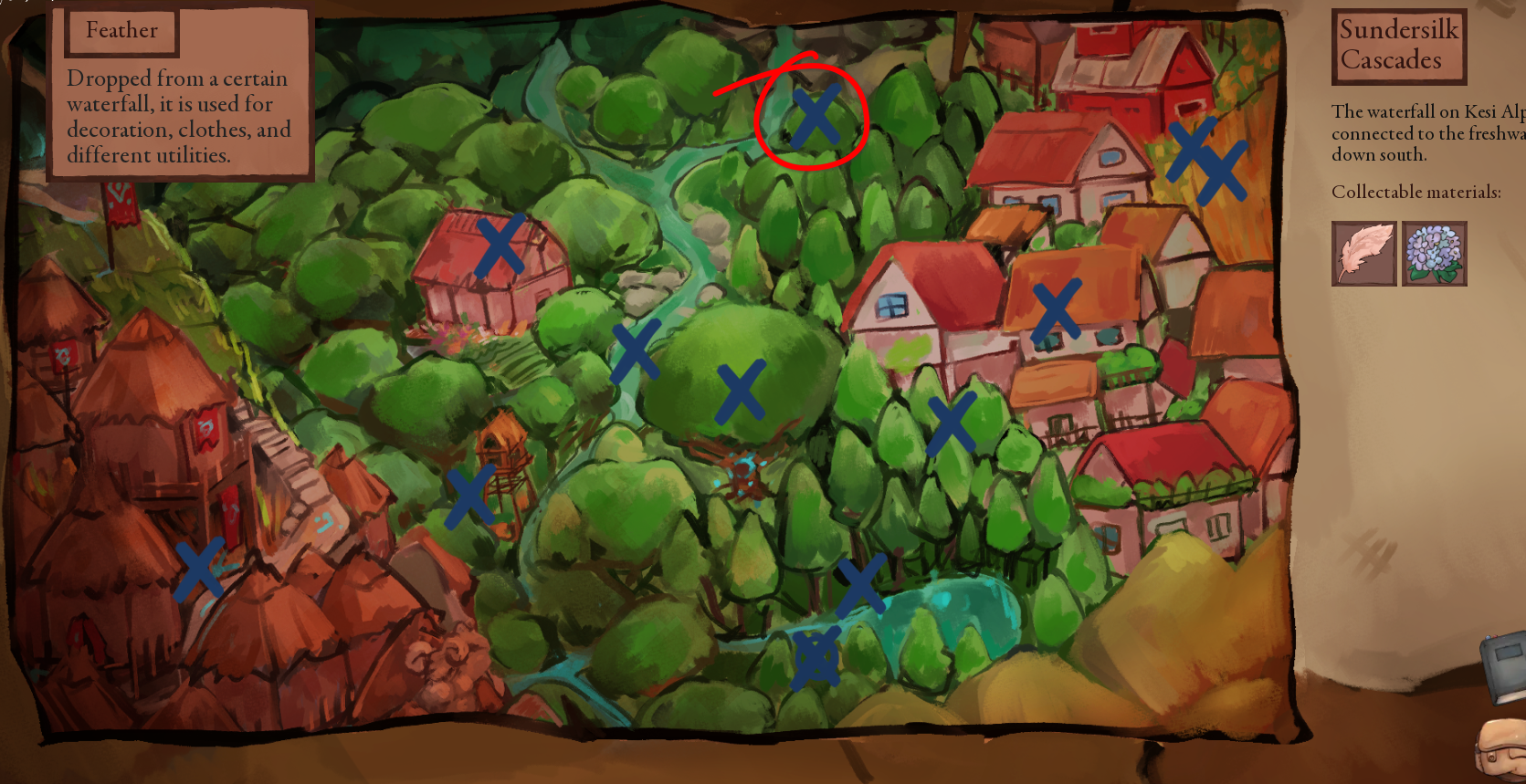
Horehound is a type of plant. Just go to the Goat tribe, then click the rightmost arrow so you can see the cheif's building (Don't go inside). You should be able to click the magnifying glass icon on the right hand side to explore, and have a random chance of obtaining horehound.
Go to Mossy Freshwater and explore for a while. It's a random chance, but you should find it eventually. Mossy Freshwater is just down the river from Sundersilk. You will also find the Woodland Outpost from there as well as the recipe for Soft Fabric, if you have yet to find either.
Shouldn't have anything to do with meeting Wuldon. The quest can be pretty buggy if you don't solve it your first time through. If you remove all of the weeds, leave and reenter, then remove all the weeds again, you will have just made it impossible to inform Uffe of your success. Same thing if you try for a second amulet.
To be able to complete the quest, the game only makes two checks - one that you have the Moonstone amulet in your inventory and a second check on your quest status. Wuldon has nothing to do with either, so it's unlikely he was the culprit. The quest status, though, is likely the issue. Remember how above I mentioned that doing certain tasks twice can make the quest impossible? Both of those alter your quest status by incrementing its value. However, this isn't reset when you exit the cave and you can repeat the action as many times as you want, further incrementing your quest status. Uffe only checks for a specific value, not a value greater than a specific threshold, making it easy to accidentally break.
There are two updates released at the same time each month. This last one was both v0.0.17 and v0.0.16, one was given to Patreons and one was released to the public.
V0.0.17 is the werewolf orgy. That one is not yet released to the public. This can be confusing as the update information contains the Patreon version info, not the public info. So if you scroll up from this comment you will see the update info for the Patreon version, not the public version. If you do in fact have the Patreon version, I'm afraid I can't help you as I don't have that version.