You’re mistaken if you believe that your website or online business can succeed without proper website traffic assessments and brand competition analysis. But how can you do that?
Enter website traffic analysis tools.
Millions of internet users, from small businesses to major corporations, employ web traffic estimators to segment traffic and use that data effectively to enhance the performance of their websites and marketing visions.
Finding the best tool for your needs can be tricky because there are so many options available. In this article, we’ve taken it upon ourselves to list the top 16 tools for accurately assessing website traffic.
What Is Website Traffic Analysis?
Website traffic analysis involves collecting and analyzing data about visitors to your site and their actions once they reach it. This information is vital for marketers to implement effective tactics that optimize website traffic and improve improve conversion rates.
The amount of traffic is no longer the only metric used to verify a business’s success. That’s why we have comprehensive website traffic analysis tools to help us make accurate assessments.
How Do Website Traffic Analysis Tools Work?
Tools for website traffic analysis look at important statistics that show the areas where your site is productive and where you need to make improvements.
These checkers scrutinize user behavior on your web pages and show calculated details about important key performance indicators (KPIs).
These KPIs include:
- Traffic volume: The number of new and returning visitors to your website along with their demographic info.
- Traffic sources: How users reached your site (e.g. organic search, sponsored ads, email, social media posts).
- Page views: The number of times people visit specific pages on the site.
- Session duration: The total amount of time a visitor spends on your website.
- Bounce rate: The proportion of visitors who landed at any of your webpages and then left without further interacting with the site.
- Conversion rate: The percentage of visitors that interact with a call to action on the website (such as submitting a form or purchasing a product). This interaction is known as a conversion.
- Unique visits: Counts only a person’s first visit, allowing you to separate potential clients from loyal users.
- Exit pages: Identifies the pages from which each visitor leaves your website.
What Do Website Traffic Analysis Tools Measure?
Website traffic analysis tools measure the performance of your website using the aforementioned metrics. The data they gather allows you to compare your performance to your competitors’ and make sure you’re on the right track.
The key measurements, however, are centered around unique visitors (UVs), page views, and traffic curves.
Monitoring unique visitors will help you identify the number of individuals who viewed one of your website’s pages at least once a month.
With traffic views, the duration of every session genuinely matters depending on the type of website you’re running. For example, it would be a critical indicator for content-generating websites.
As for traffic curves, they help determine peak audience activity times. Consequently, you’d be able to learn at what times you can expect traffic surges so you improve your strategies.
Benefits of Website Traffic Analysis
Website traffic analysis tools play a critical role in helping you personalize your B2B strategy to match your clients’ needs and learn more about your industry rivals.
Here are the top three advantages of employing these tools.
In-Depth Insight Into Website Traffic
Website traffic analysis reveals the different sources of online traffic, allowing you to determine which marketing model produces positive business outcomes. You’ll also be able to track the progress of both organic and sponsored traffic in real time.
Improving User Experience
Your target audience is your source of profit. It’s essential to develop a deep understanding of your intended clientele in order to market your products or services successfully.
Website traffic analysis tools help you identify the types of users that visit your website, their interests, and every action they take on your web pages. As a result, you’ll discover how to improve user experience (UX) and get a clearer picture of how well your website is performing.
Consider this: Do you actually reach your target audience? Which pages do they stay on the most? Do you have any undetected technical problems that drive users away? Do you meet your ROI objectives? How well are you achieving your conversion goals?
Traffic analysis tools can also help you discover whether you’re using a trusted web host that won’t negatively impact the availability or load times of your pages, which can destroy your brand identity.
Boost SEO Rankings
Many website traffic analysis solutions include search engine optimization (SEO) tools for enhancing your site’s ranking on search engines, especially Google. These features let you see how keywords are affecting your SEO and even how much traffic you’re receiving from social media platforms.
With the aid of these checkers, you can make precise modifications to improve your SEO status and get recognized on Google’s first pages.
Top 16 Tools for Effective Website Traffic Analysis
There are tons of powerful services on the Internet that you can utilize for measuring, tracking, and managing your site. We’ve compiled a list of the top 16 website traffic analysis tools to save you time and energy.
1. MyKinsta (MyKinsta Analytics)
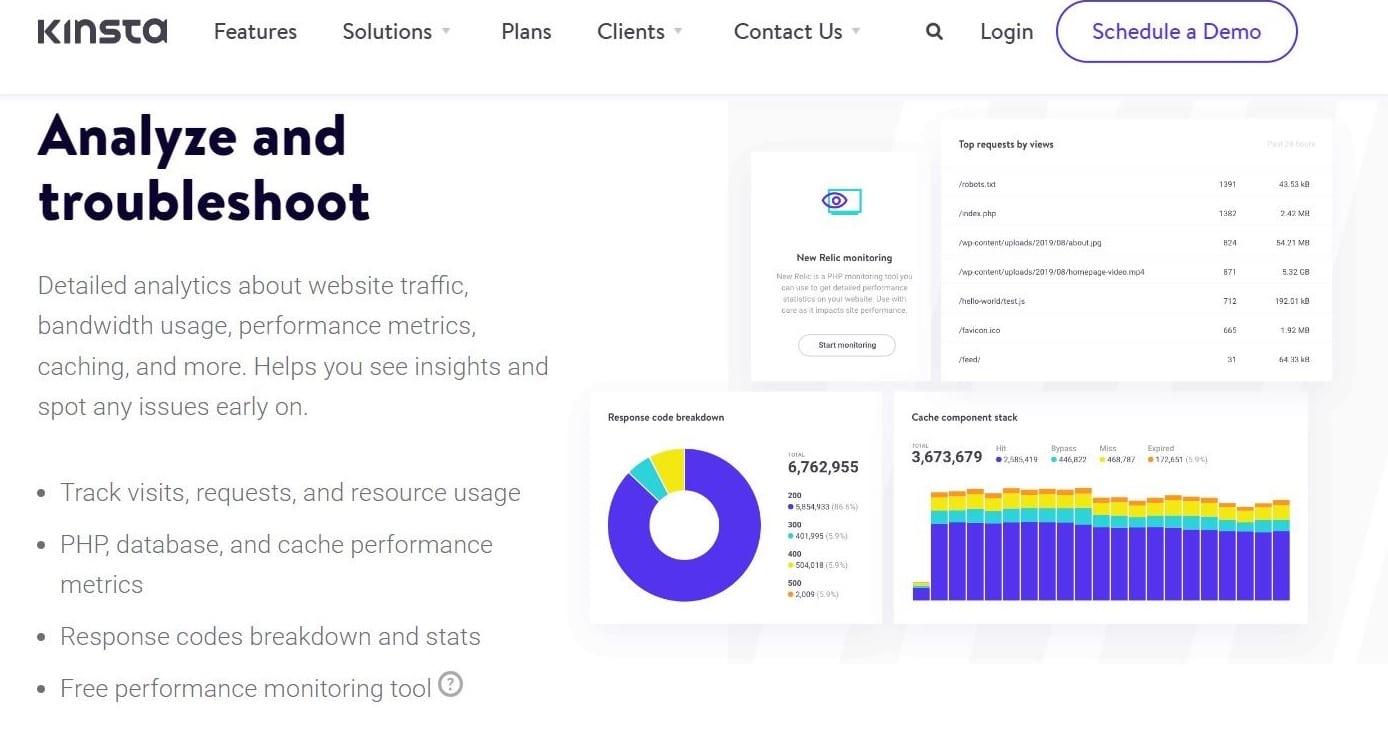
Developed in-house by Kinsta, the MyKinsta dashboard is one of the easiest full-fledged tools in the market for site management.
You can do pretty much everything through MyKinsta — from basic database search to employing server-level 301 redirects, issuing free SSL certificates, blocking IP addresses, harnessing premium DNS management, and so much more.
For the benefit of this article, we’ll clap eyes on MyKinsta Analytics, a tool within the MyKinsta dashboard.
With this tool, you have access to a wealth of performance-related analytics. For starters, you can view statistics for each site separately or collectively, with lookback windows of 24 hours, one week, and one month.
MyKinsta Analytics also provides you with extensive reports on resource usage for visitors, bandwidth, and top requests by visits or bytes. Performance monitoring reports cover different aspects, including MySQL and PHP response times as well as AJAX usage.
What’s more, the “Dispersion” section permits you to compare the percentage of traffic that comes from desktop and mobile devices for your website.
Plus, you receive a detailed analysis of the response codes on your website. These HTTP status codes range from 200 to 500. In addition, you can view the total number of redirects, success rates, errors, and error ratios. The tool’s “Top 404” error list comes in particularly useful here.
To top it off, all sites hosted with Kinsta are complemented with the Kinsta APM tool for free. The Kinsta APM tool is a robust utility that’s used to troubleshoot your website and boost its page loading speed. PHP processes, external HTTP calls, MySQL database queries, and other activities on your site can all be time-stamped in the APM tool.
Pricing:
For startups and businesses, Kinsta offers a variety of pricing options. The smallest bundle has a monthly cost of $35, and the most expensive is $1,650.
All Kinsta subscriptions are backed by a 30-day money-back guarantee.
Features:
- Free APM tool
- Resource usage tracking
- Traffic analysis
- Site and time period filters
- Cache analytics
- In-depth reports for desktop vs mobile visitors, countries, and requests
- 24/7 support
- Free WordPress migrations
2. Semrush

Launched in 2008, Semrush offers a whole range of marketing and accurate website traffic analysis tools for online businesses.
Semrush helps you measure your own online traffic and domain’s performance by giving you complete reports of visits, session duration, and page views. Plus, you can analyze the ratio of mobile to desktop traffic and user interaction.
Semrush lets you check the performance of your competitors’ websites as well. Through crucial metrics like the growth of monthly traffic volume, traffic segmentation by country, and leading keywords, you’ll have a thorough understanding of how other companies in your industry are performing.
As a result, you’ll gain insights about different successful marketing strategies and the latest trends. Simply type a URL, domain, or keyword into the search field to get a multitude of viewpoints.
Semrush allows you to explore lists of indexed pages and backlinks, too, and the Bulk Traffic Analysis feature to check the traffic volumes for several businesses at once. It additionally provides detailed solutions to optimize your website’s content and SEO for local and global searches.
Pricing:
You can choose between monthly and yearly payments for Semrush’s three price levels. Pro, Guru, and Business plans are $119.95, $229.95, and $449.95 respectively. Pro and Guru packages are available to try for free for the first 7 days of purchase.
Semrush also offers a free-forever account with capped features, which is a good option for beginners and startups.
Features:
- Domain, backlinks, and keyword analytics
- Up to 5,000 keywords to track
- Mobile rankings
- Up to 1 million pages to crawl per month
- Link building, content marketing, and social media management
- API access
- Google Looker Studio integration
3. Surfer