
Beskrivelse
Behandle og organiser kolonner på innleggs-, bruker-, kommentar. og media-oversiktene i WordPress admin-panelet. Omgjør WordPress admin-sidene til nydelige, klare oversikter.
Admin Columns Pro
The Pro version of Admin Columns will allow columns to be sorted, filtered, directly edited and its content to be exported to CSV. Admin Columns Pro offers integration with many third party plugins:
- Advanced Custom Fields: add columns for all your custom fields
- WooCommerce: display detailed product and order information
- Toolset Types, Yoast SEO, and many more
Find out about additional features of Admin Columns Pro on our website.
Enhanced list tables
By default, WordPress provides list tables, giving you an overview of your content in the admin panel. These list tables are quite limited, however. For posts and custom post types, for example, not much more than the date and title of the post is displayed. Admin Columns allows you to take control over these list tables, managing the columns dislpayed in these overviews. Supporting custom fields, featured images, custom taxonomies, EXIF data for media and much, much more (Admin Columns features over 200 columns), you can create overviews that are perfectly suited for your content.
Features
Admin Columns greatly enhances your WordPress installation. Whether you’re running a simple blog or a full-blown enterprise website, it will prove its worth within minutes. Thanks to our dedicated development and support team, you can rest assured that Admin Columns will persist to be an essential part of any WordPress installation.
To give you some insight into the great amount of possibilities Admin Columns offers to enhance your (or your client’s) WordPress admin panel, be sure to check out the screenshots or the demo video!
Sortable, filterable and editable columns & import/export
All of the new columns support sorting on all screens, and many of them support filtering. Another great feature is direct editing: it allows you to directly edit all types of data (including titles, featured images, custom fields and taxonomies) directly from the posts overview. These features are only available with Admin Columns Pro! Admin Columns Pro also allows you to import and export your column setup, and it allows you to save your columns to PHP, so you (and your clients) don’t have to worry about the admin interface!
Third party plugin integration
Admin Columns works perfectly with just about all external plugins with custom columns. Examples include Yoast SEO (SEO columns), WooCommerce, Advanced Custom Fields, Types and Pods. Not only can you reorganize the custom columns added by these plugins, you can also add custom columns provided by Admin Columns in the overview!
The Developer license of Admin Columns Pro includes Advanced Custom Fields and WooCommerce add-ons for easy integration and inline editing of data from these plugins.
Custom field column
Admin Columns allows you to display custom fields for posts (post meta) and users (user meta) for all custom fields you have. With many different custom field types supported, such as files, images, numbers and even post and user relations, you can create a beautiful overview of your custom content!
To ensure proper formatting of your custom fields, Admin Columns provides a set of custom field types, which automatically format your meta data properly.
- Color
- Date
- Bilder
- Number
- Text
- URL
- True/False
- [Pro] Relational: Posts, Users and Media
Supported content types
Admin Columns can change your post (posts, pages and custom post types), user, comment, media and taxonomy (Admin Columns Pro only) lists! Below, you can find a list of supported column types for each content type.
Post types columns
- Actions
- [PRO] Advanced Custom Field column
- Attachment
- Attachment count
- Forfatter
- Author Name
- Before More Tag
- Kategorier
- Comment Count
- Comment Status
- Comments
- Innhold
- Custom Field
- Date Published
- Page Depth
- Estimated Reading Time
- Excerpt
- Aktuelt bilde
- Formater
- ID
- Modified
- Sorter
- Page Template
- Parent
- Bane
- Permalink
- Ping Status
- Post Format
- Roles
- Kortkoder
- Slug
- Status
- Klebrig
- Taxonomy
- Word Count
User columns
- Actions
- Comment Count
- Custom Field
- Beskrivelse
- First Name
- ID
- Last Name
- Navn
- Nickname
- Post Count
- Registered Date
- Role
- URL
- Brukernavn
Media columns
- Actions
- Alternate Text
- Attached To
- Available Sizes
- Caption
- Custom Field
- Beskrivelse
- Dimensions
- EXIF Data
- File
- File Name
- File Size
- Full Path
- Høyde
- ID
- Mime Type
- Taxonomy
- Width
Comment columns
- Actions
- Agent
- Godkjent
- Forfatter
- Profilbilde
- Custom Field
- IP
- Navn
- URL
- Date
- Date GMT
- Excerpt
- ID
- Innlegg
- Svar Til
- Type
- Brukerkonto
- Word Count
Docs & Support
Is this the first time you’re using Admin Columns? Check out our Getting Started guide.
We offer an extensive and up-to-date documentation, FAQ, how-tos and an advanced Developer Documentation. For one-on-one support, please check out the Admin Columns Forums.
Translations
Thanks to the great community of translators surrounding Admin Columns, the plugin is available in many languages! To find your translation or to contribute to Admin Columns by translating it into your own language, please visit our Transifex page.
Feedback & Feature Requests
You can leave any requests or feedback on admincolumns.com.
Related Links
Skjermbilder
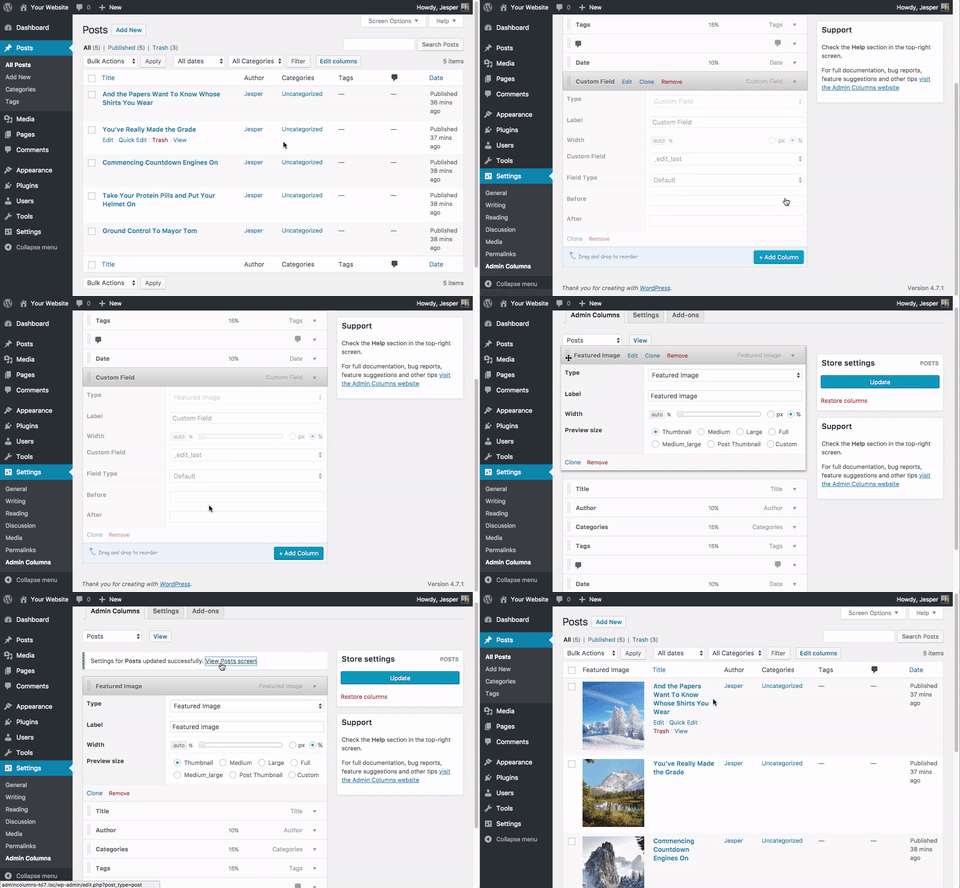
Settings page for Innlegg(type) columns. 
Posts Screen with the customized sortable columns. 
Settings page for the Media Library columns. 
Media Screen with the customized sortable columns. 
Settings page for Users columns../ch 
Users Screen with the customized sortable columns. 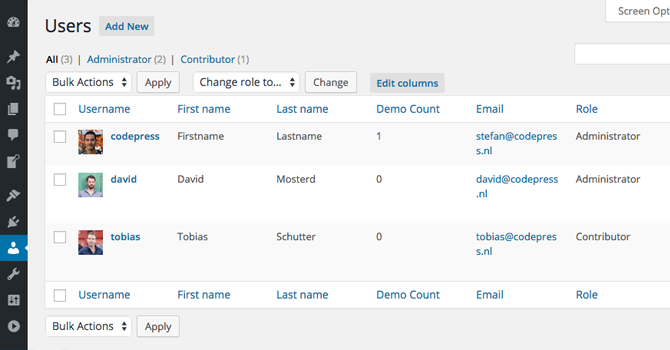
Settings page showing the different displaying types for custom field. 
Posts Screen with custom fields. 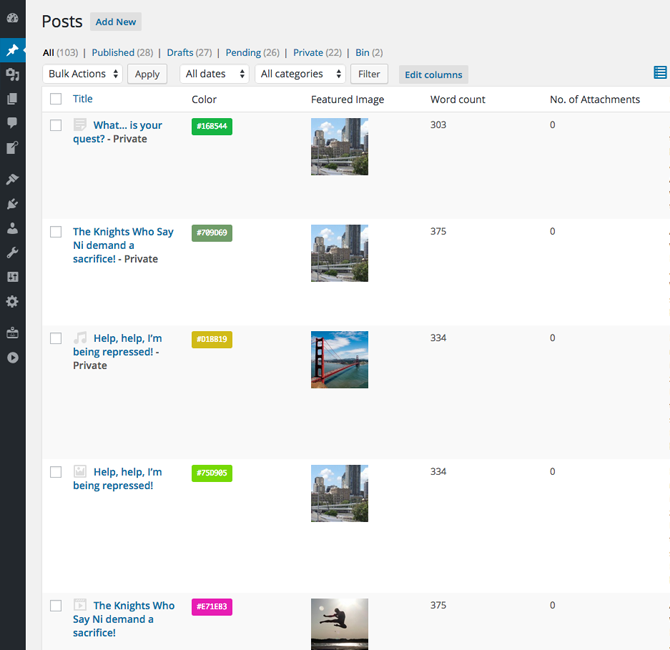


Installasjon
- Upload codepress-admin-columns to the /wp-content/plugins/ directory
- Activate Admin Columns through the ‘Plugins’ menu in WordPress
- Configure the plugin by going to the Admin Columns settings that appears under the Settings menu.
Ofte stilte spørsmål
-
Is there documentation for Admin Columns?
-
Yes, you will find all the documentation you need on the admincolumns.com documentation page.
-
I have an idea for a great way to improve this plugin
-
Great, we’d love to hear from you! Please leave your feature request in our forums!
-
How can I change the thumbnail size of images?
-
You can select a custom size for your custom field option from the Column options.
-
What filters and hooks can I use?
-
You can find a list of the available actions and filters (and examples on how to use them!) in the Admin Columns documentation.
Vurderinger


Bidragsytere og utviklere
«Admin Columns» er programvare med åpen kildekode. Følgende personer har bidratt til denne utvidelsen:
Bidragsytere


“Admin Columns” har blitt oversatt til 15 språk. Takk til oversetterne for deres bidrag.
Oversett “Admin Columns” til ditt språk.
Interessert i utvikling?
Bla gjennom koden, sjekk ut SVN-repositoriet, eller abonner på utviklingsloggen med RSS.
Endringslogg
4.7.20
Release Date: December 5th, 2025
- [Fixed] Upgrade notice Fatal fix
4.7.19
Release Date: December 2nd, 2025
- [Added] Black friday promo
4.7.18
Release Date: September 22nd, 2025
- [Improved] Prepared backward compatibility for upcoming 7.0 release
4.7.17
Release Date: August 27th, 2025
- [Fixed] Security fixes (Axios update)
4.7.16
Release Date: June 17th, 2025
- [Fixed] Cache optimization
4.7.15
Release Date: June 16th, 2025
- [Fixed] Better null check for options to prevent PHP 8.3 issues
- [Improved] Small UI changes in the admin view
4.7.14
Release Date: April 30th, 2025
- [Improved] Column values with modals can now contain extra links
4.7.13
Release Date: March 19th, 2025
- [Improved] Compacter display of the Value modal of the Images column
4.7.12
Release Date: March 12th, 2025
- [Fixed] Corruption issues affecting certain languages in the core.
4.7.11
Release Date: March 3rd, 2025
- [Updated] Axios library updates because of know security issues with older version
4.7.10
Release Date: January 7th, 2025
- [Fixed] Prevent conflicting classnames for generated column names
4.7.9
Release Date: November 5th, 2024
- [Improved] Better edit term link with taxonomy as parameter
4.7.8
Release Date: October 1st, 2024
- [Improved] WordPress tested up to 6.6.2
4.7.7
Release Date: June 10th, 2024
- [Fixed] Gravity Forms column no longer relies on namespace check
4.7.6
Release Date: June 4th, 2024
- [Fixed] Custom Field column with Post as Display value could give an error
4.7.5
Release Date: April 14th, 2024
- [Fixed] SVG Support in image columns
4.7.4
Release Date: March 4th, 2024
- [Fixed] The Custom Field column setting gave an error when using the text field hook
4.7.3
Release Date: February 6th, 2024
- [Improved] Better loading of available integrations
4.7.2
Release Date: January 16th, 2024
- [Fixed] Fatal error when Restoring the settings in the Settings tab
4.7.1
Release Date: January 9th, 2024
- [Fixed] When the edit columns button was disabled, a styled container was displayed
4.7
Release Date: December 6th, 2023
- [Improved] It is now possible to choose how dates are stored in the Custom Field column
- [Improved] Webp images are not recognized for the custom field column
- [Fixed] Fixed an issue where non-existing terms could cause an error on the column settings page
4.6.9
Release Date: October 2nd, 2023
- [Fixed] Render values for Taxonomies fixed
- [Fixed] URLs for Terms in Taxonomy columns were incorrect
4.6.8
Release Date: September 19th, 2023
- [Improved] Taxonomy Helper fixes and improvements
4.6.7
Release Date: August 25th, 2023
- [Fixed] Error when adding the ‘Last Modified Author’ column
4.6.6
Release Date: August 21st, 2023
- [Improved] Give better feedback when the settings could not be saved because of missing database tables
- [Fixed] Error on the WPML string translation page
- [Fixed] Some custom columns could give a fatal error on the settings page
4.6.5
Release Date: August 15th, 2023
- [Added] New hook to disable Admin Columns for certain list tables
ac/list_screen/is_active - [Added] New hook to disable Admin Columns for certain list tables based on keys
ac/list_screen/key/is_active - [Improved] The Preview Column now also show a preview for video and audio files
- [Fixed] The hook
ac/post_typesworks again to disable Admin Columns for specific post types
4.6.4
Release Date: May 25th, 2023
- [MLA] Media Library Assistant columns were not loaded correctly
4.6.3
Release Date: April 26th, 2023
- [Fixed] Fixed the array helper that could throw an error when an array contained an object
- [Fixed] Re-added deprecated register_group function to prevent fatal errors for third-party plugins
4.6.2
Release Date: April 25th, 2023
- [Improved] Minor changes
4.6.1
Release Date: February 22nd, 2023
- [Added] Integration for Media Library Assistant
4.6
Release Date: November 30th, 2022
- [Improved] Styling for dynamic select boxes is improved
- [Improved] The date column setting has some minor UI improvements
4.5.5
Release Date: October 17th, 2022
- [Fixed] DOMDocument will use
libxml_clear_errorsto clear any possible errors - [Fixed] The
word_countmethod will always return anint - [Fixed] The column separator will always go through the filter:
ac/column/separator - [Fixed] The link to the user profile will only be visible for users than can access that particular profile page
- [Improved] Added the atrribute tag
ReturnTypeWillChangeto be compliant with PHP 8.x
4.5.4
Release Date: September 13th, 2022
- [Fixed] JS null checks that could lead to JS errors
- [Fixed] More PHP 8.1 compatibility fixes
4.5.3
Release Date: July 4th, 2022
- [Fixed] Suppress PHP 8.1 warnings
4.5.2
Release Date: June 14th, 2022
- [Added] It is now possible to select the Website display for User related columns
- [Added] New hook to disable the column value sanitation on the table
ac/column/value/sanitize
4.5.1
Release Date: May 16th, 2022
- [Added] New Audio player column for Media list table
- [Fixed] Prevent fatal error, when removing a non-existent column set from a Local Storage repository
4.5
Release Date: March 22nd, 2022
- [Added] New Image column for the Media list table
- [Added] The Slug column is now also available for the Media list table
- [Improved] More thorough logic for the ‘Restore Settings’ option.
- [Improved] Refactor of the Setup Script that runs when the plugin is installed and activated for the first time
- [Improved] The Permalink column now also shows the (upcoming) permalinks for future and draft posts
4.4.6
Release Date: February 8th, 2022
- [Fixed] Tooltip arrows were always visible in the dom behind the admin toolbar
- [Removed] Support for the Ninja Forms integration is removed because of incompatibility with the new submission list table
4.4.5
Release Date: December 6th, 2021
- [Hotfix] The ReadOnly class is renamed because it gave a fatal error in PHP 8.1
4.4.4
Release Date: November 8th, 2021
- [Improved] UI Improvements
4.4.3
Release Date: October 26th, 2021
- [Improved] The Menu Order column has no restriction anymore
4.4.2
Release Date: October 12th, 2021
- [Fixed] The setting to hide the ‘Edit Columns’ button did not always store the settings
- [Improved] Do not force showing notices with the hidden classes
- [Added] JetEngine integration banner added
4.4.1
Release Date: September 28th, 2021
- [Improved] Small optimizations for the Add-on page
- [Improved] Give an idea of the available pro settings
4.4
Release Date: September 21st, 2021
- [Added] Complete restyling of the Admin interface
- [Fixed] Load a default column set when the preferred column set was restricted in the meantime
- [Fixed] Gravatar display option did not work anymore since the value sanitation
- [Fixed] Possible namespace clash in Admin class
4.3.2
Release Date: June 18th, 2021
- [Added] Added Media columns: Artist and Album
- [Fixed] Column date setting gave an error when the default date format was empty
4.3.1
Release Date: June 11th, 2021
- [Added] Gravity Forms integration banner added
- [Fixed] Changing the screen options on the column settings page is not persisted
- [Fixed] Fixed data formatted labels with sanitation
- [Fixed] The column value is now sanitized
4.3
Release Date: April 29th, 2021
- [Fixed] Graceful handle corrupt column settings in order to prevent a fatal error
- [Fixed] The date setting was not working correctly a second time you store a custom date format
- [Fixed] Graceful handle corrupt column settings in order to prevent a fatal error
- [Fixed] The column label in settings will now be sanitized
4.2.7
Release Date: February 8th, 2021
- [Fixed] Some settings were not saved correctly on the admin settings page
4.2.6
Release Date: February 3rd, 2021
- [Added] User Column: First and Last Post(type)
- [Improved] It’s now possible to select a post status for the Post Count column (User)
4.2.5
Release Date: December 15th, 2020
- [Fixed] The updater could give a PHP warning when there were no updates
- [Fixed] Display a correct message when an integration is not installed
4.2.4
Release Date: December 9th, 2020
- [Fixed] WordPress 5.6 compatibility issues
4.2.3
Release Date: October 6th, 2020
- [Added] Title only column added to Media list table
- [Improved] Dashicons updates for icon picker in column settings
- [Improved] New icons for action column added
4.2.2
Release Date: September 9th, 2020
- [Fixed] Slug column now applies
urldecode() - [Fixed] Links to documentation pages are updated
4.2.1
Release Date: August 21st, 2020
- [Fixed] JS error on table pages
4.2
Release Date: August 18th, 2020
- [Added] New api function
ac_get_columnsto retrieve the available columns for Listscreen ID - [Added] New api function
ac_get_columnto retrieve a single column from a Listscreen based on its ID - [Added] Screen Option to show the Listscreen ID and Listscreen Name on the Column settings page
- [Fixed] Fixed User helper that gave some PHP warnings when using in the Author column
4.1.9
Release Date: July 28th, 2020
- [Updated] Column label translation support for WPML was updated for the latest version of WPML
4.1.8
Release Date: July 21st, 2020
- [Added] New columns for the Users table: Fullname, Author Slug and Username / Login.
- [Fixed] CSS conflict on overview pages where post type is ‘Modal’
4.1.7
Release Date: June 9th, 2020
- [Improved] Better Table overview recognition to prevent wrong loaded list screens
- [Improved] The comments column on the users page will now link to the (filtered) comments table
- [Improved] The post count column on the users page now has the option to select all post types
- [Fixed] Renamed the user display option ‘First and Last Name’ to ‘Full name’
- [Fixed] The comment count column for the users page will now only count ‘approved’ and ‘pending’ comments when selecting ‘All comments’
4.1.6
Release Date: April 22nd, 2020
- [Improved] You can now display the column ID and Type by opening the screen options in top right
- [Improved] The meta column will now display a zero (when available) instead of a dash
- [Improved] Improved right-to-left (RTL) support
- [Improved] First time loading columns is faster
4.1.5
Release Date: April 17th, 2020
- [Fixed] Model auto close issue
4.1.4
Release Date: April 15th, 2020
- [Added] Javascript Improvements
4.1.3
Release Date: April 10th, 2020
- [Added] New media column: Download. For easy downloading of files.