Rain Jur: I'd gladly supply you the unitypackage for redistribution. This'll be my last attempt to get a reaction here.
My final comment on this: In its current state (1.3.3), this requires expert knowledge in vcc unity to fix up.
From my last post, I've updated to a free script, that references objects and automatically will display whatever replacement penetrator is chosen. I also replaced the placeholder to be a generic cylinder. Keeps the prefab slim and avoids any rights violations. (FYI: My own package does not contain the Portal-Clothing items).
My own version now only requires to drop the desired mesh into the "Penis" folder (remove rotations on mesh&armature, then rotate the parent), adjust the Locations (mesh, In/Out), move the parent constraint targets to the desired locations and replace an animation for open mouth.
So far it seems to me, that this project was abandoned. I see no way how I could distribute my own update to anyone who bought this, without the creator getting into contact.
I've now completed fixing this up and making a more user-friendly prefab and exported it to be a .unitypackage. Please be aware that the only person I can supply this to is the creator(Rain Jur). I will not distribute this to anyone else myself!
That being said, if you (Rain Jur) want this package, let us find a way to connect and I'll send you the file.
Changes:
Edited a bunch of animations to remove missing components
Updated Parent Constraints to VRC Parent Constraints
Automated "Parent Constraint" Objects Armature placement with Armature link (VRCF)
Fixed Animation Paths (VRCF)
Moved from Bools/Position to 1 Int for all positions per Portal
WD On for all States
Updated State Logics to simplify the Layers
Renamed layers to "Lovegate: STATENAME" and minorly adjusted naming to try and make their purpose more clear
Added new layer to simplifying adding Avatars mouth open animation
Added References + Example Penetrator (Lollipop from Wholesome)
References Delete on Upload / During Play Mode
Streamlined Scaling (Portal and Penetrator Parents now all on scaling 1. Scale Constraints for the References point to "Handle Portal" and "Penis" Objects
Cleaned up unused files
Renamed "Drag and Drop onto Avi Base" to "Lovegate"
Moved "Full Controller" and "Toggle" from "Exit World Constraints [Avatar Root"] to "Lovegate" (root object of prefab).
Updated Parameters and Menus
I am unsure if at this point I am missing one of my changes, but that's the important ones that come to mind.
I recently tested this and got everything working except that the penetrator on the exit portal is fully visible at all times. I assume the "Invisible Barrier" is supposed to hide it, but it doesn't. I suspect I gotta look into rendering order since I believe that's how it's supposed to be hidden. Additionally I dont know why there's two Parent Constraints for each hand. I ended up putting them in the same location.
I've added self-deleting references to aid portal placement, fixed the sps depth detection (it was set to meters and should be plugs instead, with -0.95 to 0) and auto-parented the constraints. It also seems that specific positions (head ones) don't automatically impose specific setups on the handle (if this is broken animations or an oversight, I've yet to verify) - but I'll look into this shortly and give it a fix. I'd also be happy to help you add a better guide afterwards.
Once I fixed/optimized this, would you (Rain Jur) be interested in the package (free for you to use and redistribute of course)?
TL;DR: This works, but at the current stage requires expert knowledge in vcc unity.
For those in trouble with the current version: Copy the folder to your project. Open the scene, copy the objects to your own scene and place them in your avatar. Add a Penetrator in the correct parent (location is mentioned in the readme). For this, I suggest to start with a mesh with no physbones to get your bearings. Set the Parent Constraint on the penetrators parent folder to Out and adjust your penetrators location so that it sits correctly on the portal. Set it back to In to restore its default state. (You probably need to set up the meshs rendering correctly to be hidden. If you read above, you know that I currently have not fixed this myself.) Add vrcf "Armature Link" to each parent constraint and assign them correspondingly (Hips/Head/Left Hand/Right Hand). (If you need visual aid: copy the Ex object and parent it into a newly created reference folder. Change its materials to something translucent. Add a scale constraint and target the Parent of Ex, "Containers". Dont forget activating the scale constraints. Add a vrcf "Delete During Upload" to it as well so your reference will get deleted on upload and during play mode. Scale Ex's "Containers" Parent folder. You can reapeat this for the En one to create a reference for your Portal Base one.) Scale "Containers" to fit your avatar (if you created reference correctly, they scale with this). Move the Parent Constraints to the correct locations. For the hands (if symmetrical) you can copy your Transforms Position after adjusting it for one hand and flip x (+ / - ) to easily place the other hand. Go to the En-Portal folder and select "Oriface_Hole". Set the SPS Sockets Range Units to Plugs and have the range be -0.95 to 0.
This should set up most of it. Some things aren't working correctly on my end yet, but it'd become a bit elaborate if I started explaing now how you fix the FX layers and Parameters.
im am unclear how this is set up and why the portal just stays on i followed what instructions given but nothing works. could there be a better walkthrough on this plze.
Can you do us and everyone that buys your product a favor and plz make a video on how to properly install this thing? cause your saying just drag and drop to their respective things. its not that simple.
Hi, just bought this and tried to set it up, however it is VERY confusing and doesn't seem to work as intended, will this be getting updates/a detailed tutorial in the near future?
There is a tutorial, but it's outdated. All you need to do is drag and drop the (drag and drop onto avatar base) onto the avi base. Literally the whole thing, but you do need to individually drag and drop the parent constraints onto the avi in the correct spots. VRCFury will do the rest (you have to check the positions to see if they're right) and then delete the throb anim from the menu. put the dick in the output in the "penis" object, and set the in/out positions using the constraints. then that's it
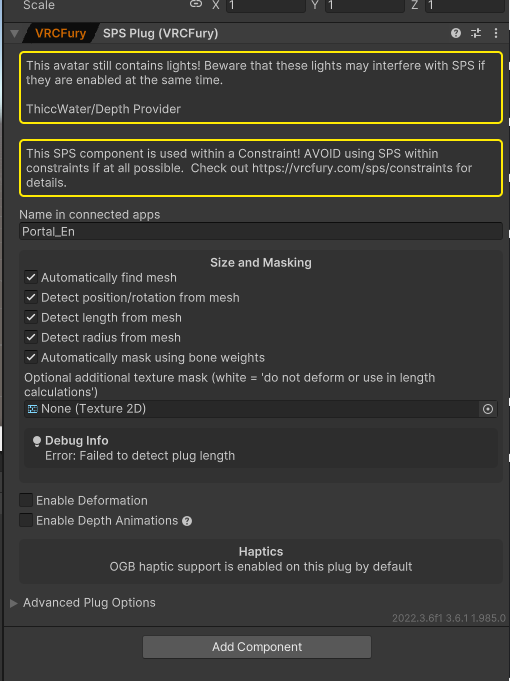
where is the screen shot for the unity set up and the world constrains are not working and there is an issue with the cube sps as well not detecting the length as well

← Return to Lovegate
Comments
Log in with itch.io to leave a comment.
Rain Jur: I'd gladly supply you the unitypackage for redistribution. This'll be my last attempt to get a reaction here.
My final comment on this: In its current state (1.3.3), this requires expert knowledge in vcc unity to fix up.
From my last post, I've updated to a free script, that references objects and automatically will display whatever replacement penetrator is chosen. I also replaced the placeholder to be a generic cylinder. Keeps the prefab slim and avoids any rights violations. (FYI: My own package does not contain the Portal-Clothing items).
My own version now only requires to drop the desired mesh into the "Penis" folder (remove rotations on mesh&armature, then rotate the parent), adjust the Locations (mesh, In/Out), move the parent constraint targets to the desired locations and replace an animation for open mouth.
So far it seems to me, that this project was abandoned. I see no way how I could distribute my own update to anyone who bought this, without the creator getting into contact.
Followup on this:
I've now completed fixing this up and making a more user-friendly prefab and exported it to be a .unitypackage. Please be aware that the only person I can supply this to is the creator(Rain Jur). I will not distribute this to anyone else myself!
That being said, if you (Rain Jur) want this package, let us find a way to connect and I'll send you the file.
Changes:
I am unsure if at this point I am missing one of my changes, but that's the important ones that come to mind.
I recently tested this and got everything working except that the penetrator on the exit portal is fully visible at all times. I assume the "Invisible Barrier" is supposed to hide it, but it doesn't. I suspect I gotta look into rendering order since I believe that's how it's supposed to be hidden. Additionally I dont know why there's two Parent Constraints for each hand. I ended up putting them in the same location.
I've added self-deleting references to aid portal placement, fixed the sps depth detection (it was set to meters and should be plugs instead, with -0.95 to 0) and auto-parented the constraints. It also seems that specific positions (head ones) don't automatically impose specific setups on the handle (if this is broken animations or an oversight, I've yet to verify) - but I'll look into this shortly and give it a fix. I'd also be happy to help you add a better guide afterwards.
Once I fixed/optimized this, would you (Rain Jur) be interested in the package (free for you to use and redistribute of course)?
TL;DR: This works, but at the current stage requires expert knowledge in vcc unity.
For those in trouble with the current version:
Copy the folder to your project. Open the scene, copy the objects to your own scene and place them in your avatar. Add a Penetrator in the correct parent (location is mentioned in the readme). For this, I suggest to start with a mesh with no physbones to get your bearings. Set the Parent Constraint on the penetrators parent folder to Out and adjust your penetrators location so that it sits correctly on the portal. Set it back to In to restore its default state. (You probably need to set up the meshs rendering correctly to be hidden. If you read above, you know that I currently have not fixed this myself.)
Add vrcf "Armature Link" to each parent constraint and assign them correspondingly (Hips/Head/Left Hand/Right Hand).
(If you need visual aid: copy the Ex object and parent it into a newly created reference folder. Change its materials to something translucent. Add a scale constraint and target the Parent of Ex, "Containers". Dont forget activating the scale constraints. Add a vrcf "Delete During Upload" to it as well so your reference will get deleted on upload and during play mode. Scale Ex's "Containers" Parent folder. You can reapeat this for the En one to create a reference for your Portal Base one.)
Scale "Containers" to fit your avatar (if you created reference correctly, they scale with this). Move the Parent Constraints to the correct locations. For the hands (if symmetrical) you can copy your Transforms Position after adjusting it for one hand and flip x (+ / - ) to easily place the other hand. Go to the En-Portal folder and select "Oriface_Hole". Set the SPS Sockets Range Units to Plugs and have the range be -0.95 to 0.
This should set up most of it. Some things aren't working correctly on my end yet, but it'd become a bit elaborate if I started explaing now how you fix the FX layers and Parameters.
I added them to my parameters on my avatar base and still nothing
im am unclear how this is set up and why the portal just stays on i followed what instructions given but nothing works. could there be a better walkthrough on this plze.
Please
ok we need a new tutorial like im fighting with 3 different things and praying and im not even that bad with unity
or im doing something wrong that super obvious
or maybe just need individual help
I gochu huzz but it is pretty easy
We would like you to provide a more explanatory tutorial, the image alone is of no help, especially if we get this error, please.
Can you do us and everyone that buys your product a favor and plz make a video on how to properly install this thing? cause your saying just drag and drop to their respective things. its not that simple.
Hi, just bought this and tried to set it up, however it is VERY confusing and doesn't seem to work as intended, will this be getting updates/a detailed tutorial in the near future?
Its cool and all but, how do you get it to actually work? Can you try adding a video tutorial?
There is a tutorial, but it's outdated.
All you need to do is drag and drop the
(drag and drop onto avatar base) onto the avi base. Literally the whole thing, but you do need to individually drag and drop the parent constraints onto the avi in the correct spots. VRCFury will do the rest (you have to check the positions to see if they're right) and then delete the throb anim from the menu.
put the dick in the output in the "penis" object, and set the in/out positions using the constraints. then that's it
it says failed to detect plug lenght
can't seem too purchase it??
bought this asset but not seeing the screenshots to how to set up the new updated one so how do i set this up?
so what if you want to add a dick that comes with a avatar
where is the screen shot for the unity set up and the world constrains are not working and there is an issue with the cube sps as well not detecting the length as well