
Description
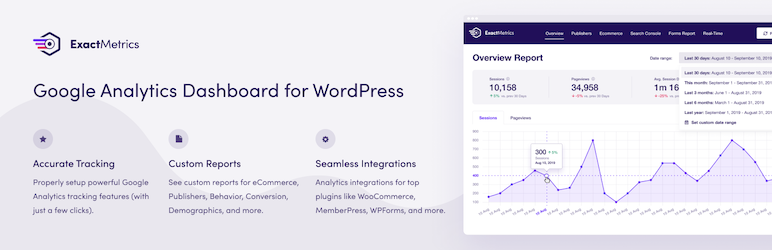
The ExactMetrics Google Analytics for WordPress plugin helps you properly setup all the powerful Google Analytics tracking features without writing any code or hiring a developer.
More importantly, over 1 million users love ExactMetrics because of our signature Google Analytics Dashboard that helps you view key Google Analytics stats right inside your WordPress dashboard.
Our goal at ExactMetrics is to help you grow your business faster with data-driven decisions.
This is why we built the most comprehensive Google Analytics plugin for WordPress, so you can setup all the powerful tracking features that website owners otherwise miss out on when simply pasting the analytics code in WordPress.
We go beyond the simple google analytics script and add the advanced event tracking, so you can see all important user behavior in WordPress with just a few clicks (without hiring a developer).
ExactMetrics works automatically Google Analytics 4 (GA4) so that you can your website can be prepared for the future of Google Analytics.
Basically, we made the same advanced Google analytics setup that big enterprise companies used to pay thousands of dollars for, available to every small business owner without the high costs.
This is why even the large companies like Microsoft, Quickbooks, Pizza Hut, Delta, Pepsi, Coldwell Bankers, and many others are using ExactMetrics to properly setup Google Analytics and see the custom analytics reports in WordPress.
ExactMetrics Pro
This plugin is the lite version of ExactMetrics Pro plugin that comes with all the Google analytics tracking features you will ever need including events tracking, ecommerce tracking, custom dimensions tracking, form conversion tracking, affiliate link tracking, and tons more. click here to purchase the best premium Google Analytics plugin for WordPress Now!.
We are on a mission to level the playing field for small businesses, so they can grow their business faster with data-driven decisions.
See what one business owner is saying about ExactMetrics:
This is absolutely, positively, one of the TOP plugins to install on your WP site. There is no better way to quickly gauge traffic for spikes, surges, and consistency. I installed this on over a dozen WordPress installations and counting, thank you for an outstanding app!
Daniel Monaghan
Custom Google Analytics Reports
- Overview Report – See the most important Google Analytics data in an easy to understand report, right inside your WordPress dashboard (Save 5 minutes each day).
- Publisher Report – See exactly which content gets the most visit, which affiliate links are performing the best, what new partnership opportunities you should pursue, and more.
- Ecommerce Report – See all your important online store metrics in one place such as total revenue, conversion rate, average order value, top products, top conversion sources, and more.
- Search Console Report – See how well your website is ranking in Google, so you can optimize your SEO to grow your traffic.
- Forms Report – See your conversion stats for various contact forms and lead forms on your website to improve conversions.
- Custom Dimensions Report – See useful stats like most popular authors, best publication times, popular categories, tags, Yoast focus keywords, SEO score, etc.
- Real Time Report – see who is online on your website in real-time, right inside your WordPress dashboard.
- Customizable Google Analytics Dashboard Widget – Our dashboard widget allows you to have quick access to your most important stats at the moment you login to your WordPress dashboard.
- Page Insights in Admin Bar – Easily view analytics for each individual page and post from the ExactMetrics menu in WordPress admin bar while browsing your website.
- Landing Page Report – Shows you which pages your visitors land, without needing to log into Google Analytics.
- Source and Medium Report – gives you an easy view of Google Analytics UTM tracking.
- Technology Report – See which devices and browsers use your website the most.
- Campaign Report – Shows you Google Analytics UTM tracking and key metrics.
- Pages Report – See which pages are most poplular on your website.
- Coupon Report – See which coupons are used most on your website.
- Funnel Report – See how people buy from your store.
- Email Summaries – Get the most important metrics delivered to you and/or your client’s email inboxes weekly with our brandable Email Summaries, allowing you to keep up to date on your website’s Google Analytics results even without needing to login to the Google Analytics dashboard.
- PDF Exports – Easily take your ExactMetrics reports with you or send them to clients or colleagues by exporting all ExactMetrics reports as a brandable PDF.
- Site Speed Report – helps you improve your website’s performance by displaying key metrics and actionable tips to improve those based on WordPress-specific solutions.
- Popular Posts – Display popular posts in your post content automatically or using Gutenberg blocks and shortcodes. Show off your top posts to your visitors using sidebar widgets, Gutenberg blocks or shortcodes
Integrations
- WooCommerce Google Analytics – Automatically setup Google analytics enhanced eCommerce tracking for WooCommerce and WooCommerce analytics.
- Easy Digital Downloads Google Analytics – Automatically setup Google analytics enhanced eCommerce tracking for EDD.
- MemberPress Google Analytics – Automatically setup Google analytics enhanced eCommerce tracking for MemberPress.
- WPForms Google Analytics – Automatically setup form conversion tracking for WPForms.
- Formidable Forms Google Analytics – Automatically setup form conversion tracking for Formidable Forms.
- Gravity Forms Google Analytics – Automatically setup form conversion tracking for Gravity Forms.
- YouTube Google Analytics – Automatically track video starts, stops, and watch progression of video plays of your YouTube videos.
- Vimeo Google Analytics – Automatically track video starts, stops, and watch progression of video plays of your Vimeo videos.
- HTML5 Video Google Analytics – Automatically track video starts, stops, and watch progression of video plays of your Vimeo videos.
- Exclude from Tracking Google Analytics – Disable loading of Google Analytics tracking on specific pages or posts.
- Contact Form 7 Google Analytics – Automatically setup form conversion tracking for Contact Form 7.
- Yoast Google Analytics – Automatically setup SEO score tracking for Yoast SEO with custom dimensions.
- Pretty Links Google Analytics – Automatically setup affiliate link tracking for Pretty Links.
- Thirsty Affiliates Google Analytics – Automatically setup affiliate link tracking for Thirsty Affiliates.
- AffiliateWP Google Analytics – Automatically setup affiliate link tracking for AffiliateWP.
- User Journey Orders – See which pages visit before becoming customers with WooCommerce, Easy Digital Downloads, MemberPress, LifterLMS, Restrict Content Pro, or GiveWP.
- User Feedback – Automatically track events and impressions with the popular User Feedback plugin.
- Google AdSense + Google Analytics – Automatically setup banner ads tracking for Google AdSense.
- Google Optimize + Google Analytics – Easily enable A/B testing in WordPress with Google Optimize and Google Analytics.
After reading this comprehensive feature list, you can probably imagine why over 1 million websites use ExactMetrics as their preferred Google Analytics plugin for WordPress.
Give ExactMetrics a try.
Love this plugin! It’s got powerful customization options, it’s easy to use, there’s good documentation, and if all that’s not enough, ExactMetrics is quick to provide support. Thanks for this wonderful plugin!
Julie Dupuis
Credits
This plugin is created by Chris Christoff and Syed Balkhi with sponsorship from WPBeginner.
Localization
You can translate Google Analytics Dashboard for WP by ExactMetrics on translate.wordpress.org.
Screenshots

Google Analytics Dashboard for WP Dashboard Widget (shown in small mode, can be configured to full size or hidden; can also customize reports shown) 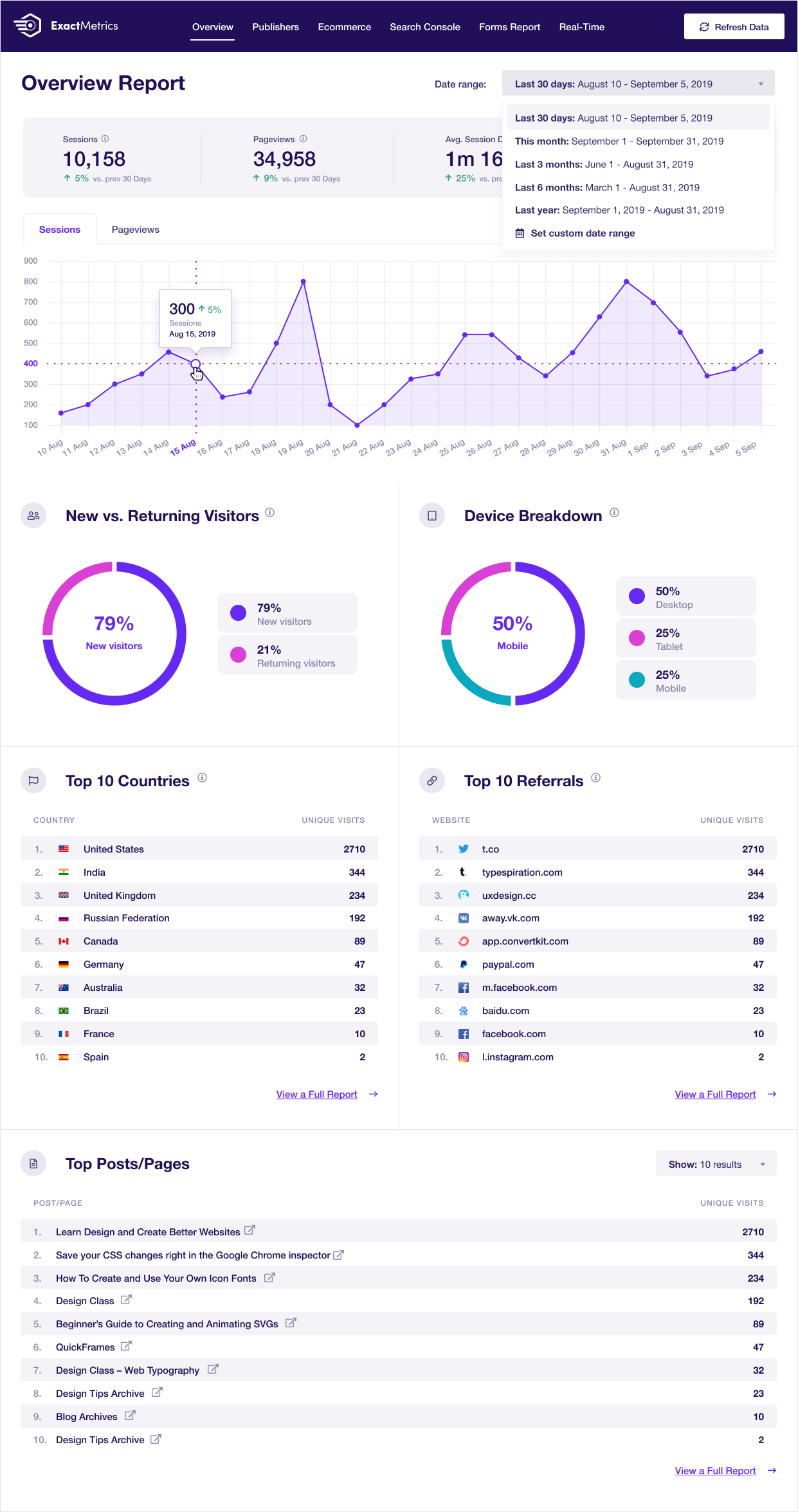
Google Analytics Dashboard for WP Overview Report 
Google Analytics Dashboard for WP eCommerce Report 
Google Analytics Dashboard for WP Settings Page (super simple to use and configure as needed)


Blocks
This plugin provides 2 blocks.
- Exactmetrics Popular Posts Inline
- Exactmetrics Popular Posts Widget
Installation
- Install Google Analytics Dashboard for WordPress by ExactMetrics either via the WordPress.org plugin repository or by uploading the files to your server. (See instructions on how to install a WordPress plugin)
- Activate Google Analytics for WordPress by ExactMetrics.
- Navigate to the Insights tab in your WordPress admin menu and configure the plugin.
- Want more features? Purchase ExactMetrics Pro!
FAQ
-
Does ExactMetrics support Google Analytics v4 (GAv4)
-
Yes, we fully support Google Analytics v4 (GAv4) properties .
-
Where can I find lite support?
-
Lite support is provided exclusively on our website.
-
How can I suggest a new feature, contribute or report a bug?
-
You can submit pull requests, feature requests and bug reports on our GitHub repository.
-
Documentation, Tutorials and FAQ
-
For documentation, tutorials, FAQ and videos check out: Google Analytics Dashboard for WP by ExactMetrics documentation.
Reviews


Contributors & Developers
“ExactMetrics – Google Analytics Dashboard for WordPress (Website Stats Plugin)” is open source software. The following people have contributed to this plugin.
Contributors

“ExactMetrics – Google Analytics Dashboard for WordPress (Website Stats Plugin)” has been translated into 34 locales. Thank you to the translators for their contributions.
Interested in development?
Browse the code, check out the SVN repository, or subscribe to the development log by RSS.
Changelog
8.11.0: December 17, 2025
- New: Year In Review Report
- Enhancements: Various Performance Improvements and Bug Fixes
8.10.2: December 9, 2025
- Fixed: Minor updates and bug fixes
8.10.1: November 14, 2025
- Fixed: Minor updates and bug fixes
8.10.0: November 13, 2025
- New: Sync site annotations with GA4 automatically
- New: Create custom conversions in GA and access detailed event tracking reports.
- New: Product Feeds Report for enhanced insights for AdTribes users
- Enhancements: Various performance improvements and bug fixes.
8.9.1: October 16, 2025
- Fixed: Minor updates and bug fixes
8.9.0: October 14, 2025
- New: Unlock new organic traffic insights with our completely updated Google Search Console report
- New: Automatically track eCommerce sales with LinkedIn and SnapChat PPC campaigns-
- Updated: Various bug fixes and updates
8.8.0: September 9, 2025
- New: Google Ads Integration! Set up Google Ads campaigns directly from the ExactMetrics dashboard.
- New: AI Traffic Report – see what LLMs are sending traffic to your website
- Fixed: Minor updates and bug fixes
8.7.4: August 7, 2025
- Fixed: Minor updates and bug fixes
8.7.3: August 6, 2025
- Fixed: Minor updates and bug fixes
8.7.1: July 22, 2025
- Fixed: Minor updates and bug fixes
8.7.0: July 22, 2025
- Updates: Misc bug fixes and updates
8.6.2: June 26, 2025
- Fixed: Minor updates and bug fixes
8.6.1: June 12, 2025
- Fixed: Minor updates and bug fixes
8.6.0: June 11, 2025
- Enhancement: Updated Forms Report to include more metrics and stats
- Fixed: Minor updates and bug fixes
8.5.3: May 14, 2025
- Fixed: Minor updates and bug fixes
8.5.0: April 29, 2025
- New: Support for Pinterest PPC conversion tracking
- Fixed: Minor updates and bug fixes
8.4.1: March 27, 2025
- Fixed: Minor updates and bug fixes
8.4.0: March 24, 2025
- New: Support for TikTok PPC conversion tracking
- Enhancement: Adding translatable strings throughout our plugin. More to come!
- Enhancement: Our monthly statistics emails got a fresh facelift
- Enhancement: Our plugin code now follows WP VIP standards
8.3.1: January 16, 2025
- Fixed: Minor updates and bug fixes
8.3.0: January 15, 2025
- New: Overview Report Metrics
- New: Cart Abandonment Report
- Fixed: Minor updates and bug fixes
8.2.4: December 13, 2024
- Fixed: Minor updates and bug fixes
8.2.3: December 10, 2024
- Fixed: Minor updates and bug fixes
8.2.2: November 12, 2024
- New: Our Year In Review report is here. This report will automatically show up starting on January 1
- Update: We’ll now check to ensure your website time zone matches Google Analytics
8.2.1: October 31, 2024
- Fixed: Fixed a bug in the Headline Analyzer tool causing errors in WordPress versions lower than 6.6
8.2.0: October 22, 2024
- New: Country and region report to see where and how your visitors find your website
- New: Advanced tracking options for users of Google Tag Manager
- New: SEO & RankMath Integrations with our Custom Dimensions addon
- Fixed: Minor updates and bug fixes
8.1.0: September 19, 2024
- New: Stats at a Glance report shows you information about your website in a whole new way.