

Description
Adds a beautiful, customizable sign-up bar to the top or bottom of your WordPress site. This bar is guaranteed to get the attention of your visitor and
increase your Mailchimp subscribers.
This plugin is an add-on for the Mailchimp for WordPress plugin.
Features
Mailchimp Top Bar adds a simple yet beautiful & customizable opt-in bar to the top or bottom of your WordPress site.
Using this bar, people can subscribe to a Mailchimp audience of your choice.
- Guaranteed to boost conversions.
- Unobtrusive, visitors can easily dismiss the bar.
- Easy to install & configure, just select a Mailchimp audience and you’re good to.
- Customizable, you can edit the bar text and colors from the plugin settings.
- The bar can be at the top or bottom of the visitor’s screen
- Lightweight, the plugin consists of just a single 2.6 kB JavaScript file.
More information
About the author
Mailchimp Top Bar is a plugin by ibericode, a company from The Netherlands that you may know from other plugins like Mailchimp for WordPress, Boxzilla Pop-ups and Koko Analytics.
Screenshots
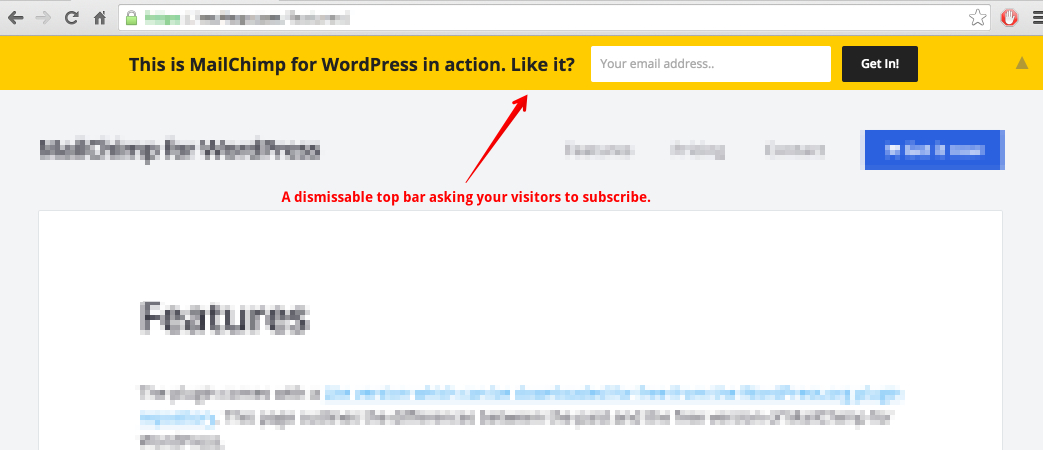
The Mailchimp Top Bar in action on the Mailchimp for WordPress site. 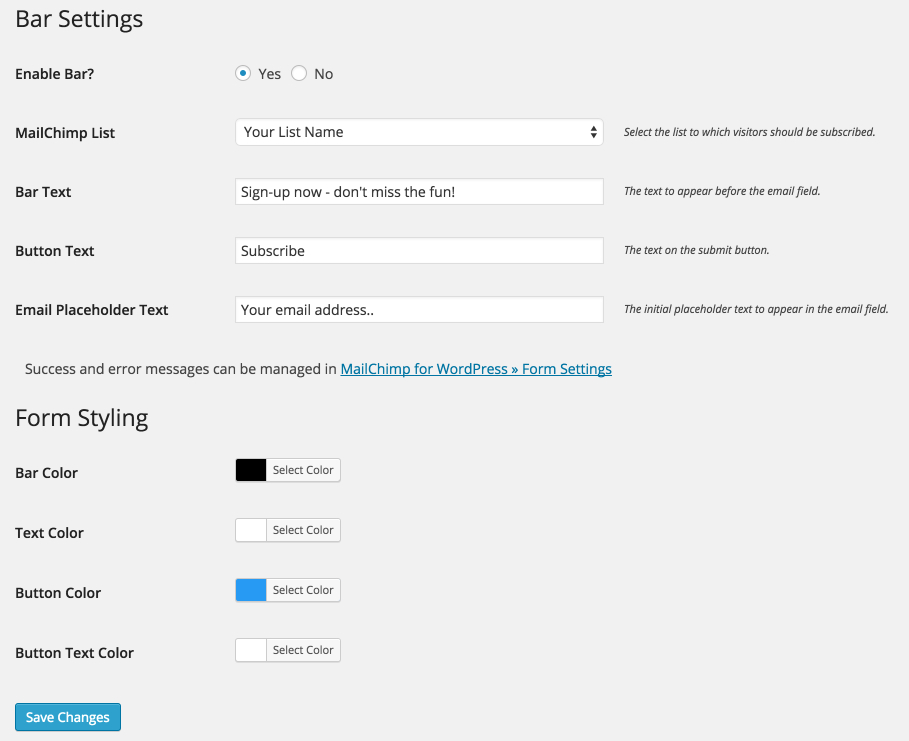
The settings page of the Mailchimp Top Bar plugin.


Installation
Mailchimp for WordPress
Since this plugin depends on the Mailchimp for WordPress plugin, you will need to install that first.
Installing Mailchimp Top Bar
- In your WordPress admin panel, go to Plugins > New Plugin, search for Mailchimp Top Bar and click “Install now“
- Alternatively, download the plugin and upload the contents of
mailchimp-top-bar.zipto your plugins directory, which usually is/wp-content/plugins/. - Activate the plugin
- Set your Mailchimp API key in Mailchimp for WP > Mailchimp Settings.
- Select a Mailchimp audience to subscribe to in Mailchimp for WP > Top Bar.
- (Optional) Customize the look & position of your opt-in bar.
FAQ
-
How to disable the bar on certain pages?
-
For now, you will have to use a filter to disable the bar on certain pages. The following example only loads the Top Bar on your blog post pages.
add_filter( 'mctb_show_bar', function( $show ) {
    return is_single();
} );
Another example, this only loads the bar on your “contact” page.
add_filter( 'mctb_show_bar', function( $show ) {
    return is_page('contact');
} );
Have a look at the Conditional Tags page for all accepted functions.
-
How to add a name field to the bar?
-
You can use the following code snippet to show a “NAME” field in your bar.
add_action( 'mctb_before_submit_button', function() { echo '<input type="text" name="NAME" placeholder="Your name" />'; }); add_filter( 'mctb_subscriber_data', function( $subscriber ) { if( ! empty( $_POST['NAME'] ) ) { $subscriber->merge_fields['NAME'] = sanitize_text_field( $_POST['NAME'] ); } return $subscriber; }); -
How to hide the bar on small screens?
-
Adding the following CSS to your site should hide the bar on all screens smaller than 600px. The Simple Custom CSS plugin is great for adding custom CSS.
@media( max-width: 600px ) { #mailchimp-top-bar { display: none !important; } } -
I think I found a bug. What now?
-
Please report it on GitHub issues if it’s not in the list of known issues.
-
I have another question
-
Please open a topic on the WordPress.org plugin support forums.
Reviews


Contributors & Developers
“MC4WP: Mailchimp Top Bar” is open source software. The following people have contributed to this plugin.
Contributors


“MC4WP: Mailchimp Top Bar” has been translated into 1 locale. Thank you to the translators for their contributions.
Translate “MC4WP: Mailchimp Top Bar” into your language.
Interested in development?
Browse the code, check out the SVN repository, or subscribe to the development log by RSS.
Changelog
1.7.3 – Oct 1, 2025
- Minor performance or memory usage related improvements.
- Compatibility check with latest WordPress version.
1.7.1 – Jul 2, 2025
- Update dependencies and WordPress compatibility.
- Decrease timestamp check to one second ago.
1.7.0 – Jan 27, 2025
- Bump required PHP version to 7.3 or higher.
- Bump required WordPress version to 4.9 or higher.
- Remove compatibility code for Mailchimp for WordPress versions before 3.0.
- Add visitor IP to sign-ups through Top Bar.
- Fix response not showing up after first trying with an invalid email address.
- Minor performance improvements troughout the code by explicitly specifying the global namespace on core PHP functions.
1.6.2 – Oct 3, 2024
- Fix button text setting not updating after saving settings.
1.6.1 – Oct 1, 2024
- Escape return value of
add_query_argbefore outputting, fixing a potential XSS issue. Thanks to vgo0 for the responsible disclosure. - Escape or kses return values of all gettext calls.
- Improved sanitization of all plugin settings.
- Minor server side performance improvements by getting rid of some unneccessary string copies or sprintf calls.
1.6.0 – Jan 4, 2023
- JS file now has
deferattribute so it is not render blocking. - Stylesheet is now inserted through JS, so it is not render blocking.
- Animations now entirely handled using CSS.
- JS file is now 20% smaller because of the above (2.6 kB gzipped).
1.5.6 – Dec 1, 2022
- Minor JS improvements to shrink ~500 bytes off script file.
- Prepare admin tab navigation for upcoming Mailchimp for WordPress release.
1.5.5 – May 14, 2021
- Always use minified asset file, regardless of
SCRIPT_DEBUGsetting. - Add nonce to all URL’s using
_mc4wp_actionparameter.
1.5.4 – May 7, 2021
- Update classnames to work with MailChimp for WordPress version 4.8.4 (and up).
- Minor JS optimizations.
1.5.3 – Mar 30, 2021
- Fix typo in help text.
- Show bar server-side to speed-up height calculation.
1.5.2 – Mar 9, 2020
- Add setting to disable bar (stop loading it altogether) after it is used.
- Increase default cookie lifetime to 1 year.
1.5.1 – Jan 21, 2020
- Fade response element using CSS animations for better performance.
- Various minor performance improvements.
1.5.0 – Oct 7, 2019
Compatibility with Mailchimp for WordPress version 4.6.
1.4.1 – Sep 11, 2019
Changes