
Description
This plugin allows Contact Form 7 users to add PDF attachments filled with form submission data to email messages and responses of Contact Form 7.
If the PDF attachment has a PDF form, the plugin allows users to add fields to the Contact Form 7 form and/or link them to fields in the PDF. The plugin also allows the attached PDF files to be embedded with images supplied by Contact Form 7 form fields. The filled PDF files can be saved on the web server.
When your website visitor submits your Contact Form 7 form, the form in the PDF file is filled with CF7 form data, images are embedded and the resulting PDF file is attached to the Contact Form 7 email message. The resulting PDF file can also be downloaded by your website visitors if this option is enabled in your form’s options. It is possible to save the resulting PDF file to your server’s wp-content/uploads directory.
What makes this plugin special is its approach to preparing PDF files. It is not generating PDF documents from scratch. It modifies the original PDF document that was prepared using third party software and supplied to the plugin. This allows users the freedom to design exactly what they need and use their pre-existing documents.
An external web API (https://pdf.ninja) is used for filling PDF forms (free usage has limitations). The “Enterprise Extension” plugin is available for purchase that enables the processing all PDF operations locally on your web server and disables the use of the external web API.
Please see Pdf.Ninja Terms of Use and Pdf.Ninja Privacy Policy.
Please see the tutorial video and the documentation for detailed information.
Requirements:
* PHP 5.2 or newer
* WordPress 4.8 or newer
* Contact Form 7 5.0 or newer
* IE 11 (or equivalent) or newer
Known problems:
* Some third party plugins may break the functionality of this plugin (see a list below). Try troubleshooting the problem by disabling likely plugins that may cause issues, such as plugins that modify WordPress or Contact Form 7 in radical ways.
* Some image optimization plugins optimize PDFs and strip PDF forms from PDF files. This may cause your existing forms to break.
* If you are still using the old version of the API (v1) or the old version of Enterprise Extension (v1), please note that resulting PDFs may not render properly in some PDF readers and with some UTF-8 (non-latin) characters, checkboxes and radio buttons.
Known incompatible plugins:
* Post SMTP (breaks PDF attachment to email messages)
* Imagify (strips forms from PDF files)
* ShortPixel Image Optimizer (strips forms from PDF files)
* « Prev
* Open external links in a new window
* WordPress Multilingual Plugin
* Contact Form 7 Skins
Special thanks to the following sponsors of this plugin:
* BrowserStack
* Momentum3
* G-FITTINGS GmbH
Screenshots

PDF Form button is available to access PDF attachments interface 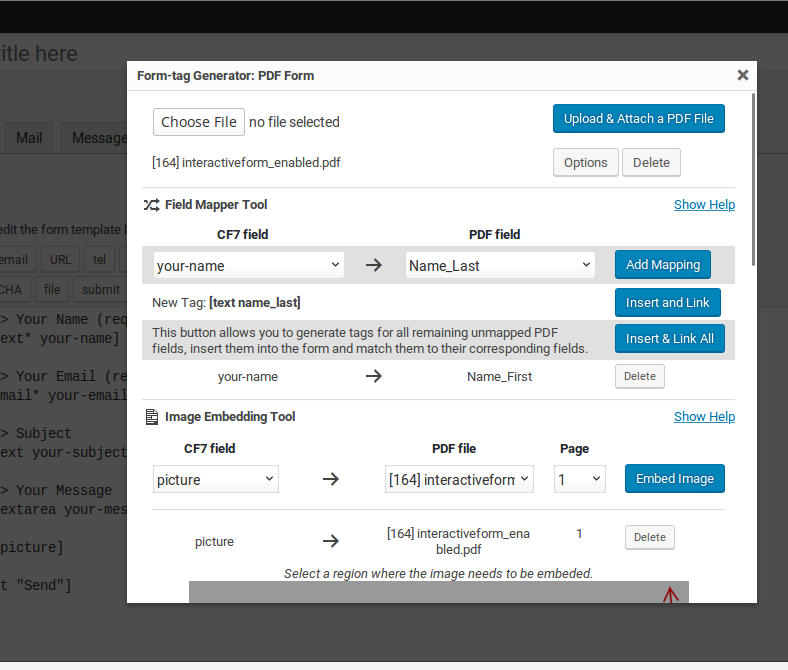
Form-tag Generator interface that allows users to attach PDF files and generate tags 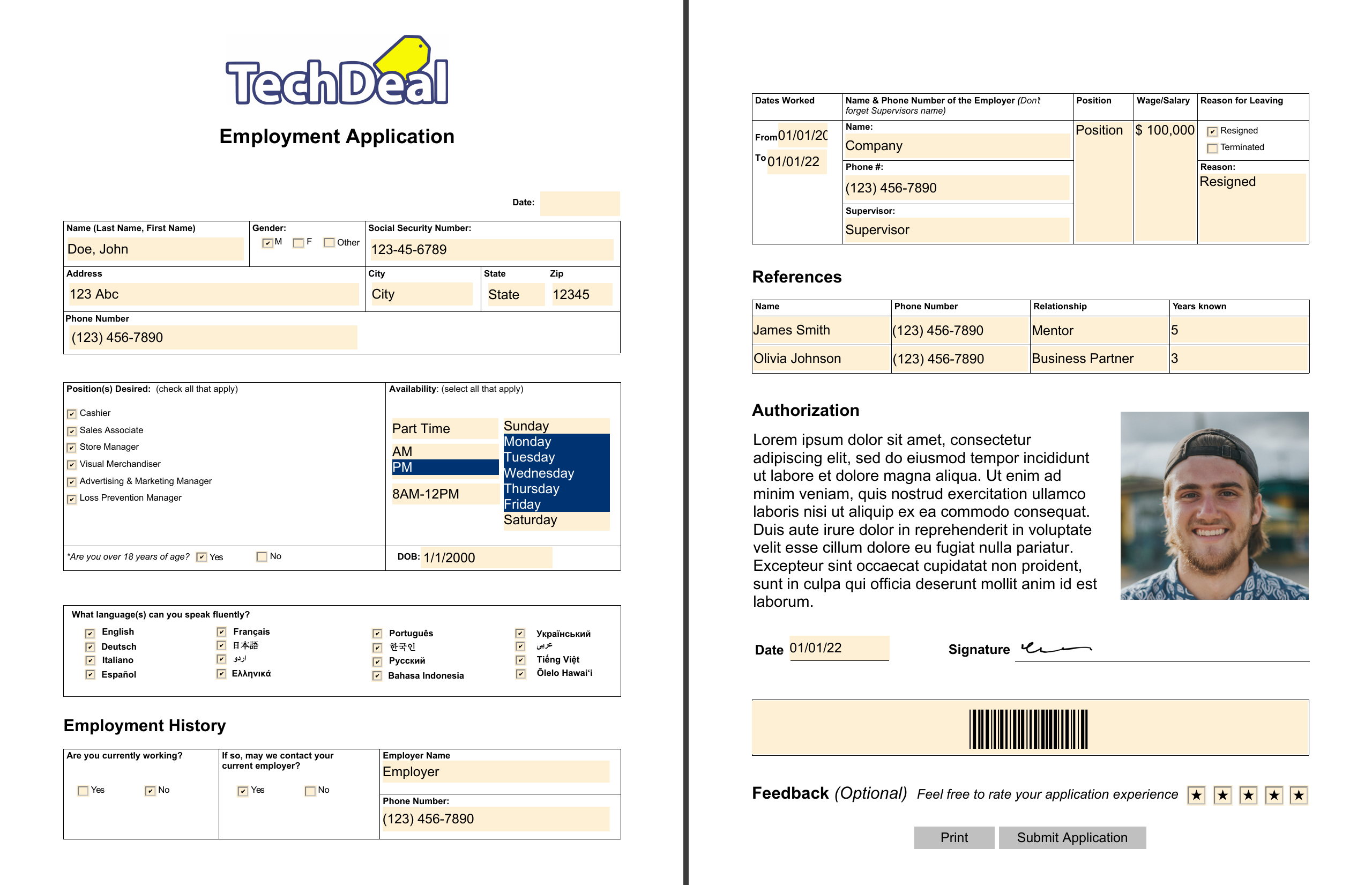
Filled PDF file


Installation
- Install the Contact Form 7 plugin.
- Upload this plugin’s folder to the
/wp-content/plugins/directory, or install the plugin through the WordPress plugins screen directly. - Activate the plugin through the ‘Plugins’ screen in WordPress.
- Start using the ‘PDF Form’ button in the CF7 form editor.
FAQ
-
I get an error: “There was an error trying to send your message. Please try again later.”
-
Please check your server’s email configuration. Please check to make sure your SPAM mitigation technique is not causing the problem (reCaptcha/Akismet/etc).
-
Does this plugin allow my website users to edit PDF files?
-
No. This plugin adds features to the Contact Form 7 interface in the WordPress Admin Panel only.
-
Does this plugin require special software installation on the web server?
-
No. The plugin uses core WordPress and CF7 features only. No special software or PHP extensions are needed. Working with PDF files is done through Pdf.Ninja API. It is recommended to have a working SSL/TLS certificate validation with cURL. Enterprise Extension is available if your business requirements prevent the use of a third party API.
-
How are CF7 form fields mapped to PDF form fields?
-
The field mapper tool allows you to map fields individually and, when needed, generate new CF7 fields on the fly. CF7 fields can be mapped to multiple PDF fields. Mappings can be associated with a specific PDF attachment or all PDF attachments. Field value mappings can also be created, allowing filled PDF fields to be filled with data that differs from the originally filled values.
-
My fields are not getting filled, what is wrong?
-
Make sure the mapping exists in the list of mappings and the field names match.
If you attached an updated PDF file and your mappings were associated with the old attachment ID then those mappings will be deleted and you will need to recreate them.
Sometimes PDF form fields have validation scripts which prevent value with an incorrect format to be filled in. Date PDF fields must be formatted with the format mail-tag.
-
How do I update the attached PDF file without attaching a new version and losing attachment ID associated mappings and embeds?
-
Try using the Enable Media Replace plugin to replace the PDF file in-place in the Media Library.
-
Make sure your PDF checkbox/radio field’s exported value matches the value of the CF7 form’s checkbox tag. Usually, it is “On” or “Yes”. If you need to display a different value in the CF7 form, you will need to create a value mapping or use pipes.
CF7 allows you to have multiselect checkboxes, however, PDFs can’t have multiple values with checkbox fields. You either need to switch to using a listbox in your PDF or rename your checkboxes such that each has a unique name and then map them appropriately.
Some PDF viewers don’t render checkboxes correctly in some PDF files. You may be able to solve this issue by recreating the PDF in a different PDF editor. If you are still using Pdf.Ninja API v1, switching to v2 may resolve your issue.
-
How do I remove the watermark in the filled PDF files?
-
Please see the Pdf.Ninja API website and the Enterprise Extension plugin page.
-
How do I set up PDF form filling on my local web server?
-
Please see the Enterprise Extension plugin page.
Reviews


Contributors & Developers
“PDF Forms Filler for CF7” is open source software. The following people have contributed to this plugin.
Contributors
“PDF Forms Filler for CF7” has been translated into 2 locales. Thank you to the translators for their contributions.
Translate “PDF Forms Filler for CF7” into your language.
Interested in development?
Browse the code, check out the SVN repository, or subscribe to the development log by RSS.
Changelog
2.2.5
-
Release date: October 10, 2025
-
Fixed a bug with CF7 v6+: inserting a tag via the tag generator doesn’t reload CF7 fields
- Minor optimization
2.2.4
-
Release date: October 6, 2025
-
Tested integration with CF7 v6.1.2
- Fixed CF7 v6.1.2 compatibility issue with panel tab switching
2.2.3
-
Release date: July 2, 2025
-
Tested integration with CF7 v6.1
- Fixed CF7 v6.1 compatibility issue on CF7’s Integration page (copy button)
- Other minor fixes and improvements
2.2.2
-
Release date: March 31, 2025
-
Added ‘delete all value mappings’ button
- Other minor bug fixes and improvements
2.2.1
-
Release date: November 21, 2024
-
Fixed localization issues
- Updated language files
2.2.0
-
Release date: November 11, 2024
-
Added support for CF7 v6.0
- Moved attachment tool, the field mapper tool and the image embedding tool from tag generator to a separate settings panel
- Added automatically download filled PDF feature
- Other fixes and improvements
2.1.10
-
Release date: March 5, 2024
-
Ensured support for CF7 v5.9
2.1.9
-
Release date: January 15, 2024
-
Fixed possible issues with API communication caused by non-alphanumeric characters in request boundary
- Other minor fixes and improvements
2.1.8
-
Release date: November 8, 2023
-
Fixed a bug with a default file name when there are multiple PDF attachments
2.1.7
-
Release date: November 3, 2023
-
Auto-resize mail-tags textarea
- Fixed a possible JS error related to UTF-8 base64 decoding
- Fixed icon file
- Improved remote attachment support
- Fixed issues in page snapshot code
- Other minor improvements
2.1.6
-
Release date: August 15, 2023
-
Ensured support for WP v6.3
- Ensured support for CF7 v5.8
- Added a few minor fixes
2.1.5
-
Release date: July 10, 2023
-
Added a workaround support for Conditional Fields plugin’s groups
- Minor corrections
2.1.4
-
Release date: May 17, 2023
-
Added a workaround for GLOB_BRACE flag not being available on some non GNU systems
2.1.3
-
Release date: May 5, 2023
-
Minor fixes and improvements
2.1.2
-
Release date: December 14, 2022
-
Ensured support for CF7 v5.7
2.1.1
-
Release date: November 29, 2022
-
Fixed bugs with frontend CF7 response
2.1.0
-
Release date: November 23, 2022
-
Some fixes were applied that affect the filling process logic. Please check your forms after the update to make sure everything is working as expected if you think they might be affected!
-
Fixed an issue with PDF fields not being cleared with empty CF7 field values (affects prefilled fields in the original PDF file)
- Fixed an issue: value mappings get applied recursively (affects field value mappings that have matching CF7/PDF values)
- Bug fix: value mapping fail to work with null values
- Improved labeling of empty value mapping options
- Improved PDF attachment affecting action detection
- Fixed German translation
- Updated Spanish translation
- Updated Italian translation
- Updated other language files
- Other minor improvements
2.0.9
-
Release date: October 27, 2022
-
Fixed issues on CF7 Integration page
2.0.8
-
Release date: September 20, 2022
-
Add duplicate CF7 value mappings to multiple unique PDF values support to multiselect feature
- Improved value mappings processing code
- Fixed German translation
- Added code to remove no longer relevant embeds
- Improved temporary file management
- Other improvements
2.0.7
-
Release date: July 25, 2022
-
Assuming support for all CF7 v5.6.* revisions
- Minor cleanup and improvements
2.0.6
-
Release date: July 3, 2022
-
Added automatic value mapping
- Removed pipes in form tag hints
- Added support for data URIs in the image embedding feature
- Other bug fixes and improvements
2.0.5
-
Release date: May 24, 2022
-
Ensured support for WP v6.0
- Ensured support for CF7 v5.6
- Changed value mapping feature to be case-insensitive when matching values
- Switched to an i18n friendly version of basename() to fix possible issues with non-latin characters in file names
- Other minor improvements