🔞 ADULT: Blocks/post type feature block - Collection
- Features
- Blocks
- Advance Text Block
- Simple Text Block
- Icon Block
- Image Block
- Button Block
- Counter Block
- Google Map Block
- Advanced List Block
- Pricing Block
- Progress Bar Block
- Rating Block
- Video Popup Block
- Divider Block
- Dynamic Columns Block
- Advanced Columns Block
- Container/Cover Block
- Carousel Block
- Slider Block
- Button Group Block
- Template Library Block
- Accordion Block
- Tabs Block
- Icon Group Block
- Form Wrapper Block
- Gallery Block
- Filter Gallery Block
- Quote Block
- Table Of Content Block
- Post (Type) Block
- Advanced Post (Type) Block
- Post (Type) Feature Block
- Post (Type) Carousel Block
- Post (Type) News Ticker Block
- Duplex Post (Type) Block
- Term (Category) Block
- Term (Category) Feature Block
- Term (Category) Carousel Block
- Popover *
- Advance Show More *
- Image Hover *
- Gutenberg Templates
- Support
- Pricing

- Features
- Blocks
- Advance Text Block
- Simple Text Block
- Icon Block
- Image Block
- Button Block
- Counter Block
- Google Map Block
- Advanced List Block
- Pricing Block
- Progress Bar Block
- Rating Block
- Video Popup Block
- Divider Block
- Dynamic Columns Block
- Advanced Columns Block
- Container/Cover Block
- Carousel Block
- Slider Block
- Button Group Block
- Template Library Block
- Accordion Block
- Tabs Block
- Icon Group Block
- Form Wrapper Block
- Gallery Block
- Filter Gallery Block
- Quote Block
- Table Of Content Block
- Post (Type) Block
- Advanced Post (Type) Block
- Post (Type) Feature Block
- Post (Type) Carousel Block
- Post (Type) News Ticker Block
- Duplex Post (Type) Block
- Term (Category) Block
- Term (Category) Feature Block
- Term (Category) Carousel Block
- Popover *
- Advance Show More *
- Image Hover *
- Gutenberg Templates
- Support
- Pricing
Module
Post (Type) Feature Block
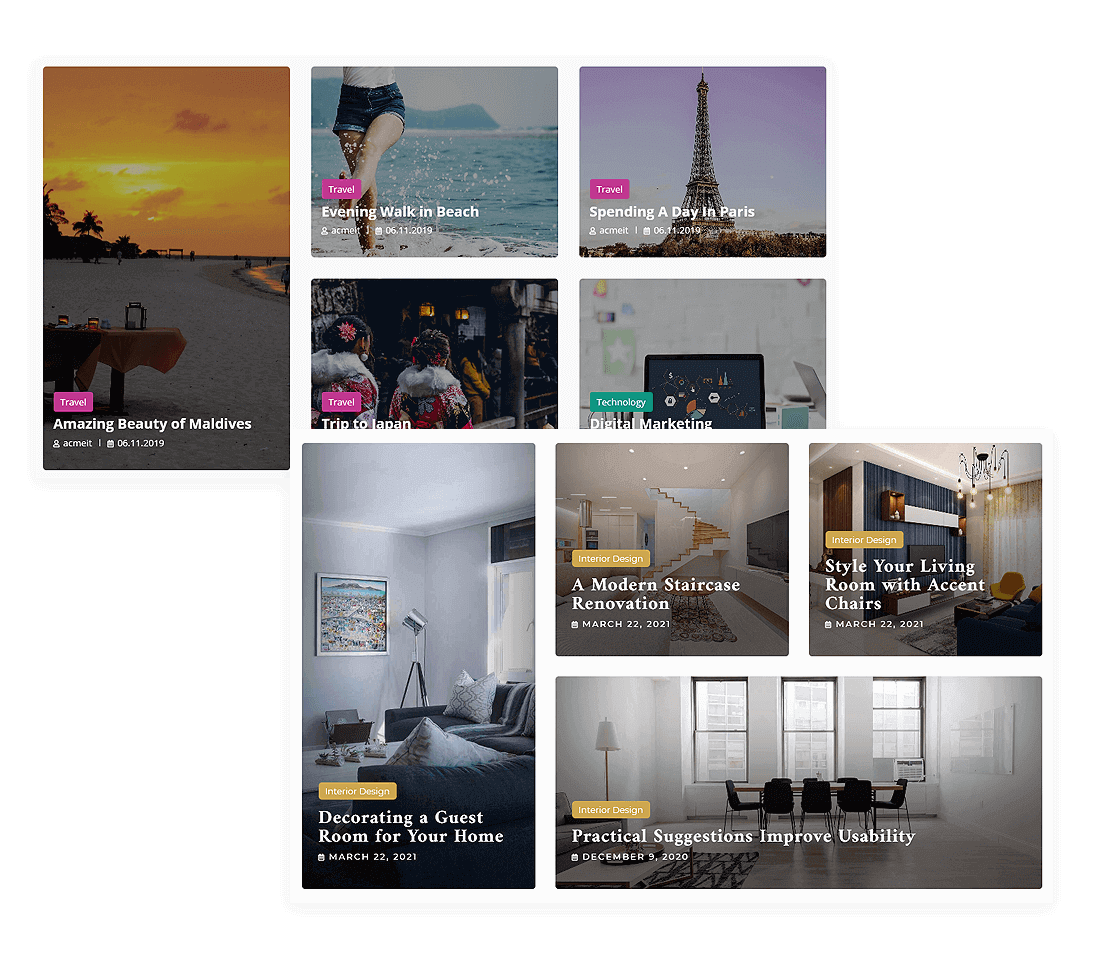
Showcase your Blog Article Post with an attractive design template. Currently, we have 38 unique and lovely templates available with advanced design options. You can create an unlimited number of stunning blog section designs for your site and customize them as per your need. This block module is developed especially for blog, news, or magazine sites.
Post (Type) Feature Block features
38 (Thirty-Eight) Feature Post(Type) Layout
Advanced Query
Query Select Any Post Type
Query Select Any Taxonomy
Query Select Multiple Terms of Selected Taxonomy
Query Order by Date, Title, Menu Order, Comment Count, Modified Date, Random and Meta Value Number
Query Meta Value Number Meta Key
Query Order Ascending or Descending
Query Include Posts By Ids
Query Excludes Posts By Ids
Query Number of Posts
Query Offset Number
Query Single or Multiple Author Selection
Responsive Height
Template Selection to Number of the Posts
Advanced Post Format for Post Type Post on Supported Theme
Post Format Position Image Top Left, Image Top Right, Image Bottom Left, Image Bottom Right, Before Title, Before Content, and Before Button
Post Format Responsive Icon Size
Post Format Spacing with Responsive Martin and Padding
Post Format Normal and Hover Border Options
Post Format Normal and Hover Box Shadow
Advanced Badge Options
Badge Supports for Post (Type) Taxonomies and New Badge
Badge Position Image Top Left, Image Top Right, Image Bottom Left, Image Bottom Right, Before Title, Before Content, and Before Button
Badge Advanced Typography
Badge Format Spacing with Responsive Martin and Padding
Badge Normal and Hover Border Options
Badge Normal and Hover Box Shadow
Avatar Advanced Options
Avatar Position Image Top Left, Image Top Right, Image Bottom Left, Image Bottom Right, Before Title Left, Before Title Right, and Sorting
Avatar Responsive Size
Avatar Overlay Normal and Hover Color
Avatar Spacing with Margin and Padding
Avatar Enable or Disable By Author Postfix Text
Avatar Postfix Text Normal and Hover Color
Avatar Postfix Text Advanced Typography
Avatar Postfix Text Spacing with Responsive Margin and Padding
Post Title Advanced Setting
Post Title Tag H1, H2, H3, H4, H5, H6, P, DIV, and Span
Post Title Normal and Hover Color
Post Title Advanced Typography
Post Title Spacing with Responsive Margin and Padding
Post Description/Excerpt Advanced Setting
Post Excerpt Length in Words or Characters
Post Excerpt Normal and Hover Color
Post Excerpt Advanced Typography
Post Excerpt Spacing with Responsive Margin and Padding
Featured Image Advanced Options
Featured Image Size for the WordPress Core Image Size
Featured Image Normal and Hover Overlay Color
Featured Image Advanced Background Options with Size, Position, Repeat and Attachment
Primary Meta Advanced Options
Primary Meta Elements Setting
Primary Meta Normal and Hover Color
Primary Meta Advanced Typography
Primary Meta Spacing with Responsive Margin and Padding
Secondary Meta Advanced Options
Secondary Meta Elements Setting
Secondary Meta Normal and Hover Color
Secondary Meta Advanced Typography
Secondary Meta Spacing with Responsive Margin and Padding
Button Advanced Setting
Button Link Advanced Options
Button Normal and Hover Background Color
Button Normal and Hover Text Color
Button Icon Position Hide, Before and After
Button Icon Selection
Button Icon Responsive Size
Button Icon Spacing with Responsive Margin and Padding
Button Spacing with Responsive Margin and Padding
Button Border Normal and Hover Border Options
Button Border Normal and Hover Box Shadow
Button Advanced Typography
Button CSS Class
Content Box Responsive Margin and Padding
Post Box Advanced Options
Post Box Responsive Alignment
Post Box Normal and Hover Background Color
Post Box Spacing with Responsive Margin and Padding
Post Box Normal and Hover Border Options
Post Box Normal and Hover Box Shadow
Block Section ID
Block Section HTML Tag
Block Section Advanced Background
Block Section Responsive Height
Block Section Normal and Hover Border Options
Block Section Normal and Hover Box Shadow Options
Block Section Design with SVG and Image with Advanced Options
Responsive Position Static, Relative, Absolute, and Fixed
Responsive Z-Index
Display Mode with Hiding on Desktop, Tablet, and Mobile
Animation Options
Custom CSS
Post (Type) Feature Block Demo