Bark Review 2025: Once and For All - Is It Really Good?

Reading time: 32 min
Last Updated: Dec 24, 2025
-

Written By Shauli Zacks Tech Writer
Bark Overview
I’ll say it clearly – Bark is not the cheapest option available, but it is considered to be one of the best parental control apps for monitoring social media. So when the company advertised they have special deals and free trials, I saw it as an opportunity to see what it’s all about.
To assess Bark’s monitoring capabilities thoroughly, I conducted a comprehensive evaluation. I chose to install the Bark application on my child’s Android device, connecting it to their various social media profiles, including Facebook, Snapchat, Instagram, WhatsApp, and Gmail. Additionally, I extensively explored the features of the parental control settings. This involved setting screen time limits, implementing web content filters, and creating a geofence. At the heart of this effort was the aim to uncover any potential vulnerabilities or ways to bypass these protective measures.
My conclusion: Bark is well worth the subscription price, It did a great job monitoring the social media and web content. It sent me alerts for a wide range of potentially dangerous or inappropriate comments and posts. The parental control features were strong, and my daughter couldn’t bypass them. You can also take advantage of their current offer and test Bark free for 7 days.
Don’t Have Time? Here’s a Short Summary (1-Minute Read)
- Monitors 30+ social media networks: Bark is the only parental control app that connects directly with the child’s social media accounts. It uses AI to recognize the content and sends alerts when its filter is triggered. Read more about social media monitoring here.
- Create a custom screen time schedule: Build a routine and set the rules for what apps are available throughout the day and evening. There’s also a Pause Device option for when you need your child to get off their phone. Get more information here.
- Web filter with 17 categories: Sends real-time alerts when the system detects text or images related to a wide range of inappropriate, dangerous, or hateful content. Find out more about managing this feature here.
- Location Tracking: Send a Check-In request to your child and add geofences to stay updated on their live location. Read more about location tracking here.
Features
The Bark philosophy is that trust and having an open line of communication between kids and parents is an essential part of keeping kids safe online. Therefore, its features, such as social media monitoring and location tracking, require that the child is an active participant instead of just transmitting the data to the parent’s dashboard. With the screen time tools, you’ll be able to create a routine, which helps develop healthy habits, while at the same time still giving you the ability to control screen time and app use.
Here’s a quick summary of Bark’s features:
Bark Features – Updated in 2025
| 🆓 Free Trial | 7 days |
| 💰 Best Price | $5 a month |
| 💻 Number of Devices Per Account | Unlimited |
| 🌐 Web Filter | ✅ |
| 📴 Screen Time Management | ✅ |
| 📍 Location Tracking | ✅ |
| 🗺️ Geofence | ✅ |
| 💬 Call and SMS Monitoring | ✅ |
| ⚙️ App Management | ✅ |
| 🆘 SOS Button | ✅ |
| 👥 Customer Service | Live chat, schedule phone calls, FAQ |
| 📱 Platforms | PC, macOS, Android, iOS, Amazon, and Chromebook |
With its comprehensive library of powerful features, Bark provided me with valuable insights and tools to effectively monitor my kid’s behavior online. By addressing potential risks and offering timely alerts, Bark offered peace of mind and the ability to create a healthy and secure online environment. Here are some of the top features that made Bark an invaluable asset in safeguarding my kids online.
AI Content Monitoring to Detect Inappropriate and Dangerous Interactions
Bark uses AI and machine learning algorithms to scan videos, text, photos, DMs, and even emojis in more than 30 social media and email apps. The algorithm has 17 categories that include everything from sex, drugs, and self-harm to risky app use and creating a public profile.
I was able to adjust the sensitivity levels of the category or turn it off completely if I didn’t think it was relevant to my child.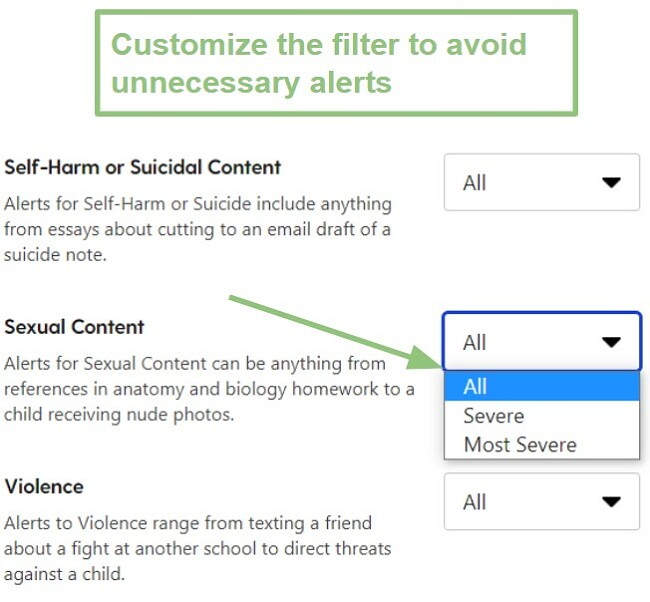
By adjusting the sensitivity levels, I was able to limit the number of false flags or alerts that were really minor, and didn’t require my attention.
The 17 Categories that Bark Monitors
| Anxiety | Body Image and Eating-related | Cyberbullying | Change in Account Activity | Dangerous organization | Depression |
| Drug and alcohol related content | Hate Speech | Inappropriate behavior | Medically Concerning Content | Profanity | Public Profile |
| Risky App/site usage | Self Harm or Suicidal content | Sexual Content | Violence | Weapons |
Bark uploads a screenshot of any content that triggers an alert, along with tags to make it easy to see which categories caused the alert. After my first few days of using Bark, I saw that many of the alerts were caused because the sensitivity settings were high. However, because it shows me the filter tag, I was able to go to the settings and change them to a lower sensitivity level, which reduced the number of false flag alerts.
Another nice feature I noticed is that if I trust the person communicating with my daughter, I can choose to remove all alerts from their interactions. For example, in the image below, the alert was triggered in a siblings and parents group, where one of my other children sent a funny beer commercial that Bark flagged for drugs and alcohol. I don’t need to get alerts from our family WhatsApp group, so I clicked the link that says “Don’t alert me to issues with this group.”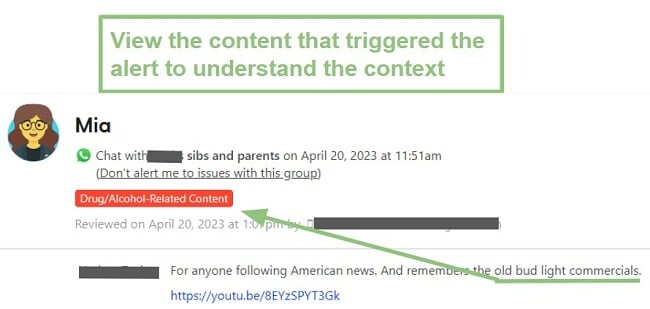
💡 It’s important to know that Bark only uploads messages or gives you insights into their social media interactions if it triggers an alert. As long as your child is acting appropriately, you will not be able to see who they’re interacting with or what they’re talking about.
Bark Monitors the Most Popular Social Media Apps and Email Accounts
Bark is compatible with a good mix of more than 30 social media and chat apps that are popular among teens. While I did have to sit with my daughter and connect some of her accounts to Bark, others are automatically monitored if the apps are installed on the phone. Connecting Bark to the apps is an easy process – you can see complete instructions here.
Here is the complete list of the apps that Bark monitors for Android and iOS, and what it can monitor with each one.
| App | Monitors | Android | iOS |
| Chats | ✅ | ✅ | |
| Discord | Channel Chats, Group DMs, Individual DMs | ✅ | ✅ |
| Dropbox | Documents, images, and videos | ✅ | ✅ |
| Text and photos posted on the timeline | ✅ | ✅ | |
| Flickr | Photos and comments | ✅ | ✅ |
| Google Drive | Documents, comments and replies, photos, and videos | ✅ | ✅ |
| GroupMe | Group and Direct messages | ✅ | ✅ |
| HOLLA | Text chats with matches | ✅ | ❌ |
| Houseparty | Notes | ✅ | ❌ |
| All posts, DMs, and search | ✅ | ✅ | |
| Kik | Chat based text | ✅ | ✅ |
| Lipsi | DMs | ✅ | ✅ |
| LiveMe | In-stream chats and DMs | ✅ | ✅ |
| Messenger Kids | DMs | ✅ | ❌ |
| OneDrive | Documents, comment and replies, photos, and videos | ✅ | ✅ |
| Profile and pinned content | ✅ | ✅ | |
| Posts, Comments and replies, and DMs | ✅ | ✅ | |
| Skype | DMs and group chats | ✅ | ❌ |