


Nobody likes a slow website. It is frustrating for your visitors and can actually cost you money in lost sales.
We know this because we have spent more than 15 years optimizing WordPress performance for high-traffic sites. A faster site ranks higher in Google and keeps your readers engaged longer.
In this guide, we will share our ultimate checklist to boost your WordPress speed and performance.
Unlike other “X best WordPress caching plugin” lists or generic “X tips to speed up WordPress” tutorials, this article is a comprehensive guide to WordPress performance optimization.
We tried to cover everything from why speed is important to what slows down your WordPress site and actionable steps that you can take to improve your WordPress speed immediately.
To make it easy, we have created a table of contents to help you navigate through our ultimate guide to speeding up your WordPress site.
Table of Contents
Basics of WordPress Performance
- Why Speed Is Important for Your WordPress Site
- How to Check Your WordPress Website Speed
- What Slows Down Your WordPress Website?
- Importance of Good WordPress Hosting
Speeding Up WordPress in Easy Steps (No Coding)
WordPress Performance Optimization Best Practices
- Keep Your WordPress Site Updated
- Optimize Background Processes
- Use Excerpts on Homepage and Archives
- Split Comments into Pages
- Use a Content Delivery Network (CDN)
- Don’t Upload Audio or Video Files Directly to WordPress
- Use a Theme Optimized for Speed
- Use Faster Plugins
Fine-Tuning WordPress for Speed (Advanced)
- Split Long Posts into Pages
- Reduce External HTTP Requests
- Reduce Database Calls
- Optimize WordPress Database
- Limit Post Revisions
- Disable Hotlinking and Leeching of Your Content
- Use Lazy Loading if Needed
- Use DNS Level Website Firewall
- Fix HTTPS/SSL Errors without Plugin
- Use the Latest PHP Version
Why Speed Is Important for Your WordPress Site
Studies show that over the last two decades, the average human attention span has dropped significantly to around 8 seconds.
What does this mean for you as a website owner?
It means that you have very little time to show users your content and convince them to stay on your WordPress website.
A slow website means users will potentially leave your page before it even loads.
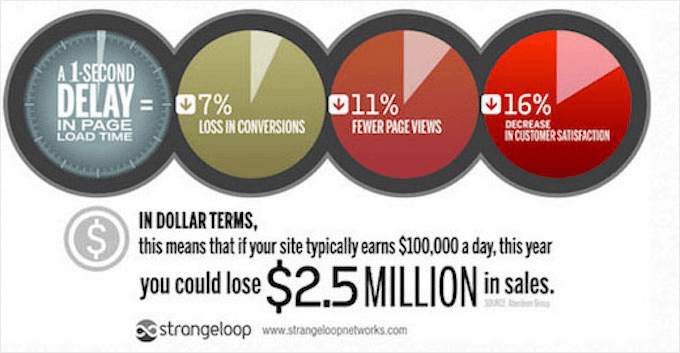
According to a StrangeLoop case study that involved Amazon, Google, and other larger sites, a 1 second delay in page load time can lead to a 7% loss in conversions, 11% fewer page views, and a 16% decrease in customer satisfaction.
On top of that, Google and other search engines have already started penalizing slower websites by pushing them down in the search results, which means lower traffic for slow websites.
To sum it all up, if you want more traffic, subscribers, and revenue from your website, then you must make your WordPress website FAST!
How to Check Your WordPress Website Speed
Often beginners think that their website is OK just because it doesn’t feel slow on their computer. That’s a HUGE mistake.
Since you frequently visit your own website, modern browsers like Chrome store your website in the cache and automatically prefetch it as soon as you start typing an address. This makes your website load almost instantly.
However, a normal user who is visiting your website for the first time may not have the same experience. In fact, users in different geographical locations will have a completely different experience.
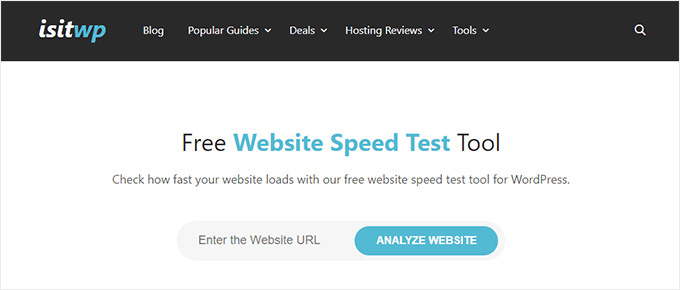
This is why we recommend that you test your website speed using a tool like IsItWP’s WordPress speed test.
It is a free online tool that allows you to test your website’s speed.
For more recommendations, you can see our guide on how to properly run a website speed test.
After you run your website speed test, you might be wondering what website speed you should aim for.
A good page load time is under 2 seconds.
However, the faster you can make it, the better. A few milliseconds of improvements here and there can add up to shaving off half or even a full second from your load time.
What Slows Down Your WordPress Website?
Your speed test report will likely have multiple recommendations for improvement. However, most of that is technical jargon that is hard for beginners to understand.
Learning what slows down your website is the key to improving performance and making smarter long-term decisions.
The primary causes for a slow WordPress website are:
- Web Hosting – When your web hosting server is not properly configured, it can hurt your website speed.
- WordPress Configuration – If your WordPress site is not serving cached pages, then it will overload your server and cause your website to be slow or crash entirely.
- Page Size – Pages load slowly if you use images that aren’t optimized for the web.
- Bad Plugins – If you are using a poorly coded plugin, then it can significantly slow down your website.
- External scripts – External scripts such as ads, font loaders, and so on can also have a huge impact on your website performance.
Now that you know what slows down your WordPress website, let’s take a look at how to speed up your WordPress website.
Pro Tip: Want to reduce the number of plugins on your site? Start using WPCode, which is a powerful code snippet management plugin for WordPress. It will easily help you reduce at least 5 plugins.
Importance of Good WordPress Hosting
Your WordPress hosting service plays an important role in website performance. A good shared hosting provider like Bluehost or SiteGround takes extra measures to optimize your website for performance.
However, on shared hosting, you share the server resources with many other customers. This means that if your neighboring site gets a lot of traffic, then it can impact the entire server performance, which, in turn, will slow down your website.
On the other hand, using a managed WordPress hosting service gives you the most optimized server configurations to run WordPress. Managed WordPress hosting companies also offer automatic backups, automatic WordPress updates, and more advanced security configurations to protect your website.
We recommend SiteGround as our preferred managed WordPress hosting provider. We use them for the WPBeginner blog and they are one of the most popular provider in the industry. (See our special Siteground coupon.)
