

A primer on JavaScript SEO for WordPress

The technologies which power the web, and which power parts of WordPress, are changing. It’s increasingly common for developers to use JavaScript to make our websites behave more and more like apps. Done well, these approaches create rich, interactive experiences. When built poorly, they can be catastrophic for SEO.
For most WordPress website owners and managers, you shouldn’t need to worry about JavaScript SEO. Most WordPress plugins and themes work fine with JavaScript, and won’t cause any special SEO problems. But if you’re developing bespoke themes or plugins, then you should make sure that you follow best practice, and avoid the common pitfalls.
If you’d like to learn more about JavaScript SEO for WordPress, this article provides a starting point and resources that you can use to learn more.
Table of contents
Front-end vs back-end technologies
Traditionally, most websites have a distinct ‘back-end’ (or ‘server-side’) and ‘front-end’ (or ‘client-side’). Note that this isn’t the same as “the public or user-facing parts of my website” or “my WordPress admin area“; we’re talking about the technologies that power the website, not the different parts of a WordPress website.
In WordPress, the back-end is usually a combination of PHP (a scripting language) and MySQL (a database technology). These store and process your data, and run the logic that constructs your front-end.
HTML, CSS & JavaScript
The front-end is a combination of HTML, CSS and JavaScript. HTML builds the structure and content (words and images). CSS manages presentation (colours, layouts and styles). JavaScript adds behaviour (interactivity, movement, and responsiveness).
When your browser requests a URL, the back-end determines what the server should respond with. That’s typically a package (or a series of packages) of HTML, CSS and JavaScript files. Your browser downloads and reads those files, and uses them to construct the front-end.
As you navigate through a site, this process repeats each time you visit a different page. Whenever you click a link, the page you’re on unloads, and the new page is sent from the server to your browser.
If you’d like to learn more about the difference between back-end and front-end development, we recommend this guide by Chris Castiglione on One Month.

JavaScript in WordPress
Many WordPress sites use JavaScript in plugins and themes to power specific parts of their site. Interactive components like sliders, calendars, popups and similar functionality often rely on JavaScript.
In WordPress, it’s best practice to split JavaScript into individual files, and to ‘enqueue’ them via WordPress’ wp_enqueue_script() function. That allows plugins and themes to share resources, to declare dependencies, and to manage versioning (or even to dequeue other resources).
When it comes to shared resources, it’s common for the front-end of WordPress themes and plugins to have been built using jQuery; a JavaScript ‘library’ which acts as a development framework (and which is included by default, along with many addons and extensions). jQuery isn’t the only option, though, and more modern (or bespoke) themes might use libraries like React. We’ll discuss React and more modern JavaScript frameworks later in this article.
You can learn more about including JavaScript in WordPress themes and plugins from this guide on wordpress.org.

Performance considerations
From an SEO perspective, it’s important to consider performance when you’re using JavaScript.
If you’re running many plugins, you might be loading a lot of JavaScript or complex scripts, which can slow down your website.
It’s important to follow best practices for JavaScript optimization, like minifying files, using caching, only loading what you need for specific pages, and loading non-critical resources asynchronously.
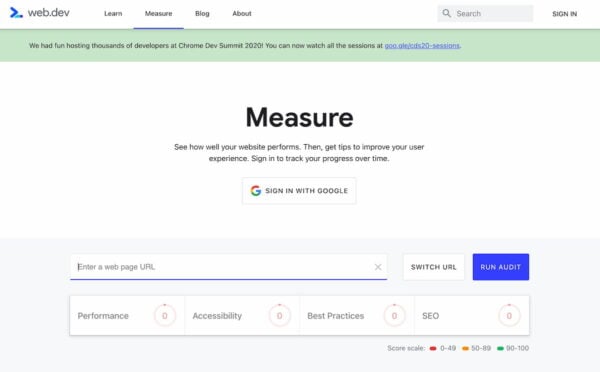
Many of the popular caching plugins should handle most of this for you, but it’s always good practice to check your site’s Core Web Vitals metrics using Google’s PageSpeed Insights reports.
You can learn more about best practices for optimizing JavaScript in this KeyCDN article by Cody Arseault.
Introducing Ajax
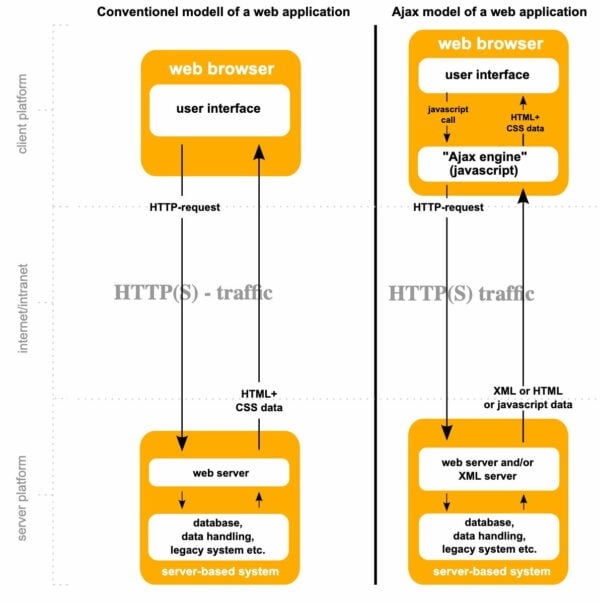
For more complex websites, some user interactions (or other scenarios) might mean that you want to update parts of a page without having to reload it.
For example, we might want to let a user submit a form and see a message based on the outcome, without reloading the page.
In these cases, we can use Ajax (“Asynchronous JavaScript and XML”) to send our data from the front end to the back end and then listen for the response. Based on the data we get back from the server, we can then use JavaScript to update the page’s contents and show our message.
This functionality powers many of the interactive tools and processes we’ve all become familiar with as the web has evolved, such as editing content, exploring maps, submitting forms, and using live chat.
From an SEO perspective, it’s important to remember that any content that is only loaded after user interaction might be undiscoverable by search engines and other systems. In general, you shouldn’t load critical page content via Ajax.
If you’d like to learn more about Ajax, we recommend starting with this W3Schools tutorial.
Ajax in WordPress
In WordPress, many plugins and themes use Ajax to dynamically get, set, and update the contents of pages based on user interactions. They typically do this in one of two ways:
- Requesting a WP REST API endpoint
- Requesting
/wp-admin/admin-ajax.php(with an action)
If you recognize the admin-ajax.php filename, that might be because you’ve seen it show up in your robots.txt file.
WordPress’ default robots.txt file contains an instruction to explicitly allow crawling of this URL, even though its parent folder (/admin-ajax/) is blocked.
User-agent: *
Disallow: /wp-admin/
Allow: /wp-admin/admin-ajax.php
This is because many themes and plugins relied so heavily on (sending, and) retrieving data and content from this endpoint that much of it wasn’t discoverable. By permitting crawlers to follow links to admin-ajax.php endpoints (like admin-ajax.php?action=get-some-critical-content), search engines could crawl and index otherwise ‘invisible’ content.
Well-developed plugins and websites shouldn’t need to rely on exposing content in this way. Instead, they should consider how their content is discovered, crawled and indexed regardless of which of the Ajax approaches they use.
This article won’t go into depth on comparing the technical differences between these approaches, other than to highlight that the WP REST API is far superior to the (legacy) admin-ajax.php approach. It’s easier to develop with, provides a better framework for managing permissions, and is significantly faster to respond.
If you’d like to learn more about the differences between the approaches, you can compare the WordPress REST API performance to admin-ajax.php.
The admin area
In 2015, Matt Mullenweg (creator of WordPress) implored the developer community to “Learn JavaScript deeply“. That’s because WordPress’s admin tools and areas are being gradually upgraded, moving away from pure PHP to use JavaScript-powered editing interfaces.
In the future, more parts of WordPress will use JavaScript to enable fluid, flexible editing and management. Your WordPress website, starting with the admin area, will behave more and more like a single-page application.
Single page applications
Over the past few years, a new type of website has emerged. As users expect websites to behave more and more like apps, single page applications (or ‘SPAs’) have become increasingly common.
SPAs are ‘apps’, powered by JavaScript, running inside the browser. When you request a URL, instead of the server returning the HTML, CSS and JavaScript for the page, the server returns the code for the application. Once it’s loaded, the app takes over all of the logic around loading, presenting, and interacting with content.
All of the app’s logic is stored and executed client-side. The app only communicates with the back end (via Ajax) when it needs to retrieve new content or data.
This makes it much easier to build responsive, fast experiences, where the page doesn’t need to reload when content, layouts, and components are updated.
Websites that have lots of moving, changing parts, which update as you interact with them, are well-suited for being built as SPAs. In fact, many of the ‘app-like’ websites which you use in daily life – like Gmail, Facebook, Twitter and even PayPal – use SPAs in their main web services. You’ll notice that as you browse through their views, and interact with their tools, the page doesn’t ‘reload’.
Developers build most SPAs with open source JavaScript frameworks, like Angular, React, and Vue.
Whilst faster, sleeker websites can definitely benefit users, they can also introduce a whole range of SEO challenges.
SEO challenges
Historically, search engines and other systems (like social media crawlers) have struggled with SPAs. Because the initial response from the server doesn’t contain the page’s content (it only contains the JavaScript required to load the app), systems that don’t run the JavaScript application never see the content.
Even today, few search engines and social networks support JavaScript completely or effectively. That means that, unless you go to special lengths to expose your content, everything in your SPA may be ‘invisible’ to anything other than human users.
Even systems that do consume JavaScript do so at a cost. It’s vastly more expensive (in time, processing power, and cost) to download and run a JavaScript app and to make sense of what it does than it is to read simple HTML.
Conceptual challenges
One key concept in SEO and how Google works is that a webpage should be about something. A given page should have a clear topic and a clear focus. That page resides on a URL, which uniquely identifies it and shouldn’t change or be removed.
This is how most conventional websites, and certainly most WordPress websites, work. You write pages about topics.
But for websites which behave more like