⚡ NEW: Foxvox - Complete Album!
- View all by foxsterfoxster
- Follow foxsterFollowFollowing foxsterFollowing
- Add To CollectionCollection
- Comments
- Devlog
- More like thisRelated
FoxVox
A downloadable FoxVox for Windows
FoxVox is a modern and highly flexible control app which combines speech recognition with joystick, keyboard, and mouse hardware, creating a seamless virtual control center. Setup is easy and the interface supports dark/light modes as well as custom colors. The app utilizes an intuitive input-to-output mapping structure for both voice and key control providing specialized settings along with drag-drop functionality.
Here's just some of what FoxVox can do:
- Send keyboard, mouse, or joystick commands via fully customizable voice and key control.
- Create button and key combinations to greatly extend hardware capabilities without the need for other software.
- Re-map analog controls with the ability to combine or split an axis with full control over the entire range.
- Utilize both Speech-To-Text and Text-To-Speech capabilities.
- Support individualized Push-To-Talk and Push-To-Mute control.
- Perform Speech Recognition and Text-To-Speech in multiple languages.
- Create macro commands and chains that can be executed via voice control, hardware controls, or both.
- Build intricate control configurations using dynamic variables, conditions, and expression-based formulas without the need for external scripting.
- Extend its capabilities with built-in support for external plugin modules.
- Show and control timers and messages as overlays on the screen.
- Open files, launch programs, produce scripts, play sounds, swap libraries, generate feedback, and much more.
Community Resources:
Plugin Development - Variable Values
Plugin Development - Voice Control
Additional Features include:
- Supports all input types: Voice, Joystick/HID, Keyboard, & Mouse, including vJoy virtual joysticks.
- Create and store independent libraries for each game. Library files can be shared with friends and communities.
- Unlimited combinations and configurations, outputs, and commands.
- Randomized outputs can be set to make gameplay unique.
- Dynamic variables & conditional execution.
- Flexible curves and unlimited custom ranges available for analog inputs.
- Acceleration curves and speed customizations available for cursor control.
- Enhanced speech recognition algorithm layer for more accurate results.
- Supports macro chains with timed delays.
- Enhance voice recognition with related words and key phrases to support natural speech.
- Dark/Light modes with custom colors.
- Customize sound notifications for confirmation of command execution.
- Pause/resume speech recognition on the fly.
- Push-to-talk/Push-to-Mute functionality.
- Allows for dynamic on-the-fly command aliases.
- Launch executables, scripts, or open files with registered apps.
- External plugin support and variable mapping. Learn More
- Dynamically switch library files.
- Merge settings and configurations from other library files.
- Enable/disable commands as needed.
- Show popup messages and timers
- Create unlimited configurations for more variety with the same library.
Two versions designed for Windows are available - Portable or MSI installer. Using the installer provides the advantage of automatically registering supported file extensions with the app.
NOTE:
As of version 2.5, Windows 11 has started incorrectly reporting the msi installer as a potential hazard (likely due to its key detection). If you are unable to download it directly, I have also provided it inside a zip file which should allow downloading. The files provided here on this page are official and 100% safe in spite of the erroneous warning. Additionally, no internet connection is required to run and it can be blocked by the firewall without issue.
| Status | Released |
| Category | Tool |
| Platforms | Windows |
| Rating | |
| Author | foxster |
| Tags | input, keyboard, macro, recognition, speech, talk, voice, voice-controlled |
| Code license | MIT License |
| Average session | A few seconds |
| Inputs | Voice control |
| Accessibility | Configurable controls |
| Links | Community |
Download
Click download now to get access to the following files:
Development log
- FoxVox Update v3.659 days ago
- FoxVox Update v3.5.6Sep 16, 2025
- FoxVox Update v3.5.5Sep 07, 2025
- FoxVox Update v3.5.4Aug 27, 2025
- FoxVox Update v3.5.3Aug 23, 2025
- FoxVox Update v3.5.2Aug 19, 2025
- FoxVox Update v3.5.1Aug 18, 2025
- FoxVox Update v3.5Aug 16, 2025
Comments
Log in with itch.io to leave a comment.
Hello FoxVox,
Thank you for this beautiful program it looks awesome.
I would like to use it with BMS and somewhat am stuck during the process.
Running on Windows11, the installation of your latest version was successful.
When running the program I can see that the speech recognition is working,
the voice-to-text is good and the commands are well received, output is also processed.
But then the log file shows : Run E: ... /allgoodsir.mp3
only there is no sound ...
When I manually select the voice files from the VCC/sounds directory they all play correct using Windows Media Player.
I have been going over all the settings to come to mind or that I could find, but so far no success yet.
Would you have any idea what could be causing this ?
Thank you so much and greetings.
Hi klxtwn,
Thank you for your comments. You could be missing the Windows media player classic. Here's how to check and install it.
Windows Media Player can be installed as an optional feature in Windows 10 and Windows 11. In Windows 10, you can find it by going to Settings > Apps > Apps & features > Manage optional features > Add a feature and selecting Windows Media Player. In Windows 11, the process is similar: go to Settings > Apps > Optional features, then click View features and select Windows Media Player.
Detailed Steps:
You can also watch these videos to learn how to install Windows Media Player in Windows 11:
Hi foxster,
Thank you for the guide, I was really missing the legacy WMP.
Added it and everything works now.
It is truly magical how the speech and voice interaction brings the sim to life !
Thank you for this awesome program.
Ps. I noticed when foxvox is running that it makes the CPU ( 9800X3D ) run a little higher in temperature as the fans are becoming louder. Not sure if I can tweak this somehow.
Hi,
first of all thank you for your awesome work! I am trying to use it with falcon BMS and I encountered an Issue. When I tried to say some command, especially in the group „Tower“, its not recognized. When I click on the Button with the glasses I see its always understands something different. When I use the Win 11 Speech Recognition to write a text (e.g. press Windows + H in the editor) everything I said is much better understood.
Now I looked into the setting of foxvox and the option to use ms 11 speech recognition (sr) is off. When I turn it on I get an error which tells me there are no sr packages installed. But I found en-US in the folder C:/Windows/Speech/Engines/sr. I also tried starting the software as admin but still the error persisted. Do you have an Idea why this error occurs? And is it possible, that the recognition errors are solved by this?
Greetings
Tomatentoyota
Hello,
From your inquiry, it appears that the MSP 11 platform isn't installed on your system, but the older Windows Speech Recognition (WSR) is. If you're getting much better results with dictation using Win + H, you may want to install MSP 11 and try it (see more info here).
I have also noticed over the course of development a slight decline in recognition performance, due to several factors - and honestly Windows recognition can be very finicky. I am currently working on modifications that improve the overall recognition reliability and reduce differences between WSR and MSP11 performance. I highly recommend you check back to get the new update in a couple of weeks to see if it makes a difference for you. Plus I'm adding in support for some of the new features released in BMS 4.38.
Alright, that might be the reason! I will try to install MSP 11. I am looking forward for the new updates!
Thank you again!
Kind regards
Tomatentoyota
Thank you for the wonderful program.
When trying to configure the axes in FoxVox VCC, I use the Thrustmaster TARGET HID combined device
FoxVox normally sees axes from 50 to 100. From 50 to 0 there is a sharp transition.
In Falcon BMS and other applications, these axes are displayed and work completely normally.
I would be grateful for any help.
From a hardware standpoint, nose down and nose up are on the same axis, just half on one side, half on the other. The FoxVox Parser plugin automatically uses the range 0-45% for one side, and 65-100% for the other by default, leaving a small 10% dead-band in the middle (It may actually be 20%...I don't recall offhand).
I'm not familiar with the TM TARGET HID device, but you can manually set the desired axis range within FoxVox by clicking the controller button next to it and setting whatever range you want it to be.
For this command on the VCC, although the input is analog, it is working as a discrete on/off switch - toggling on and off as the axis enters and leaves the specified range.
Thank you very much. That's what I did.
If you use just Warthog without TARGET profile in FoxVox the whole range of axes is available.
But if you use a profile that combines stick and throttle into one HID device, this is needed for fine tuning of stick sensitivity, FoxVox loses values between 0 and 50.
Input nose down and left aileron work at 0 which comes immediately after 50 with minimal movement of the stick.
Nose up and right aileron do not have such a problem since FoxVox has full sensitivity from 50 to 100.
P.S. Also on the MJOY 1.3 device FoxVox does not see the axes, it only sees the buttons.
Once again, thank you very much for your wonderful application
Changed the sequence of launching applications.
If you launch the TM TARGET profile after launching FoxVox, everything works great.
The lines AF Elevator AF Aileron appear and everything works great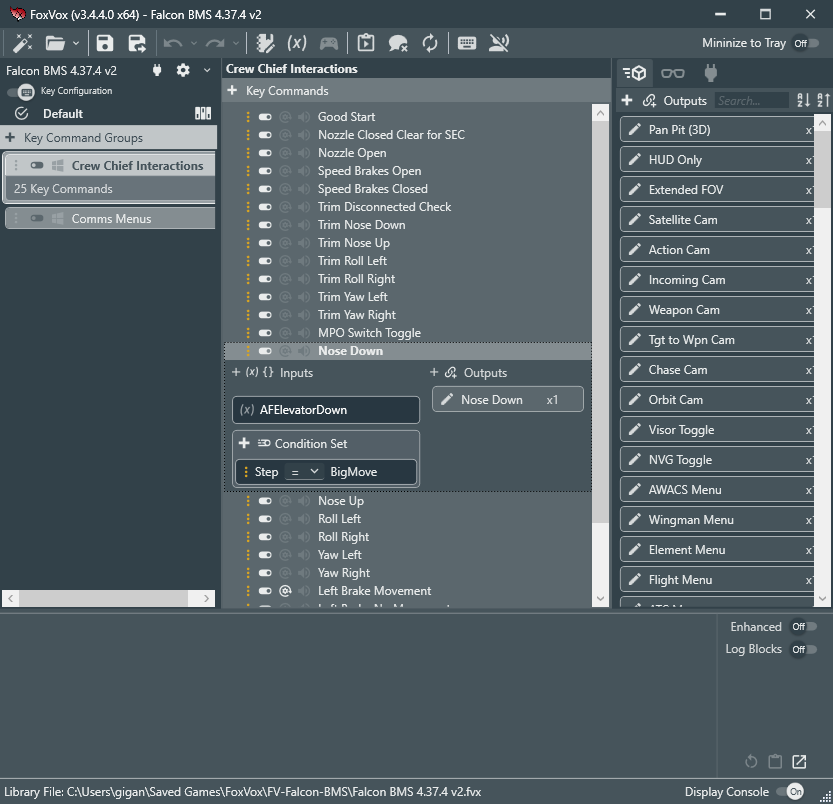
I love your app so much.
I found that when I say "Tower", the engine recognizes it as "," for some reason.
So I added "," to voice keys and the engine then recognizes "Tower" perfectly but on saving the profile or toggling voice recognition, the app shows "phrase cant be an empty string" error.
The app is still usable since I just need to add the voice key manually every time but I will be very grateful if you can fix it.
Thanks for your report. That is really strange...I have seen the voice recognition come back with garbly-goop before, but only when using my laptop built-in mic which was picking up fan noise while I was speaking (and I think it also may have happened while running multiple instances of FoxVox at the same time). Odd that you say the "," is consistent, though, as I've only ever seen it on rare un-repeatable occasions. I will keep an eye out for any information on what might be happening. Please look into your microphone's recording clarity as well, just in case there is any issue there - perhaps go through the windows speech training one or two times as well.
Apparently, to train the "English" recognition model, windows UI lang has to be English too and I don't really want to change UI lang... but it might be worth trying to see if training can solve the problem later.
I turned off everything that was making noise but the issue still persists and confidence level is always around 0.93.
My microphone is blue Yeti nano so its not very bad.
As a programmer, I understand that handling "," for a special case like this is very annoying and not worth the effort :(
I love the program i am gonna try it for fc25 (new fifa) ,... any tips for controller macros via voice ? (last here was keyboard anything i should do different ?
also foxster do you have a fb or x / twitter or anything, so i can follow you more?
To send controller output instead of keyboard keys you'll need to install vJoy and enable it within FoxVox. Feel free to join the Discord server for more community support: https://discord.gg/vc37eJ4Bsp
so i just found this program here, i did download here but didnt pay (yet ) i will donate when i get money it is well worth it!
i just made my first macro in this video it worked "mount up" in the steam game: The Quinfall :
Thanks Wiley, that's very cool. No worries about donating...sharing your video showing your first working command is thanks enough! I hope you have fun creating many more possibilities with FoxVox.
this what i got working so far , thanks for this great program!
If you're using short single phrase commands like that, you might try experimenting with the Eager Recognition setting which is designed for speeding up commands for that kind of game. It will fire off a command the instant it recognizes a match when it's on without waiting for the entire phrase to complete.
Great tool, only marred by Microsoft Speech Recognition. I don't understand why MS cannot produce better speech recognition for Windows.
Keep up the great work.
Did you consider adding support for switching to other speech recognition libraries by abstracting access to those features? You can have adaption source code between your code and the speech recognition library. In which case your source code can be kept closed.
Thank you, and interesting suggestion. I suppose I could provide program access to speech recognition functions to openly support alternative engines. I'll give this some consideration for the future.
This one may be interesting:
https://github.com/ggerganov/whisper.cpp?tab=readme-ov-file
I second the suggestion, MS speech seems like a limitation... But i am very biased.
MS voice recognition is a pain even for a native speaker. For a not native speaker like me this software(and alternatives like VA) is COMPLETELY useless.
So, alternative engine is a must.
Is there an option to use Google recognition API? And feed data via TCP from API? Everyone who wants to pay for google engine can do it on their own, just pasting API key in app
Currently no. I am looking into a potential free alternative engine first, primarily to support Linux, before considering any paid engine support. I don't make anything doing this, aside from the few kindly donations, and I don't particularly feel like promoting someone who does, but we'll see in the future. Aside from voice control, there are those using it for other functionality such as a replacement for JoyToKey and Joystick Gremlin as well, so although perhaps not for you, there is value in it for others.
Is it possible, to consider making a Linux release? I would pay a lot for that if you did.
Sorry, but no. The problem is that the speech recognition is a major part of this app and is only freely provided by Microsoft Windows platform. There are other speech platforms but they typically require online processing and charge fees, which I won't support. It is built on the .net core platform for portability, but its reliance on these MS components limits it. There are some open source SR engine initiatives out there so perhaps in the future, but don't hold your breath - it might be a while.
edit: There is the Kaldi SR engine which I can possibly work with in the future found here: https://github.com/kaldi-asr/kaldi
If the time ever comes to pass, know i and others of my Linux community greatly appreciate the work!
As far as im aware more MS components have either alternatives or are cross platform such as .NET. So, I wouldn't be surprised if one day you found a (relatively) simple way to make it work or even go forward without so many windows dependancies.
But that's speculation and I'm not going to hold you to that in the slightest. Tho I am hopeful. Have a good day!
(Only 85 days late lol)
Hello Foxster.
Can Foxvox handle more than two command on one Voice Commands?
The software will recongnise one of any two commands in a spoken command, given the correct command inside the phrase but if I add a third command to the Voice command then I will get Command not found on Group.
Thanks
Yes, it does. You must group it correctly on the command depending on how you want it to work - as an alternative or additional phrase. This is explained best in the basic tutorial video; https://youtu.be/0Aqbf5IWd1w
Hi Foxster.
I can see where in your vid that two voice keys work fine and it does with my examples but if I add another voice key to the Voice command making it a list three voice keys commands then I will get command not found on Group.
No matter how I arrange the list.
For example. Setting up for "Ready or Not" tactical shooter.
I would have as a Voice Command Group called:
"Element".
That would take me to the Voice Commands -> Voice Keys->
"Scan" (as a key command & key press) -> 4
"Slide" (as a key command & key pres) -> 3
(there is a sub-menu at scan that lead to Slide, Pie and Peek but just to keep things simple)
I can then say "Element Scan"
Or I can say "Element Scan, Slide"
Both will work (be recognised) but If I add the other Voice key that goes:
"Element Scan and Pie" or "Element Scan, Pie"
I will get message: "Command not found on Element".
No matter what order I switch the Voice Keys on Element Voice Group, if I have more than two voice keys listed on Voice Commands for a group I will get the "command not found on group, with no execution of the command.
So in other words, Can FoxVox support more than two Voice Keys per "Voice key Command"?
Sorry I wasn't clear on initial post.
Yes, it does, but you need to understand the rules. First, key order doesn't matter - it's just for your convenience. Second, each key must be fulfilled by a word or phrase on the command in order for it to execute. BUT...you can put the same word on multiple keys and that doesn't mean you need to say it twice.
Example:
If you want to be able to say three things, "Element Scan Slide", "Element Scan Pie", "Element Scan Peek":
Create Voice group "Element"
Create Voice Command with two keys
Key #1: "Scan"
Key #2: "Slide", "Pie", "Peek"
This will require saying "Element" to get on the voice group, "Scan" to fulfill Key #1, and either "Slide", "Pie", or "Peek" to fulfill Key #2. If you add "Scan" to Key #2 also, then you can say "Element Scan ...(whatever else)" and it will be fulfilled as the word "Scan" fulfills both Key #1 and Key #2.
If this still doesn't help you, let me know the exact phrases you want to say to execute the command and I'll try to provide a solution.
Hiya Foxster.
I have included a screen shot of what I was hoping to acheive.
I have included the expanded Scan Voice key example only as an illustration for you to see exactly what I have in mindand is not the working example.
If you look at the top of the list you will see Scan 1
Scan 2 and Scan 3. It works fine with that example but was hoping to be able to condense all those voice keys into one Scan Voice Key.
I would like to say a phrase with and just one of the key words Peek, Pie, Slide or Scan and just the appropriate Voice Key will be activated.
It works if there is just two voice keys in the Voice commands but not with more than two.
Are the outputs really supposed to be the same for Scan 1, 2 & 3? If not, then they have to be on separate commands. If so, then I think maybe this is what you're after? This allows for any of these phrases to work:
"Element Scan Peek"
"Element Scan Slide"
"Element Scan Pie"
I'm sorry if I'm misunderstanding you...
Hello Foxster, getting a lot out of using this software with BMS. I'm having an issue however with some AI wingman instructions. When I instruct my wingman to "Fence In" the instructions he receives are "Close Up Formation". I paused the game and go to the FoxVox software and the command line was indeed "Fence In". I test phrase the "Fence In" and it shows 8 W's and a 1 which is correct per the wingman menu. But for some reason in game only 6 W's and a 1 are recognized which per the wingman menu is "Close Up Formation". I tried another phrase instructing the wingman to turn "Music On" but the in game instructions he receives is "Break Left" again which is 6 W's and a 4, not 8 W's and a 4. Cannot understand why the game is cutting out the last two W's. Any help would be much appreciated.
I'll look into it to see if there is a timing issue or something going on.
One thing to consider is it may be sending the keypresses too quickly causing one or two not to register. You can test that by setting a value for Key Delay under the library settings (cog wheel icon to the right of the library name in the upper left). Set it to a value of something like 10 or 20 ms and see if that helps.
Hello. That was the trick. I put 10 ms in the Key Delay and it works perfectly now. Thanks a lot for the help.
Best,
It's an awesome peace of software you have developed. Just to clean up things. might it be possible to make a tutorial video. from installing, configure and to setup BMS from Start up, including the newest Ground Chief and may some tips and tricks for speech recognition?
Thanks, and yes, that's a good suggestion since things have become a bit more sophisticated than just voice recognition. On my todo list.
Thanks for the quick reply.
Maybe its only me, when Im making my contact with ATC, its only recognizes precise phrase, For instance: Gunsan GROUND, REQUEST TAXI FOR DEPARTURER.
What I would like to say is.
" Gunsan „GROUND“, Goblin 2 1 good day , 2 ship F16 at the Wolf Pack Apron with Information Alpha, „REQUEST TAXI FOR DEPARTURE.
This extended phrase is not working for me throughout all stages in FoxVox. Ist still WIP. Or do I make something wrong? Also Do you have Discord Channel?
It can/does handle long phrases but there are some things to watch out for, particularly with a phrase as long as the one you show. First, watch out for pauses that trigger a stop in the speech processing (particularly at 'Good day'). Speech processing processes one phrase at a time so if it is split into 2, then each one processes independently. This leads into the second issue - FoxVox works by a command word followed by special key words. In the default library the phrase must start with "Ground" to activate the Ground command group, then include the word taxi (and not include "back" or "ramp"). From your example, you would have to add "Gunsan" to the ground command group to be successful or make "Ground" a wildcard by adding an asterisk "*" behind it (meaning it doesn't have to be the first word spoken and can come anywhere in the phrase). Making it a wildcard would have negative repercussions however as "Ground" is used in other key phrases for wingman, i.e. "Two, datalink ground target" or "Two, weapons free air to ground". These commands wouldn't be executed properly because the ATC Ground command group would be activated instead of the Wingman group due to the wildcard and its earlier position in the list. I may do a revision to prioritize keywords found at the beginning of the phrase over wildcards first, but currently that's not how it works.
So from this, you need to be sure that the processed phrase is found. I experimented with your wording a bit and found that adding both "Taxi*" and "Departure*" as wildcards to the ATC Ground command group seemed to work best. I also added "Departure" as an optional word on the Request Taxi command and as a blocked word to the Request Taxi Back to Ramp command to help prevent an accidental misfire. Doing this seemed to give the best results regardless of pauses being present or not. I just had to focus on making sure "Taxi" and/or "Departure" was understood properly. Also, remember when testing and troubleshooting, be sure to enable the enhanced log to see what is being tracked as you speak. I also think I can possibly make some enhancements with really long phrases that might help in the underlying engine...I'll experiment more for the next update.
I need to see about opening a channel on discord - good suggestion. There's not many people using FoxVox currently, but who knows, might be more in the future.
Thanks again for your time to reply, I will try your suggestions and come back to you
Hi Foxster. I saw this program you made and I wonder if it could also be used to i.e. write by using your voice? Oh and I tried to install it (even for gaming that would be good, since I have wrist problems, but it would be a lifesaver if it worked for writing/other programs as well) and it gave me an error message. On the program I can see that there is no new library opened, and if I try to create one, it gives the same error as when I opened it.
Below is a transcript of the error:
Object reference not set to an instance of an object.
Inner Exception: Empty
at System.Speech.Internal.ObjectTokens.RegistryDataKey..ctor(String fullPath, RegistryDataKey copyKey)
at System.Speech.Internal.ObjectTokens.ObjectTokenCategory..ctor(String keyId, RegistryDataKey key)
at System.Speech.Internal.ObjectTokens.ObjectTokenCategory.Create(String sCategoryId)
at System.Speech.Recognition.SpeechRecognitionEngine.InstalledRecognizers()
at oQPjw3XBISnI3ZoZhWl2.JkHbDUJw5F(oQPjw3XBISnI3ZoZhWl2)
at zQd7WjreSE5yZvY3pMZ.yIXDhQr5Lpfgld9wpAR..ctor()
at FoxVox.MainWindow.QBvufRErA(Object , RoutedEventArgs )
at System.Threading.Tasks.Task.<>c.<ThrowAsync>b__128_0(Object state)
at System.Windows.Threading.ExceptionWrapper.InternalRealCall(Delegate callback, Object args, Int32 numArgs)
at System.Windows.Threading.ExceptionWrapper.TryCatchWhen(Object source, Delegate callback, Object args, Int32 numArgs, Delegate catchHandler)
Hi there, glad to see your desire to be creative with the app. I'm not sure how well it will function for how you intend to use it, but certainly give it a try. As for the error you report, this is a strange one. The app is basically saying it is failing to find any qualified speech recognition modules on your system. What language is your Windows installed with? Can you check if there are any sub folders found in the following location:
Windows install path (default C:)\Windows\Speech\Engines\SR
For default English US for example there will be a folder call 'en-US'.
If you are finding at least one folder there, the issue may be due to a permissions error in the MS System.Speech module accessing the registry. In that case, installing the app with the installer and possibly running it as an administrator could potentially solve the issue. If there aren't any, then you don't have any recognition engines installed and you'll need to install one here:
Select the Start button, then select Settings > Time & Language > Speech
Please be aware:
There are new languages supported using the MS Speech Platform 11 but FoxVox does not have those implemented currently.
I will add in some additional error handling to detect this issue more gracefully, but see if you can investigate what I suggested to try and solve it.
I looked into the folder inside Speech and it had a folder named TTS in which I found an en-US. I'll have to try the things you said and see if it works, will report my findings.
Hi Foxster. I tried running your app today with BMS and I am having trouble getting it to work for me. I open the FoxVox app and do some test phrases to make sure its working. I open the BMS launcher and do a test flight and give some various voice commands and I get no response in the cockpit. When i close BMS and look at the FoxVos app the voice commands I gave show up on the bottom of the app. Not sure what setting I am missing to get it to work. Any help is much appreciated. viperipc
When I open your app and the BMS game as an administrator it works!
Thanks.
Really strange, but glad it's working. I run neither as administrator and they work fine. Perhaps your BMS installed in a protected location like 'Program Files'?
Hello Foxster, first of all thank you for this app, I think this is a more intuitive alternative to VA. I'm trying BMS with it, and I have a weird bug that makes FoxVox to crash when I use the axis slider on my throttle to control the FOV/Zoom in BMS. I'm not sure how I can debug this. I can reproduce it tho.
Thanks for your help.
I'll look into it. Can you explain how you are settling it up so I can duplicate it?
In fact, no need for BMS, axis movement makes FoxVox UI sluggish and almost unresponsive. I'm using a Virpil CM3 Throttle and Constellation Alpha Stick. If I move the foxvox window while moving the axis, it does that. And randomely makes my usb device crash (I heard unplug/plug usb sound). And in the Even viewer I have an APPCRASH for FoxVox
Repro case : I open fox vox, move my axis all around for a few seconds, foxvox crash and my usb devices reboot. If I'm not opening FoxVox and do the same thing, nothing happens. Weird stuff.
This sounds like an issue with output overload which happens when every tiny movement of the analog stick causes the output to fire, which can quickly overwhelm the system. If you remove/disable the slider binding does everything else work OK? It would be good to narrow down the culprit. Also, just to check, does the system bog down or have any problem when you move the axis while the Key Recognition is disabled (keyboard button second to last in the toolbar)?
Hello, no, I found it's actually not the slider but all my Virpil Hotas Axis. I have another device with axis, a simgears ICP and and this one is not affected. And the key recognition is not enabled.
Interesting. The key recognition disabled rules out output overload. Are you running any virpil control software at the same time? Without key recognition running FoxVox is only passively monitoring input which shouldn't cause any lag.
Awesome tool! I've been away from BMS for a while and was hoping to find an easy to use voice activation program. The video you posted helped a lot and explained things very well. I added several new Game commands on top of your BMS 4.37.3 but when I go to check the outputs using notepad or Word I do not get anything. When I check the ones you created it works. Not sure what I an doing wrong. Best.
Welcome back to BMS...glad you like the app! One thing that comes to mind is make sure that in the settings (little cog wheel icon by library name) you allow any process (by not having any assigned) or include it in the allowed process list. I'm not sure this is the issue though, as you say the built in ones are working. Make sure the command window shows that the voice command is being activated/recognized, and make sure the outputs are defined properly. If you can detail a specific question, I'll be glad to help either here or in the BMS forum.
Regards, Foxster
Thanks for the quick reply Foxster. I should have tried running the voice script in game before commenting. I kept testing the first few commands with notepad but the commands for those were tied to function keys which would not show up on notepad. Once I tried the other commands which were tied to numbers it tested fine. Thanks again for a great, easy to use voice editor. Now its time to get back in the Pit and blow some stuff up! Best, viperipc
Hello again
Two problems, maybe not related:
Error message and related output to log when creating output library from scratch:
Specified cast is not valid.Inner Exception: Empty at FoxVox.MainWindow.FdCM9KumuB(Object , RoutedEventArgs ) at System.Threading.Tasks.Task.<>c.<ThrowAsync>b__128_0(Object state) at System.Windows.Threading.ExceptionWrapper.InternalRealCall(Delegate callback, Object args, Int32 numArgs) at System.Windows.Threading.ExceptionWrapper.TryCatchWhen(Object source, Delegate callback, Object args, Int32 numArgs, Delegate catchHandler)
2) Unable to drag and drop from output library to voice commands, and vice-versa.
version 2300 x64 on win 11 system
Thanks Mistral. I must confess, these have been resolved already and are part of the next release, but it's been slow in coming due to the intricate and complex addition of supporting variables on inputs. This is part of the next phase to prepare for full dynamic integration with BMS (and potentially other apps). In the future, hopefully by BMS v4.38, FoxVox will automatically utilize callsigns, detect which seats are human vs AI, automatically set PTT to match UHF and VHF assigned buttons, and use direct callbacks rather than menu assignments for all comms. It will also auto-bind brakes, flight controls, and buttons used by the Virtual Crew Chief which are set in BMS. There's a lot of work going into this and all of it will make FoxVox more versatile in the end. In the meantime, thank you for pointing out these issues - please continue to do so, and thanks for your patience. Look for the next update releasing soon!
Hello. To simplify bindings, can the BMS_Falcon .key file be imported to the 'output library' ? I would like the names and the actions required to activate that function readily available. I suppose some parsing would be in order, but it would save hundreds of lines of input.
This is already underway...and where it's headed soon. The library will automatically integrate with BMS bindings, call signs, etc.
Hello i have a problem
Speech Error
Failed to start voice recognition for:
английский ( Соедененные штаты)
The language for the grammar does not match the language of the speech recognizer
I'm looking into this further, but for now make sure that the Windows speech recognition is set to match the same language selected in FoxVox, and also make sure the Windows UI is set to the same language also.
I will be fixing/improving this area soon as other's have reported the same issue and it really shouldn't be as quirky as it is.
I solve it by set windows on english, i don't like change language of my system for 1 programm. If you want reply me, text me on discord phaxnyo3t
Latest version FoxVox on Windows11 throws this error on my PC:
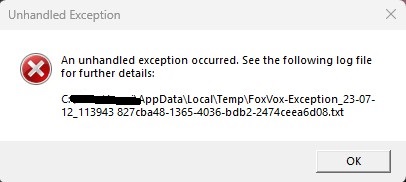
Initialization of 'System.Windows.Controls.Primitives.ToggleButton' threw an exception.
Inner Exception: The input string '0.5' was not in a correct format.
at System.Windows.Markup.XamlReader.RewrapException(Exception e, IXamlLineInfo lineInfo, Uri baseUri)
at System.Windows.Markup.WpfXamlLoader.Load(XamlReader xamlReader, IXamlObjectWriterFactory writerFactory, Boolean skipJournaledProperties, Object rootObject, XamlObjectWriterSettings settings, Uri baseUri)
at System.Windows.Markup.WpfXamlLoader.LoadBaml(XamlReader xamlReader, Boolean skipJournaledProperties, Object rootObject, XamlAccessLevel accessLevel, Uri baseUri)
at System.Windows.Markup.XamlReader.LoadBaml(Stream stream, ParserContext parserContext, Object parent, Boolean closeStream)