

Description
- Removes
index.phpfrom permalinks when using WordPress with nginx. - Adds support for purging redis-cache when used as full-page cache created using nginx-srcache-module
- Adds support for nginx fastcgi_cache_purge & proxy_cache_purge directive from module. Provides settings so you can customize purging rules.
- Adds support for nginx
map{..}on a WordPress-multisite network installation. Using it, Nginx can serve PHP file uploads even if PHP/MySQL crashes. Please check the tutorial list below for related Nginx configurations.
Tutorials
You will need to follow one or more tutorials below to get desired functionality:
Screenshots
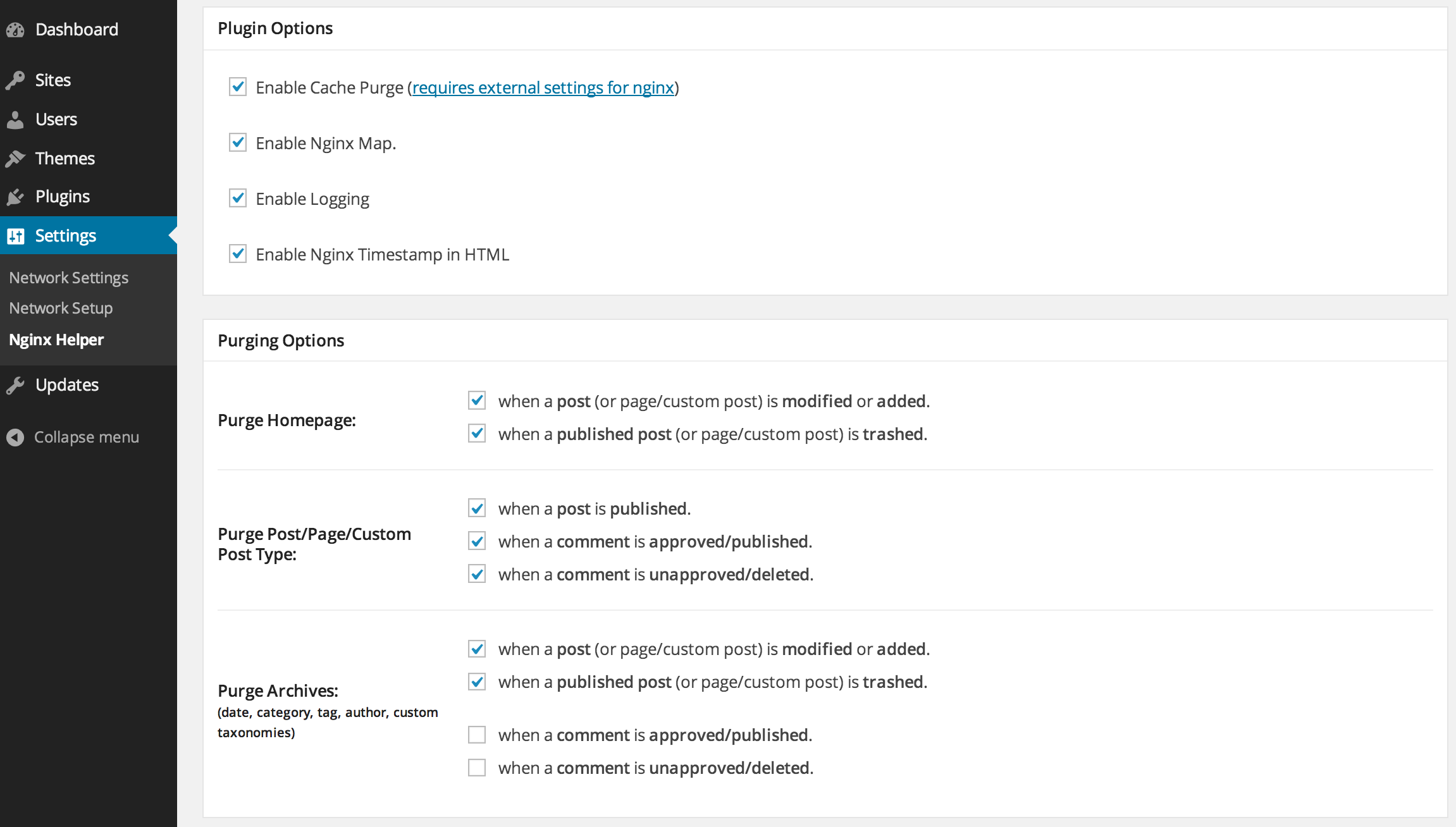
Nginx plugin settings 
Remaining settings


Installation
Automatic Installation
- Log in to your WordPress admin panel, navigate to the Plugins menu and click Add New.
- In the search field type “Nginx Helper” and click Search Plugins. From the search results, pick Nginx Helper and click Install Now. WordPress will ask you to confirm to complete the installation.
Manual Installation
- Extract the zip file.
- Upload them to
/wp-content/plugins/directory on your WordPress installation. - Then activate the Plugin from Plugins page.
For proper configuration, check out our tutorial list in the Description tab.
FAQ
Important – Please refer to https://github.com/rtcamp/nginx-helper#frequently-asked-questions for up-to-date FAQs.
-
FAQ – Installation/Comptability
-
Q. Will this work out of the box?
No. You need to make some changes at the Nginx end. Please check our tutorial list.
-
FAQ – Nginx Fastcgi Cache Purge
-
Q. There’s a ‘purge all’ button? Does it purge the whole site?
Yes, it does. It physically empties the cache directory. It is set by default to
/var/run/nginx-cache/.If your cache directory is different, you can override this in your wp-config.php by adding
define(‘RT_WP_NGINX_HELPER_CACHE_PATH’,’/var/run/nginx-cache/’);Replace the path with your own.
Q. Does it work for custom posts and taxonomies?
Yes. It handles all post-types the same way.
Q. How do I know my Nginx config is correct for fastcgi purging?
Manually purging any page from the cache, by following instructions in the previous answer.
Version 1.3.4 onwards, Nginx Helper adds a comment at the end of the HTML source (‘view source’ in your favourite browser):
<!–Cached using Nginx-Helper on 2012-10-08 07:01:45. It took 42 queries executed in 0.280 seconds.–>. This shows the time when the page was last cached. This date/time will be reset whenever this page is purged and refreshed in the cache. Just check this comment before and after a manual purge.As long as you don’t purge the page (or make changes that purge it from the cache), the timestamp will remain as is, even if you keep refreshing the page. This means the page was served from the cache and it’s working!
The rest shows you the database queries and time saved on loading this page. (This would have been the additional resource load, if you weren’t using fast-cgi-cache.)
Q. I need to flush a cached page immediately! How do I do that?
Nginx helper plugin handles usual scenarios, when a page in the cache will need purging. For example, when a post is edited or a comment is approved on a post.
To purge a page immediately, follow these instructions:
- Let’s say we have a page at the following domain: http://yoursite.com/about.
- Between the domain name and the rest of the URL, insert ‘/purge/’.
- So, in the above example, the purge URL will be http://yoursite.com/purge/about.
- Just open this in a browser and the page will be purged instantly.
- Needless to say, this won’t work, if you have a page or taxonomy called ‘purge’.
Q. Does it need any kind of URL structure?
Yes. When setting the URL structure in Nginx configuration file a trailing slash should always be added.
-
FAQ – Nginx Redis Cache
-
Q. Can I override the redis hostname, port and prefix?
Yes, you can force override the redis hostname, port or prefix by defining constant in wp-config.php. For example:
`define(‘RT_WP_NGINX_HELPER_REDIS_HOSTNAME’, ‘10.0.0.1’);
define(‘RT_WP_NGINX_HELPER_REDIS_PORT’, ‘6000’);
define(‘RT_WP_NGINX_HELPER_REDIS_PREFIX’, ‘page-cache:’);
`Q. Can I override the redis socket path, username, password?
Yes, you can force override the redis socket path, username, password by defining constant in wp-config.php. For example:
`phpdefine( ‘RT_WP_NGINX_HELPER_REDIS_UNIX_SOCKET’, ‘/var/run/redis/redis.sock’ );
define( ‘RT_WP_NGINX_HELPER_REDIS_USERNAME’, ‘admin’ );
define( ‘RT_WP_NGINX_HELPER_REDIS_PASSWORD’, ‘admin’ );
` -
FAQ – Nginx Map
-
Q. My multisite already uses
WPMU_ACCEL_REDIRECT. Do I still need Nginx Map?Definitely.
WPMU_ACCEL_REDIRECTreduces the load on PHP, but it still ask WordPress i.e. PHP/MySQL to do some work for static files e.g. images in your post. Nginx map lets nginx handle files on its own bypassing wordpress which gives you much better performance without using a CDN.Q. I am using X plugin. Will it work on Nginx?
Most likely yes. A wordpress plugin, if not using explicitly any Apache-only mod, should work on Nginx. Some plugin may need some extra work.
-
FAQ – WP-CLI
-
Q. How can I update the options using WP-CLI?
`shellwp option patch update rt_wp_nginx_helper_options
` -
Still need help!
-
Please post your problem in our free support forum.
Reviews


Contributors & Developers
“Nginx Helper” is open source software. The following people have contributed to this plugin.
Contributors


